AEM 6: How to install namespaces automaticaly? | Community
Skip to main content
Magicr
Level 6
Apr 14, 2022 12:11 PM UTC
Solved

AEM 6: How to install namespaces automaticaly?

Over the time some new meta tags found the way into some programs which can edit media files. When some files added to AEM, the creation process for packages breaks with a javax.jcr.NamespaceException. I found https://experienceleague.adobe.com/docs/experience-cloud-kcs/kbarticles/KA-16465.html?lang=en to add the missing namespaces manually.

My question: In case the instance has to be renewed, how can be the missing names provided during package installation?


Thanks in advanced

This post is no longer active and is closed to new replies. Need help? Start a new post to ask your question.
DEBAL_DAS
DEBAL_DASAccepted solution
New Participant
Apr 14, 2022 1:39 PM UTC

Could you please explore via CND File as described at https://techrevel.blog/2020/01/23/aem-custom-namespace/


The CND File way has a advantage, that the namespace will be automatically registered on deploying code.

Create a nodetypes.cnd at the location /src/main/content/META-INF/vault/nodetypes.cnd
Register you namespace as shown in the example below
<'sling'='http://sling.apache.org/jcr/sling/1.0'&gt;
<'nt'='http://www.jcp.org/jcr/nt/1.0'&gt;
<'techrevel'='http://www.techrevel.blog'&gt;

[sling:Folder] > nt:folder
– * (undefined)
– * (undefined) multiple
+ * (nt:base) = sling:Folder version


Once you deploy the code, the namespace would be available for use.


I could see nodetypes.cnd is available at aem-demo\ui.frontend\node_modules\aemsync\data\package-content\META-INF\vault\nodetypes.cnd [my sample aem application]. Please check nodetypes.cnd in your project.


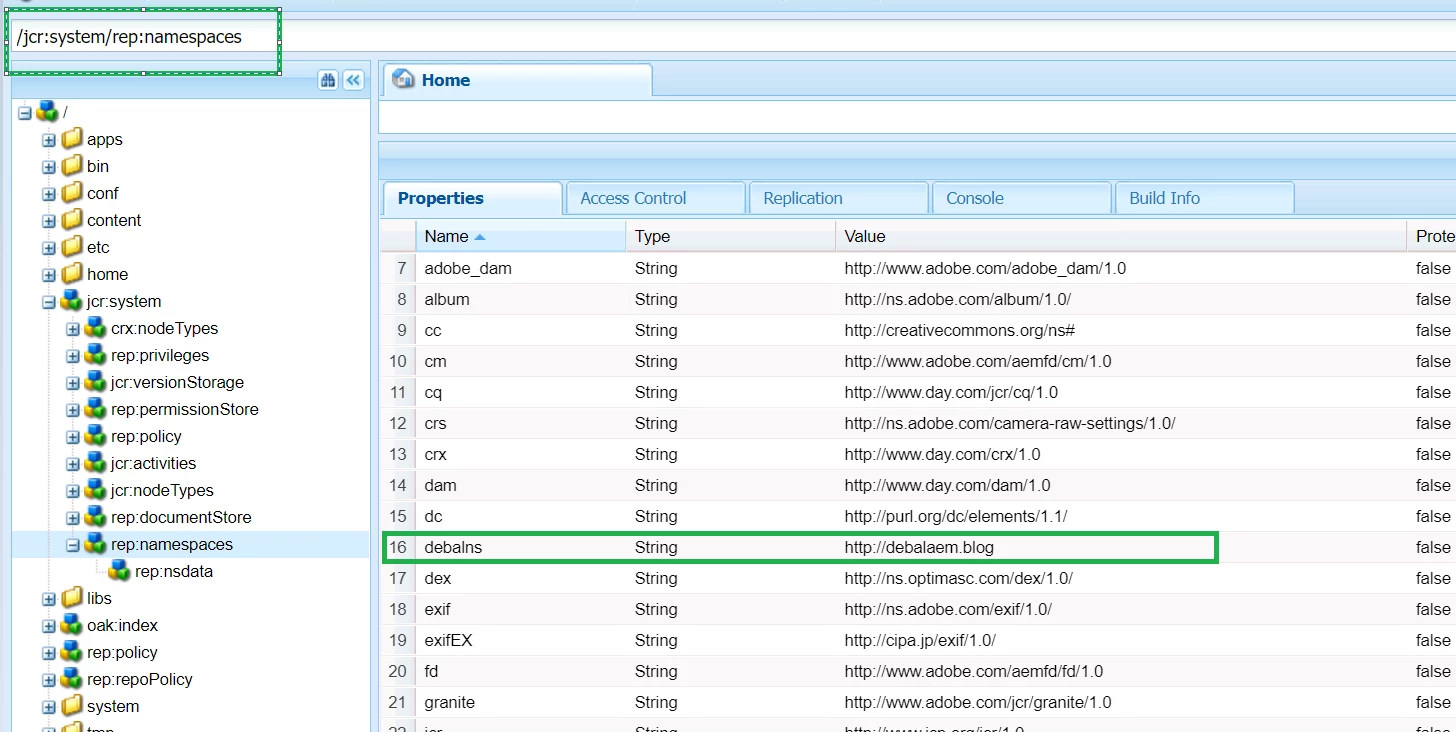
namespaces are getting stored under /jcr:system/rep:namespaces as shown below -


We could create a separate package for namespaces and install.

Hope it will help.

5 replies

DEBAL_DAS
DEBAL_DASAccepted solution
New Participant
Apr 14, 2022 1:39 PM UTC

Could you please explore via CND File as described at https://techrevel.blog/2020/01/23/aem-custom-namespace/


The CND File way has a advantage, that the namespace will be automatically registered on deploying code.

Create a nodetypes.cnd at the location /src/main/content/META-INF/vault/nodetypes.cnd
Register you namespace as shown in the example below
<'sling'='http://sling.apache.org/jcr/sling/1.0'&gt;
<'nt'='http://www.jcp.org/jcr/nt/1.0'&gt;
<'techrevel'='http://www.techrevel.blog'&gt;

[sling:Folder] > nt:folder
– * (undefined)
– * (undefined) multiple
+ * (nt:base) = sling:Folder version


Once you deploy the code, the namespace would be available for use.


I could see nodetypes.cnd is available at aem-demo\ui.frontend\node_modules\aemsync\data\package-content\META-INF\vault\nodetypes.cnd [my sample aem application]. Please check nodetypes.cnd in your project.


namespaces are getting stored under /jcr:system/rep:namespaces as shown below -


We could create a separate package for namespaces and install.

Hope it will help.

Translate
Magicr
MagicrAuthor
Level 6
Apr 14, 2022 2:22 PM UTC

Thanks for your answer. I tried it out immeditly. I added the file to an existing package. During package building I get the error message "[ERROR] Request failed: java.lang.IllegalStateException: Archive not valid. (500)".  What is wrong?


Translate
Magicr
MagicrAuthor
Level 6
Apr 14, 2022 2:44 PM UTC

I could fix it. The file name is not correct. It must be "nodetype", the singular form. After correction it works like a charm. 🙂


Thanks a lot..

Translate