AEM as a Cloud Service: How can I separate dispatcher farms by domain | Community
Skip to main content
Employee
November 29, 2023
Solved

AEM as a Cloud Service: How can I separate dispatcher farms by domain

  • November 29, 2023
  • 1 reply
  • 1087 views

I'd like to create multi domain site in AEM as a Cloud Service.

If not AACS (e.g. AMS), I can create some farms and some virtualhosts.any in dispatcher settings.

But in the case of AACS, every farms should be include "../virtualhosts/virtualhosts.any" in virtuslhosts section.

Also, when I try to include other file(sample_virtualhosts.any) from virtualhosts.any, I get "file included at unknown location" in the validation of the dispatcher tool.
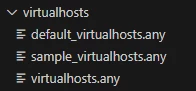
 

virtualhosts.any

 

errors

Cloud manager validator 2.0.62 2023/11/29 11:24:52 Dispatcher configuration validation failed: 2023/11/29 11:24:55 conf.dispatcher.d\virtualhosts\virtualhosts.any:9: file included at unknown location: /etc/httpd/conf.dispatcher.d/virtualhosts/sample_virtualhosts.any

 

This post is no longer active and is closed to new replies. Need help? Start a new post to ask your question.
Best answer by ShaileshBassi

Hi @seiku1 IMO, adding another virtualhost file is not allowed, instead only editing that file is recommended as it matches every incoming request.


You can try to include the vhost file reference directly within the farm file, if that works. Like in AMS we used to do the direct entry to the available vhost file for the respective avialable farm. For this you can provider the same server-name used in vhost file in the farm file 

/virtualhosts { "server-name" }


Otherwise you can open an Adobe Suppport ticket to take the confirmation for the best approach to handle this scenario.

Hope this helps!

Thanks

1 reply

ShaileshBassi
New Participant
November 29, 2023

Hi @seiku1

  • Dispatcher begins at the lowest farm and progresses upward in the dispatcher.any file.
  • For each farm, Dispatcher begins with the topmost value in the virtualhosts property and progresses down the list of values.

In case of AEM as a Cloud , you define vhost settings in src/conf.d/available_vhosts and create a symlink under src/conf.d/enabled_vhosts


There is then OOTB default.vhost which catches all configurations i.e if you dont have domain based vhost defined, it will be rendered by default.vhost.


The files are always included in alphabetical order, so if for example you name your files as 001_sitea.vhost and siteb.vhost, the order in which the files will be included is 001_sitea.vhost, default.vhost , and last 002_siteb.vhost . In this case any request for siteb will be handled by default.vhost.


So it is always advised in case of multisite dispatcher configurations to use naming convention i.e. 00_<site name>.vhost, to ensure that all the custom sites vhost files are loaded before default.vhost to find the best match with the servername or alias name present under the <virtualhost> configuration.


Hope this helps!

Thanks

SeiKu1Author
Employee
November 29, 2023

Hi @shaileshbassi 

Thank you for your reply.

But, My question is about virtualhosts.any under "src/conf.dispatcher.d".

Do you know anything about this as well?


Regards.


ShaileshBassi
ShaileshBassiAccepted solution
New Participant
November 29, 2023

Hi @seiku1 IMO, adding another virtualhost file is not allowed, instead only editing that file is recommended as it matches every incoming request.


You can try to include the vhost file reference directly within the farm file, if that works. Like in AMS we used to do the direct entry to the available vhost file for the respective avialable farm. For this you can provider the same server-name used in vhost file in the farm file 

/virtualhosts { "server-name" }


Otherwise you can open an Adobe Suppport ticket to take the confirmation for the best approach to handle this scenario.

Hope this helps!

Thanks