AEM Author Image Target option | Community
Skip to main content
This post is no longer active and is closed to new replies. Need help? Start a new post to ask your question.
Vaibhavi_J
Vaibhavi_JAccepted solution
Level 7
Jul 17, 2020 5:00 AM UTC

Hi @luca_lattarini , 

Yes it is possible.

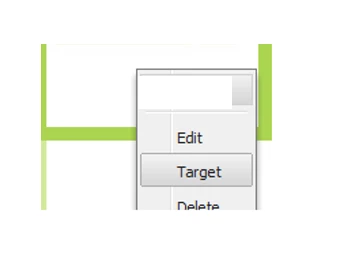
Set the below property in  cq:editConfig node of component where you do not want target option to be enabled. In your scenario add it in image component. 

cq:disableTargeting="true"

This will disable the target option. 

5 replies

kautuk_sahni
Employee
Jul 17, 2020 9:45 AM UTC
Vaibhavi_J
Vaibhavi_JAccepted solution
Level 7
Jul 17, 2020 5:00 AM UTC

Hi @luca_lattarini , 

Yes it is possible.

Set the below property in  cq:editConfig node of component where you do not want target option to be enabled. In your scenario add it in image component. 

cq:disableTargeting="true"

This will disable the target option. 

Translate
Luca_Lattarini
Level 9
Jul 17, 2020 9:04 AM UTC

Hi @vaibhavi_j ,

I set up this cq:disableTargeting="true" every time my client builds a new component. Is there any way of setting this cq:disableTargeting="true" as default for each new element without my support to set up cq:disableTargeting="true" ?

Thanks

Translate
Luca_Lattarini
Level 9
Jul 17, 2020 4:24 AM UTC
Basically, if we click on Target mode on the imagine, we cannot go edit the image anymore,
Translate