AEM/CQ - javax.xml.namespace can't resolve OSGI dependency | Community
Skip to main content
jineetv21622325
New Participant
June 5, 2017
Solved

AEM/CQ - javax.xml.namespace can't resolve OSGI dependency

  • June 5, 2017
  • 17 replies
  • 6385 views

'm using AEM 6.2 and I'm currently implementing WebService. I included all dependency jars in OSGI bundle which I created externally and all dependency issue got resolved except one:

javax.xml.namespace,version=[1.0,2) -- Cannot be resolved

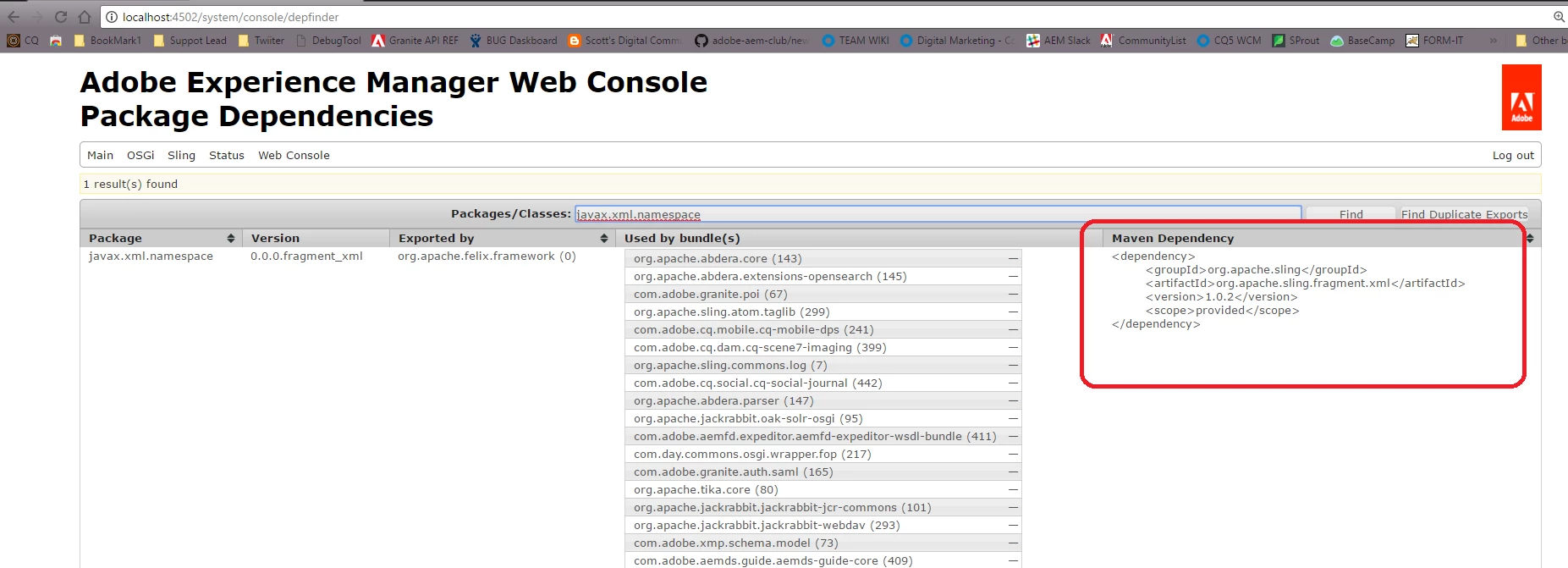
When I checked in the maven using depfinder tool, it showed me as below:

<dependency> <groupId>org.apache.sling</groupId> <artifactId>org.apache.sling.fragment.ws</artifactId> <version>1.0.2</version> <scope>provided</scope> </dependency>

However, in my other custom project, the javax.xml.namespace is showing resolved state.

I'm stuck in this situation and any pointers will be really appreciated.

Thanks, Jineet
This post is no longer active and is closed to new replies. Need help? Start a new post to ask your question.
Best answer by smacdonald2008

You should be using the Dependency finder that i referenced in this thread and then get that into you Dependencies section of your POM. For AEM 6.2 - see this:

17 replies

New Participant
April 27, 2020

@jineetv21622325 , I also faced similar error while upgrading from AEM 6.3 to 6.5 SP4. 


Error Log -

24.03.2020 15:09:40.573 *ERROR* [qtp1041007297-2360] org.apache.felix.http.jetty %bundles.pluginTitle: 
Cannot start (org.osgi.framework.BundleException: Unable to resolve com.XXX.XXXX.XXX [590](R 590.0):
missing requirement [com.XXX.XXX.XXX [590](R 590.0)] osgi.wiring.package;
(&(osgi.wiring.package=javax.xml.namespace)(version>=0.0.0)(!(version>=1.0.0)))
Unresolved requirements: [[com.XXX.XXX.XXX [590](R 590.0)]
osgi.wiring.package; (&(osgi.wiring.package=javax.xml.namespace)(version>=0.0.0)(!(version>=1.0.0)))])
org.osgi.framework.BundleException: Unable to resolve com.XXX.XXX.XXX [590](R 590.0): missing requirement


Reason - 

As you see in the error log above, Bundle Exception is due to failed OSGI Wiring. Version of javax.xml.namespace is not suffiecient or compatible enough. 


Solution -

jineetv21622325
New Participant
June 6, 2017

smacdonald2008​, I found that if I include org.apache.axis2 dependency, the bundle shows unresolved for javax.xml.namespace. But on removing org.apache.axis2 dependency, the bundle goes in resolved state.

I'm implementing web service using Apache Axis 2 and I need to use this dependency for my project work.

Not sure what conflict it is creating with Apache Axis 2 API.

Thanks,

Jineet

smacdonald2008
smacdonald2008Accepted solution
New Participant
June 5, 2017

You should be using the Dependency finder that i referenced in this thread and then get that into you Dependencies section of your POM. For AEM 6.2 - see this:

jineetv21622325
New Participant
June 5, 2017

AEM v6.2, Uber Jar v6.2.0, archetype v10.

jineetv21622325
New Participant
June 5, 2017

smacdonald2008 What should be the dependency added in pom.xml to make it pick appropriate version?

smacdonald2008
New Participant
June 5, 2017

I have done this from time to time when i need to get it to work But correct - the ideal way is to get it correct in the POM file!

joerghoh
Employee
June 5, 2017

Hi Scott,

this doesn't help if you need to do it again and again after every build :-)

smacdonald2008
New Participant
June 5, 2017

Here is a tip (but you would need to do it each time you build the bundle) - open the bundle in ZIP tool. Open the  Manifest file.

Remove the version information beside the package - then it will pick up the available version in AEM.

joerghoh
Employee
June 5, 2017

Hi,

There's a version mismatch, so it looks like you compile against a wrong version of the AEM uber jar. What version of the uber.jar are you using and what version of AEM are you targetting? Or: what version of the AEM archetype are you using?

regards,

Jörg

jineetv21622325
New Participant
June 5, 2017

Using AEM 6.2, archetype 10 and using Uber Jar as well.