
AEM Developer Tools - not a direct child error while 'Export to Server' | Community
Skip to main content
VeenaVikraman
New Participant
August 27, 2017
Solved

AEM Developer Tools - not a direct child error while 'Export to Server'

  • August 27, 2017
  • 3 replies
  • 1340 views

Hi All

    I am using AEM Developer Tool to sync the content. I created a component in CRXDE light and imported it to the eclipse using "Import from Server". Once I edit it in eclipse and try to "Export to Server" I am getting below error.
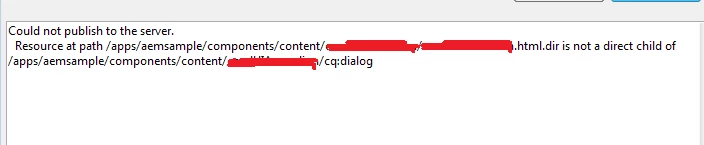
. My local content structure is as below
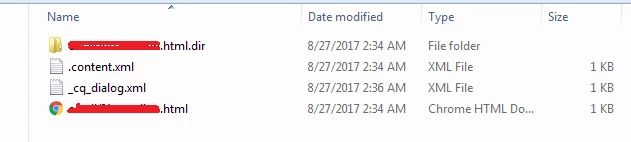
     I am working with TOUCH UI components and I face issue only with those components .

This post is no longer active and is closed to new replies. Need help? Start a new post to ask your question.
Best answer by Ratna_Kumar

Hi Veena,

I got it working very well using AEM Developer tools plugin and also I am able to sync from CRXDE Lite to Eclipse and vise versa.

Have a look at this articles Project Setup and Creating Base page and Template:

Getting Started with AEM Sites Part 1 - Project Setup

Getting Started with AEM Sites Part 2 - Creating a Base Page and Template

It is using Lazybones, whatever project it will work..It is only for Setup. Please let me know if you still not able to Sync.

Regards,

Ratna.

3 replies

VeenaVikraman
New Participant
August 28, 2017

Hi Ratna

          Thanks for those links . The links explain project setup using lazybones right ? What about a normal AEM Developer tool Plugin ? This particular issue I faced was especially when I create the project using AEM Developer Tool  in eclipse

Thanks

Veena

Ratna_Kumar
Ratna_KumarAccepted solution
New Participant
August 27, 2017

Hi Veena,

I got it working very well using AEM Developer tools plugin and also I am able to sync from CRXDE Lite to Eclipse and vise versa.

Have a look at this articles Project Setup and Creating Base page and Template:

Getting Started with AEM Sites Part 1 - Project Setup

Getting Started with AEM Sites Part 2 - Creating a Base Page and Template

It is using Lazybones, whatever project it will work..It is only for Setup. Please let me know if you still not able to Sync.

Regards,

Ratna.

VeenaVikraman
New Participant
August 27, 2017

Bit Research and I bumped into this question Could not Publish to Server - Generates "Not Direct Child" Error · Issue #63 · Adobe-Marketing-Cloud/aem-eclipse-develo…  and seems to have the perfect answer for my issue.

paul-bjorkstrand commented on Oct 13, 2016

So i tried applying the same . Rearranged my folder like below and it started working !!.

The original _cq_dialog.xml file was copied inside _cq_dialog folder and it is renamed to .content.xml

This seems to be solving the issue !!. But this is something which I needs to do manually one time every-time I create a new component. Looking to see if there is any permanent solution for this issue with AEM developer tool plugin for Eclipse.

PS:-  The file vault works normally for syncing . This issue I am facing only for the AEM Developer Tool Plugin in Eclipse