AEM Layout Grid + Fluid Layout | Community
Skip to main content
New Participant
January 22, 2019
Solved

AEM Layout Grid + Fluid Layout

  • January 22, 2019
  • 3 replies
  • 3810 views

When trying to implement the AEM Grid system on a site, is it possible to allow content to flow around another component based on that component's size in the Grid? It seems that the text component can only be either 100%, or the width that you set in the Grid, no fluidity.

I've attached a screenshot as an example.
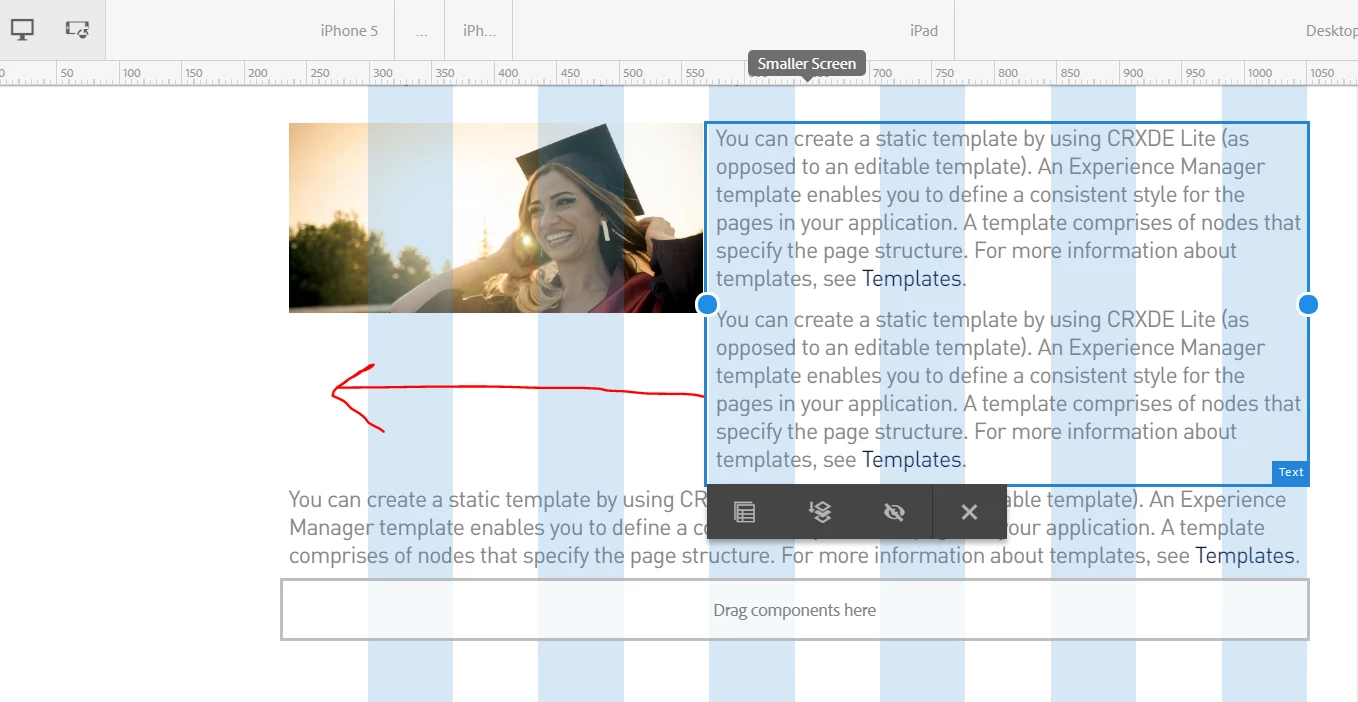
Thanks!

This post is no longer active and is closed to new replies. Need help? Start a new post to ask your question.
Best answer by Lokesh_Shivalingaiah

Hi Matthew,

as these two are 2 different components (image and text) it’s not possible to overflow one on the other.

2 ways to handle this.

1. Combine this to one component ‘imageText’ and handle it via css style

2. Break the text component to 2 text components and add the content accordingly

3 replies

New Participant
January 23, 2019

smacdonald2008​ This looks more like creating individual columns for the elements. I'm looking to one layout container that I drag a text and an image component into. From there, using the layout tools, adjust the images width, and  have the text from the text component flow around it. As bsloki​ mentioned, I could create another component to achieve this, however IMO, that seems a bit overkill to simply position an image using the responsive grid.

I'll continue to look for a solution. Thanks for your replies!

Lokesh_Shivalingaiah
Lokesh_ShivalingaiahAccepted solution
New Participant
January 23, 2019

Hi Matthew,

as these two are 2 different components (image and text) it’s not possible to overflow one on the other.

2 ways to handle this.

1. Combine this to one component ‘imageText’ and handle it via css style

2. Break the text component to 2 text components and add the content accordingly

smacdonald2008
New Participant
January 22, 2019

See this section of the Weekend tutorial - where this is covered.

Getting Started with AEM Sites Chapter 3 - Client-Side Libraries and Responsive Grid

It works as you suggested - when you follow the instructions in the doc - you set the width of the grid.

Hope this helps....