AEM local doesn't show any functionalities | Community
Skip to main content
Level 2
Jan 12, 2023 7:02 PM UTC
Solved

AEM local doesn't show any functionalities

All the function buttons are go when I click a page on AEM, I was trying to modify it.
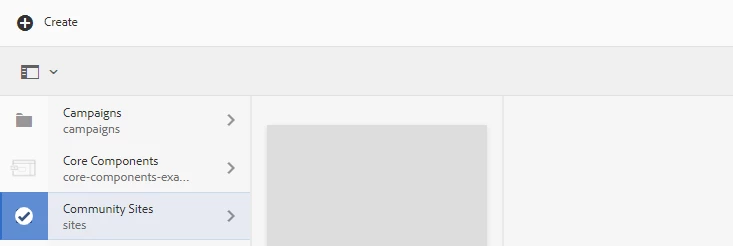
I can only see the "Create" button.

Can anyone give me some suggestions?

Thank you

This post is no longer active and is closed to new replies. Need help? Start a new post to ask your question.
BrianKasingli
BrianKasingliAccepted solution
New Participant
Jan 12, 2023 7:47 PM UTC

It might be because you don't have the correct permissions to your user?

Secondly, can you please share with me errors that you find in these steps? https://sourcedcode.com/blog/aem/development/basic-steps-to-debug-an-error-in-aem


2 replies

BrianKasingli
BrianKasingliAccepted solution
New Participant
Jan 12, 2023 7:47 PM UTC

It might be because you don't have the correct permissions to your user?

Secondly, can you please share with me errors that you find in these steps? https://sourcedcode.com/blog/aem/development/basic-steps-to-debug-an-error-in-aem


Translate
HanL1Author
Level 2
Jan 19, 2023 9:14 PM UTC

Hi, I found that the root cause is because I used this JSON schema validator:

<dependency> <groupId>com.github.fge</groupId> <artifactId>json-schema-validator</artifactId> <version>2.2.6</version> </dependency>

It breaks the app and someone of the osgi components fail to start. Not sure why.

Here's the code:

private String jsonSchema ="{\\\"$schema\\\":\\\"https://json-schema.org/draft/2019-09/schema\\\",\\\"$id\\\":\\\"http://example.com/example.json\\\",\\\"type\\\":\\\"object\\\",\\\"default\\\":{},\\\"title\\\":\\\"RootSchema\\\",\\\"properties\\\":{\\\"startDate\\\":{\\\"type\\\":\\\"string\\\",\\\"default\\\":\\\"\\\",\\\"title\\\":\\\"ThestartDateSchema\\\",\\\"examples\\\":[\\\"2021-01-01\\\"],\\\"format\\\":\\\"date\\\"},\\\"endDate\\\":{\\\"type\\\":\\\"string\\\",\\\"default\\\":\\\"\\\",\\\"title\\\":\\\"TheendDateSchema\\\",\\\"examples\\\":[\\\"2021-12-27\\\"],\\\"format\\\":\\\"date\\\"},\\\"governingBodyId\\\":{\\\"type\\\":\\\"string\\\",\\\"default\\\":\\\"\\\",\\\"title\\\":\\\"ThegoverningBodyIdSchema\\\",\\\"examples\\\":[\\\"a6f7A0000001B08QAE\\\"],\\\"pattern\\\":\\\"^[a-zA-Z0-9]{0,256}$\\\"},\\\"sourceId\\\":{\\\"type\\\":\\\"string\\\",\\\"default\\\":\\\"\\\",\\\"title\\\":\\\"ThesourceIdSchema\\\",\\\"examples\\\":[\\\"\\\"],\\\"pattern\\\":\\\"^[a-zA-Z0-9]{0,256}$\\\"},\\\"courseId\\\":{\\\"type\\\":\\\"string\\\",\\\"default\\\":\\\"\\\",\\\"title\\\":\\\"ThecourseIdSchema\\\",\\\"examples\\\":[\\\"\\\"],\\\"pattern\\\":\\\"^[a-zA-Z0-9]{0,256}$\\\"},\\\"useCompletionDate\\\":{\\\"type\\\":\\\"boolean\\\",\\\"default\\\":false,\\\"title\\\":\\\"TheuseCompletionDateSchema\\\",\\\"examples\\\":[true]}},\\\"examples\\\":[{\\\"startDate\\\":\\\"2021-01-01\\\",\\\"endDate\\\":\\\"2021-12-27\\\",\\\"governingBodyId\\\":\\\"a6f7A0000001B08QAE\\\",\\\"sourceId\\\":\\\"\\\",\\\"courseId\\\":\\\"\\\",\\\"useCompletionDate\\\":true}]}"; String JsonData = IOUtils.toString(request.getInputStream(),"UTF-8"); JsonNode dataNode = JsonLoader.fromString(JsonData); JsonNode schemaNode = JsonLoader.fromString(jsonSchema); JsonSchema schema = JsonSchemaFactory.byDefault().getJsonSchema(schemaNode); ProcessingReport processingReport = schema.validate(dataNode); if(!processingReport.isSuccess()){ log.error("Input JSON parameters don't match with the required pattern"); return; }

If AEM doesn't compile with the JSON schema validator, what methods should I use to validate the JSON input (such as format, length etc.)?

Thanks

Translate