AEM Performance issue in Lucene index in 6.5 SPA | Community
Skip to main content
Level 2
March 4, 2025
Solved

AEM Performance issue in Lucene index in 6.5 SPA

Hi Everyone,

                I am using query builder api to get search results like below:

fulltext=baggage
group.p.or=true
group.1_group.path=/content/project1/ph/en/home
group.1_group.type=cq:PageContent
group.2_group.path=/content/dam/project1
group.2_group.type=dam:Asset
group.2_group.p.not=true
group.2_group.property=jcr:content/metadata/@dc:format
group.2_group.property.value=application/json
p.limit=-1

When I am checking in http://localhost:4502/libs/granite/operations/content/diagnosistools/queryPerformance.html

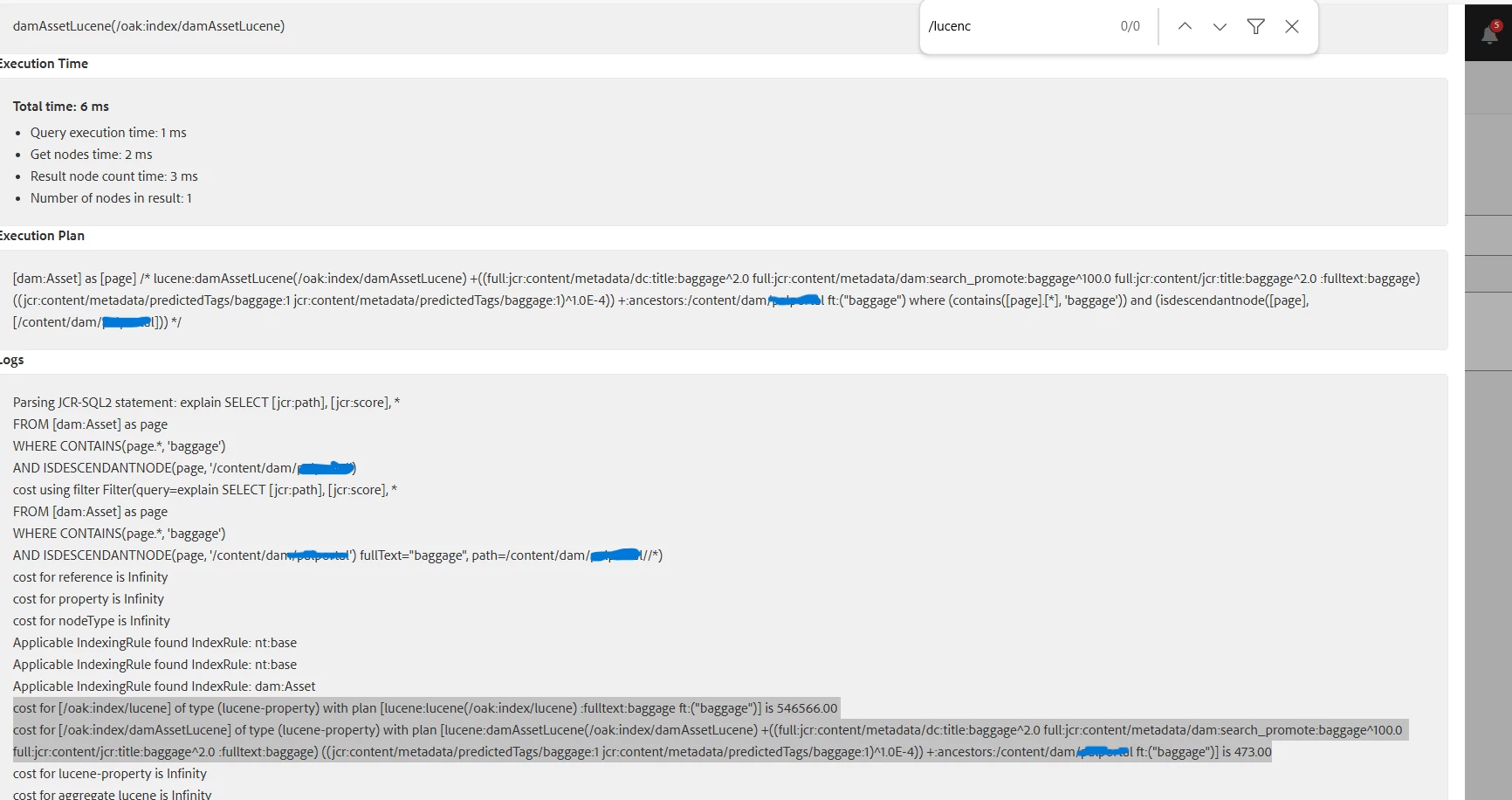
It is showing along with cqPageLucene Lucene index also triggering which is impacting AEM environment performance.


Error log when querying:


Is there any option to resolve this issue? Experts need your solution on this, Thanks in advance!

giuseppebaglio
giuseppebaglioAccepted solution
Level 10
March 5, 2025

To improve the situation effectively, consider exploring following options.

  • The queryPerformance.html tool indicates the /oak:index/lucene index has a cost of 546,566 , which is significantly higher than the DAM-specific index (damAssetLucene). This suggests that the query is triggering a full-text search across the entire repository via the generic Lucene index. The group.p.or=true condition combines two groups (pages and DAM assets), forcing the query to scan multiple paths.
  • Setting p.limit=-1 fetches all results , which is resource-intensive. Use pagination (e.g., p.limit=20&p.offset=0) to reduce load.
  • If pagination isn’t feasible, ensure the query is as restrictive as possible.
  • You can restructure the query by split the query into two separate queries:
    For pages (cq:PageContent):


fulltext=baggage path=/content/project1/ph/en/home type=cq:PageContent


For DAM assets (exclude JSON files):


fulltext=baggage path=/content/dam/project1 type=dam:Asset property=jcr:content/metadata/@dc:format property.value!=application/json


This ensures the DAM-specific index (damAssetLucene) is used exclusively for assets, avoiding the costly generic Lucene index.


  • You can also define a custom Lucene index for /content/project1 pages to avoid full-repository scans. Example oak:index definition:


<index name="customPageLucene" type="lucene"> <property name="path" value="/content/project1"/> <property name="type" value="cq:PageContent"/> <property name="includePropertyTypes"> <value>metadata/@dc:format</value> <value>jcr:title</value> </property> </index>​


This will ensure the query targets a specific index instead of the generic one.


Further reading:

Query and Indexing Best Practices

Troubleshooting Slow Queries
 

1 reply

giuseppebaglio
giuseppebaglioAccepted solution
Level 10
March 5, 2025

To improve the situation effectively, consider exploring following options.

  • The queryPerformance.html tool indicates the /oak:index/lucene index has a cost of 546,566 , which is significantly higher than the DAM-specific index (damAssetLucene). This suggests that the query is triggering a full-text search across the entire repository via the generic Lucene index. The group.p.or=true condition combines two groups (pages and DAM assets), forcing the query to scan multiple paths.
  • Setting p.limit=-1 fetches all results , which is resource-intensive. Use pagination (e.g., p.limit=20&p.offset=0) to reduce load.
  • If pagination isn’t feasible, ensure the query is as restrictive as possible.
  • You can restructure the query by split the query into two separate queries:
    For pages (cq:PageContent):


fulltext=baggage path=/content/project1/ph/en/home type=cq:PageContent


For DAM assets (exclude JSON files):


fulltext=baggage path=/content/dam/project1 type=dam:Asset property=jcr:content/metadata/@dc:format property.value!=application/json


This ensures the DAM-specific index (damAssetLucene) is used exclusively for assets, avoiding the costly generic Lucene index.


  • You can also define a custom Lucene index for /content/project1 pages to avoid full-repository scans. Example oak:index definition:


<index name="customPageLucene" type="lucene"> <property name="path" value="/content/project1"/> <property name="type" value="cq:PageContent"/> <property name="includePropertyTypes"> <value>metadata/@dc:format</value> <value>jcr:title</value> </property> </index>​


This will ensure the query targets a specific index instead of the generic one.


Further reading:

Query and Indexing Best Practices

Troubleshooting Slow Queries

 

Translate