AEM Proxy component Issue : carousel | Community
Skip to main content
Level 2
Dec 11, 2020 5:40 AM UTC
Solved

AEM Proxy component Issue : carousel

I have tried to create a proxy component of the adobe core component - Carousel-v1 (https://aemcomponents.dev/content/core-components-examples/library/container/carousel.html).
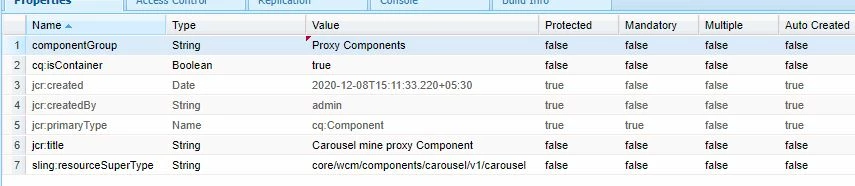


sling:resourceSuperType - core/wcm/components/carousel/v1/carousel

In the AEM Product catalog page of carousal , the buttons are icons :


In my proxy component , the icons are coming as buttons :

.
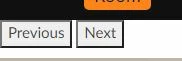
Which CSS should i call to make it like the catalog page ?  

AEM 6.5.5.0 is the version.

This post is no longer active and is closed to new replies. Need help? Start a new post to ask your question.
BrianKasingli
BrianKasingliAccepted solution
New Participant
Dec 11, 2020 11:17 AM UTC

When using the Core WCM Carousel Component, the CSS for this component can be found here, https://github.com/adobe/aem-core-wcm-components/tree/master/content/src/content/jcr_root/apps/core/wcm/components/carousel/v1/carousel/clientlibs, simply refer to the client libraries from here :

core.wcm.components.carousel.v1.editor core.wcm.components.carousel.editor.hook.v1 core.wcm.components.carousel.v1

11 replies

BrianKasingli
BrianKasingliAccepted solution
New Participant
Dec 11, 2020 11:17 AM UTC

When using the Core WCM Carousel Component, the CSS for this component can be found here, https://github.com/adobe/aem-core-wcm-components/tree/master/content/src/content/jcr_root/apps/core/wcm/components/carousel/v1/carousel/clientlibs, simply refer to the client libraries from here :

core.wcm.components.carousel.v1.editor core.wcm.components.carousel.editor.hook.v1 core.wcm.components.carousel.v1
Translate
AnnzRozAuthor
Level 2
Dec 11, 2020 11:29 AM UTC
@briankasingli , i had tried to add these still , it wasnt loading the correct CSS.I have dowloaded the latest version of aem components from git.
Translate
arunpatidar
New Participant
Dec 11, 2020 8:37 AM UTC

AEM Component Library using custom css to change look and feel of indicator.

You need to write custom css to :

float indicator to right

hide label

add new icon using pseudo after selector

Example - https://github.com/arunpatidar02/aemaacs-aemlab/blob/master/ui.apps/src/main/content/jcr_root/apps/aemlab/clientlibs/clientlib-site/carousel.css


you can ask front end people in your team they would be able to help

Translate
Arun Patidar
AnnzRozAuthor
Level 2
Dec 11, 2020 8:40 AM UTC
Thanks Arun, just wanted to confirm.
Translate