AEM quickstart jar file is not running | Community
Skip to main content
Level 2
Jan 13, 2022 2:55 PM UTC
Solved

AEM quickstart jar file is not running

Hi Team,
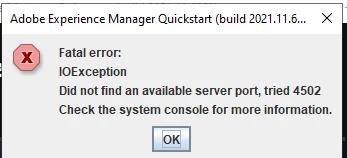
While i am trying to open aem jar file ,its throwing "did not find an available server port tried 4502"
please refer below error attached screenshot and help me out

Note: as per guidance i have to use 4502 port only


This post is no longer active and is closed to new replies. Need help? Start a new post to ask your question.
NitinLAccepted solution
Level 3
Jan 13, 2022 3:56 PM UTC

You can rename the jar something like "aem-sdk-quickstart-14502.jar" and start ther server, it will start your server on 14502 server.

3 replies

NitinLAccepted solution
Level 3
Jan 13, 2022 3:56 PM UTC

You can rename the jar something like "aem-sdk-quickstart-14502.jar" and start ther server, it will start your server on 14502 server.

Translate
ibishika
Level 4
Jan 13, 2022 3:12 PM UTC

Some task must be running on that port. Kill that task to free the port and try starting the jar. Follow the below steps to kill the task:

  1. Open up cmd.exe (note: you may need to run it as an administrator, but this isn't always necessary), then run the below command: netstat -ano | findstr :<PORT> (Replace <PORT> with the port number you want, but keep the colon)
  2. Next, run the following command: taskkill /PID <PID> /F. (No colon this time)
Translate
Love_Sharma
Level 4
Jan 13, 2022 3:11 PM UTC

Hello,

Try checking if you are already running any AEM instance on same port, if not, killing Java process completely and then start your AEM helps most of the time.

Thanks

Translate