AEM SAML Configuration in code repository | Community
Skip to main content
pankajrohira
Level 2
Feb 26, 2018 7:32 PM UTC
Solved

AEM SAML Configuration in code repository

I configured AEM SAML integration on author instance and it just works fine. Now this was time to put the config in code repository. So:

1. I put that config in the code repository (at /apps/<project-folder>/config.author.dev/com.adobe.granite.auth.saml.SamlAuthenticationHandler-myproject.xml

2. Deleted the manually created SAML configuration in Felix Console.

2. Performed a build

3. I see the SAML config added by code

4. I hit Author URL and it doesn't take me to IDP login page.

5. I go to felix, open SAML config, click Save (without touching anything else)

6. I hit Author URL again and now it takes me to IDP login page.

Any reason?

Thanks in advance!!

This post is no longer active and is closed to new replies. Need help? Start a new post to ask your question.
pankajrohira
pankajrohiraAccepted solution
Level 2
Aug 16, 2019 2:03 PM UTC

Hi Kunal,

The jcr:data structure, I meant if you are directly adding this file in CRXDE temporarily for testing. But in order to add this file into code base, you can create it as a "regular" file.

1. Name the file as: "com.adobe.granite.auth.saml.SamlAuthenticationHandler-<Project_Identifier>.config" (Make sure it is a regular file in Eclipse or IntelliJ); no need to add extension ".xml" at the end.

2. Inside this file, just add the configuration like a regular text. Please see below:

# Configuration created by Apache Sling JCR Installer

keyStorePassword="keystorepass"

service.ranking=I"5002"

idpHttpRedirect=B"false"

createUser=B"true"

defaultRedirectUrl="/content/project/en/aem-assets.html"

userIDAttribute="http://schemas.xmlsoap.org/ws/2005/05/identity/claims/name"

assertionConsumerServiceURL=""

defaultGroups=["contributors"]

signatureMethod="http://www.w3.org/2001/04/xmldsig-more#rsa-sha256"

idpCertAlias="certalias___xxxxxxxxxxxx"

addGroupMemberships=B"true"

path=["/content/projects"]

digestMethod="http://www.w3.org/2001/04/xmlenc#sha256"

synchronizeAttributes=""

clockTolerance=I"60"

groupMembershipAttribute="groupMembership"

idpUrl="IDP URL GOES HERE"

logoutUrl="logouturl"

serviceProviderEntityId="service_provider_entity_id"

handleLogout=B"true"

spPrivateKeyAlias=""

useEncryption=B"false"

nameIdFormat="urn:oasis:names:tc:SAML:2.0:nameid-format:transient"

You can also copy the content of the file from CRXDE, after you manually save the OSGi config thru /system/console/configMgr.

Please see the attached screen-shot. You can clearly see the difference between a regular file and a sling:osgiConfig file (com.day.cq.commons.impl.ExternalizerImpl.xml).
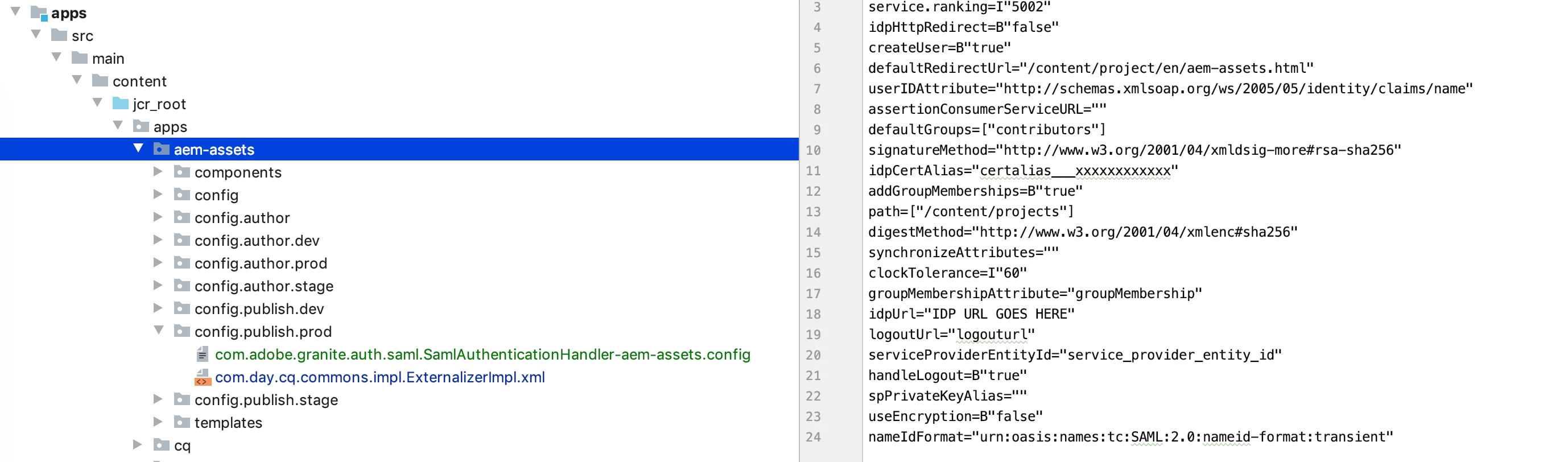
Thanks.

11 replies

kunalm
Level 2
Aug 20, 2019 4:57 AM UTC

Hi Pankaj,

Thanks for the detailed reply. I was able to register the config from code using the method you described above. You can mark your response as the correct answer.

Thanks,

Kunal

Translate
pankajrohira
pankajrohiraAuthorAccepted solution
Level 2
Aug 16, 2019 2:03 PM UTC

Hi Kunal,

The jcr:data structure, I meant if you are directly adding this file in CRXDE temporarily for testing. But in order to add this file into code base, you can create it as a "regular" file.

1. Name the file as: "com.adobe.granite.auth.saml.SamlAuthenticationHandler-<Project_Identifier>.config" (Make sure it is a regular file in Eclipse or IntelliJ); no need to add extension ".xml" at the end.

2. Inside this file, just add the configuration like a regular text. Please see below:

# Configuration created by Apache Sling JCR Installer

keyStorePassword="keystorepass"

service.ranking=I"5002"

idpHttpRedirect=B"false"

createUser=B"true"

defaultRedirectUrl="/content/project/en/aem-assets.html"

userIDAttribute="http://schemas.xmlsoap.org/ws/2005/05/identity/claims/name"

assertionConsumerServiceURL=""

defaultGroups=["contributors"]

signatureMethod="http://www.w3.org/2001/04/xmldsig-more#rsa-sha256"

idpCertAlias="certalias___xxxxxxxxxxxx"

addGroupMemberships=B"true"

path=["/content/projects"]

digestMethod="http://www.w3.org/2001/04/xmlenc#sha256"

synchronizeAttributes=""

clockTolerance=I"60"

groupMembershipAttribute="groupMembership"

idpUrl="IDP URL GOES HERE"

logoutUrl="logouturl"

serviceProviderEntityId="service_provider_entity_id"

handleLogout=B"true"

spPrivateKeyAlias=""

useEncryption=B"false"

nameIdFormat="urn:oasis:names:tc:SAML:2.0:nameid-format:transient"

You can also copy the content of the file from CRXDE, after you manually save the OSGi config thru /system/console/configMgr.

Please see the attached screen-shot. You can clearly see the difference between a regular file and a sling:osgiConfig file (com.day.cq.commons.impl.ExternalizerImpl.xml).

Thanks.

Translate
kunalm22890025
New Participant
Aug 16, 2019 9:28 AM UTC

Hi Pankaj,

I'm performing the final step as you mentioned "jcr:data" which contains a file with all the configuration details."

Would you be able to tell me if there is any syntax I need to follow to put all the SAML configurations in the jcr:data file?

Thanks

Translate
arunpatidar
New Participant
Aug 10, 2019 12:34 PM UTC

Hi,

How did you added SAML config in the repository?

1. you need to create sling:OsgiConfig node type and create properties.

2. Do not update repository config from web console, if you do then it won"t be repository config, it will be converted into web console-based config (sling:OsgiConfig) will be converted into nt:file.

I recently implemented SAML using repository based config.

Translate
Arun Patidar
pankajrohira
Level 2
Aug 9, 2019 8:20 PM UTC

Yes, I had appended custom pid.

Translate
kunalm
Level 2
Aug 9, 2019 8:08 PM UTC

Hi Pankaj,

Thanks for your reply. I do see the config come into effect when manually saved in the Felix console. I'll try out the steps you've provided to see if they work for me.

Did you append a custom pid to your config like com.adobe.granite.auth.saml.SamlAuthenticationHandler-myproject.xml or let it be com.adobe.granite.auth.saml.SamlAuthenticationHandler.xml?

Translate
pankajrohira
Level 2
Aug 9, 2019 7:00 PM UTC

Hi Kunal,

Do you see the OSGi config coming into effect after you open the OSGi config and click on 'Save'?

If yes, then please try below solution (I had created a daycare ticket at that time and was suggested below solution):

For this particular scenario, I was asked to not to save the OSGi config as "sling:osgiConfig" in code repo rather as "nt:file" (the one it creates once you save the OSGi config through /system/console/configMgr).

You would need to define your OSGi config file with jcr:primaryType=nt:file with a sub-node "jcr:content" with jcr:primaryType="nt:resource" and "jcr:data" which contains a file with all the configuration details.

Thanks, Pankaj

Translate
kunalm
Level 2
Aug 9, 2019 7:14 AM UTC

Were you able to fix this issue? I'm facing the same problem of the OSGi config not coming into effect when deployed from code

Translate
pankajrohira
Level 2
Feb 27, 2018 4:04 PM UTC

Hi Kautuk, did you understand my question? I mentioned that SAML configuration worked as expected. It's just that when I add that in my code repo, it doesn't come into affect. The articles you provided they talk more about configuring SAML.

Translate
navinkaushal
Level 4
Feb 27, 2018 7:48 AM UTC

The OSGI config is picked in this order:

1. From OSGI Config Setting

2. Config settings given from  /apps/<project-folder>/config.author.dev/com.adobe.granite.auth.saml.SamlAuthenticationHa ndler-myproject.xml

3. <cq-installation-dir>/crx-quickstart/launchpad/config/

My Guess is you have some default config in 1st place which is picked up and when you save again from your deployed configuration then it refreshes and take place.

Please check if this helps

Translate