AEM Service pack Version 6.5.16.0 not updating. | Community
Skip to main content
New Participant
September 19, 2023
Solved

AEM Service pack Version 6.5.16.0 not updating.

  • September 19, 2023
  • 3 replies
  • 1672 views

Hello Team,

I have performed the service pack upgrade from 6.5.3.0 to  6.5.16.0 on our on prem "publish" instance. 
Installation went successful and not seeing any warnings or errors.


But , strangely when I check the version in "product information" and other places it is still showing up the older Service pack version instead of newer.

Did anyone face this kind of issue and am I missing any steps here?

Please help?

Thanks,
VK.
This post is no longer active and is closed to new replies. Need help? Start a new post to ask your question.
Best answer by Jagadeesh_Prakash

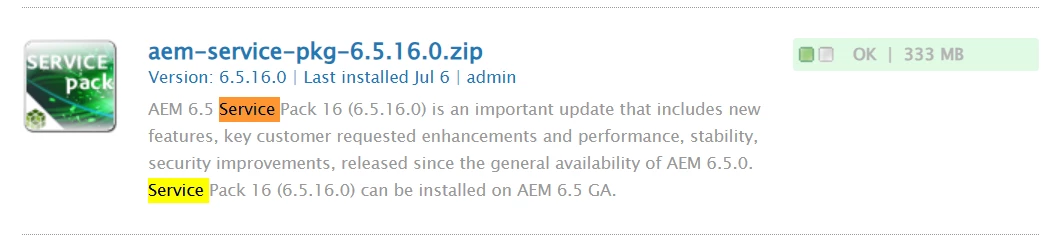
@kk463j  Seems some thing issue on how you are looking at the information. I tested this in local and see its reflecting correctly. Only difference i see here is after installing the service pack i see "ok" option in my local package manager. But in your screen i see option "share" not sure if that makes any difference. 


Package manager : 


Welcome Page: 


3 replies

kautuk_sahni
Employee
September 21, 2023

@kk463j Did you find the suggestions from users helpful? Please let us know if more information is required. Otherwise, please mark the answer as correct for posterity. If you have found out solution yourself, please share it with the community.

Kautuk Sahni
kk463jAuthor
New Participant
September 26, 2023

Suggestion was partially helpful but didn't fix the exact issue and once I find the solution or got any inputs from others. I will mark the correct answer- Thanks!

EstebanBustamante
New Participant
September 19, 2023

Where are you checking? Try checking in "http://<host>:<port>/welcome" page. Are you seeing any logs of activity related to the SP installation going on? Can you verify the SP package in Package Manager has the status as "Installed"? Did you try to restart the server after the SP upgrade? Usually, a restart is recommended although not mandatory, if everything is successfully installed you can try to restart your server and then check again.

Esteban Bustamante
kk463jAuthor
New Participant
September 19, 2023

@estebanbustamante As said I have checked in "product information" in Felix console and also verified in welcome page as it is showing the older version. below is screenshot that is installed in package manager and restarted the instance couple of times but nothing helped.

Package Manager:


Welcome page:


Jagadeesh_Prakash
Jagadeesh_PrakashAccepted solution
New Participant
September 19, 2023

@kk463j  Seems some thing issue on how you are looking at the information. I tested this in local and see its reflecting correctly. Only difference i see here is after installing the service pack i see "ok" option in my local package manager. But in your screen i see option "share" not sure if that makes any difference. 


Package manager : 


Welcome Page: 


Jagadeesh_Prakash
New Participant
September 19, 2023

@kk463j  I tried the same in my local and its working fine. Can you check if you have necessary permissions and also check if the package in available in package manager 


kk463jAuthor
New Participant
September 19, 2023

@jagadeesh_prakash I have logged in with Admin credentials and package is installed successfully in package manager.
