Alt text issue in links in RTE when alt text has a special character | Community
Skip to main content
New Participant
May 16, 2018
Solved

Alt text issue in links in RTE when alt text has a special character

  • May 16, 2018
  • 5 replies
  • 2896 views

Hi All,

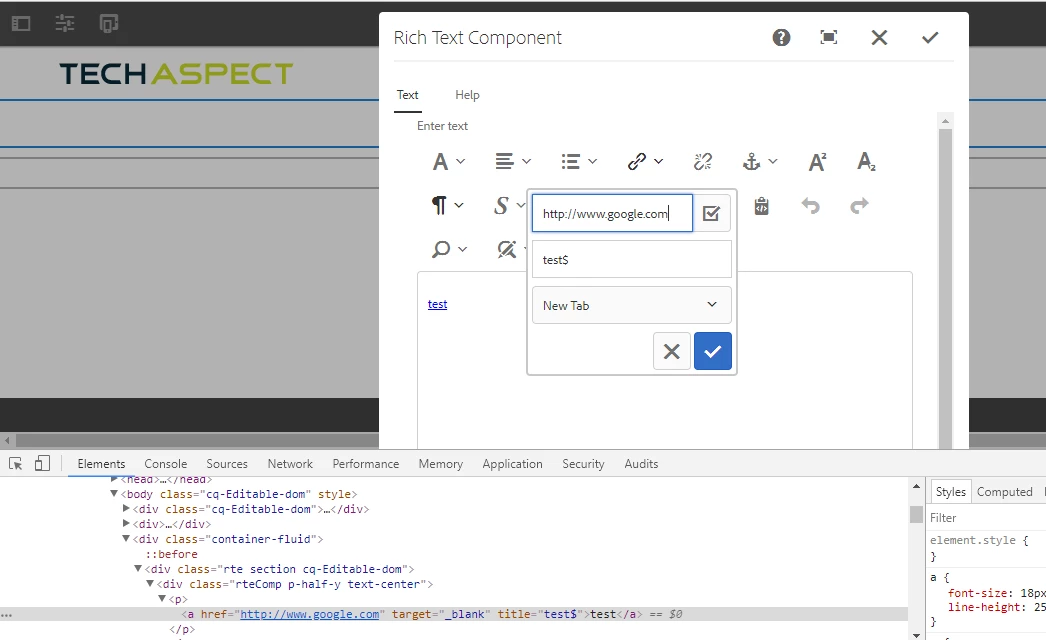
In AEM 6.3 when i am trying to add special character in alt text field for a link in RTE, the hover functionality stops working and I don't see any alt text.When I have inspected <a> tag, I found that the title attribute from <a> tag is completely removed due to special character.Is there any way I can add special characters like '?',copyright in alt text.To render the RTE content to page I am using context as 'html' .

Thanks in advance.
This post is no longer active and is closed to new replies. Need help? Start a new post to ask your question.
Best answer by Techaspect_Solu

Hi,

Instead of using @ context = 'unsafe', it's good to use AntiSamy configuration file in CRXDE light to handle your use-case.

We've tested your use-case and it got resolved after following the below steps:

1) Copy /libs/cq/xssprotection/config.xml to /apps/cq/xssprotection/config.xml.

2) Open /apps/cq/xssprotection/config.xml.

3) In the config.xml file, search for common-attributes and add the following target attribute declaration.

<attribute name="title">

     <regexp-list>

           <regexp value="[a-zA-Z0-9-_\$]+" />

      </regexp-list>

</attbribute>

4) Search for the term <tag name="a" in the config.xml file.

5) Add the line below in the list of attributes:

<attribute name="title" />

6) Save the file. Now, test your use-case and the issue should be resolved.

Sample output:

You can also find above steps in adobe helpx docs:

XSS Filter issue with the target attribute of the a tag

Hope this helps!

Regards,

TechAspect Solutions

5 replies

smacdonald2008
New Participant
May 17, 2018

Techaspect Solutions​ -- great answer!

Techaspect_Solu
Techaspect_SoluAccepted solution
New Participant
May 17, 2018

Hi,

Instead of using @ context = 'unsafe', it's good to use AntiSamy configuration file in CRXDE light to handle your use-case.

We've tested your use-case and it got resolved after following the below steps:

1) Copy /libs/cq/xssprotection/config.xml to /apps/cq/xssprotection/config.xml.

2) Open /apps/cq/xssprotection/config.xml.

3) In the config.xml file, search for common-attributes and add the following target attribute declaration.

<attribute name="title">

     <regexp-list>

           <regexp value="[a-zA-Z0-9-_\$]+" />

      </regexp-list>

</attbribute>

4) Search for the term <tag name="a" in the config.xml file.

5) Add the line below in the list of attributes:

<attribute name="title" />

6) Save the file. Now, test your use-case and the issue should be resolved.

Sample output:

You can also find above steps in adobe helpx docs:

XSS Filter issue with the target attribute of the a tag

Hope this helps!

Regards,

TechAspect Solutions

smacdonald2008
New Participant
May 17, 2018

NOt that I am aware of. I avoid using special chars as much as possible,

New Participant
May 17, 2018

Is there any other way we can use special characters in alt text without using context as unsafe.

smacdonald2008
New Participant
May 16, 2018

I do not think Special chars are supported in this use case.