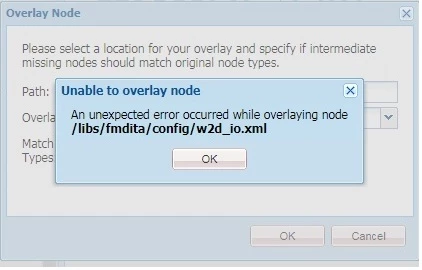
An unexpected error occurred while overlaying node /libs/fmdita/config/w2d_io.xml in AEM | Community
Skip to main content
New Participant
September 14, 2019
Solved

An unexpected error occurred while overlaying node /libs/fmdita/config/w2d_io.xml in AEM
  • September 14, 2019
  • 2 replies
  • 2849 views

I am using XML Technical Documentation and I am going to upload a word document from my local machine to XML documentation and for the same I have to create an overlay node as per user guide, but when I am going to create an overlay node I am getting following error, please check the provided screenshot

Best answer by user05162

Overlay, JSP / JS / CSS / XML overlays aren't officially supported. So, you need to overlay the folder structure(/libs/fmdita/config) and recreate the XML node.

Sharing below another way of creating an overlay :

1- Make a package of "/libs/fmdita/config/w2d_io.xml"

2- Download and extract the package.

3- Open "jcr_root" folder and rename "libs" to "apps"

4- Open "META-INF/vault" folder and open filter.xml

5- Change the "<filter root="/libs/fmdita/config/w2d_io.xml"/>" to "<filter root="/apps/fmdita/config/w2d_io.xml"/>"

6- Save the file.

7- Repackage "jcr_root" and "META-INF" folder.

8- Upload and Install the newly created package from step 7 and check force upload option.

2 replies

user05162Accepted solution
Employee
September 14, 2019

Overlay, JSP / JS / CSS / XML overlays aren't officially supported. So, you need to overlay the folder structure(/libs/fmdita/config) and recreate the XML node.

Sharing below another way of creating an overlay :

1- Make a package of "/libs/fmdita/config/w2d_io.xml"

2- Download and extract the package.

3- Open "jcr_root" folder and rename "libs" to "apps"

4- Open "META-INF/vault" folder and open filter.xml

5- Change the "<filter root="/libs/fmdita/config/w2d_io.xml"/>" to "<filter root="/apps/fmdita/config/w2d_io.xml"/>"

6- Save the file.

7- Repackage "jcr_root" and "META-INF" folder.

8- Upload and Install the newly created package from step 7 and check force upload option.

Employee
September 14, 2019

The 1st thing to check is to make sure you have the proper permission to the node. If you have the proper permission to the node(s) the browser debugger tool might provide more details on what might be causing the issue.