Assets Link Share - Video Playback Issues | Community
Skip to main content
Level 2
Jan 31, 2019 3:26 PM UTC
Solved

Assets Link Share - Video Playback Issues

When a video is shared via the "Link Share" feature the video fails to load in chrome. If the whitespace is clicked the video loads and plays. In firefox the video preview does load. However, intermittently the play button does not load.
Is this expected behavior?
This post is no longer active and is closed to new replies. Need help? Start a new post to ask your question.
crazy4aemAccepted solution
Level 2
Feb 1, 2019 3:12 PM UTC

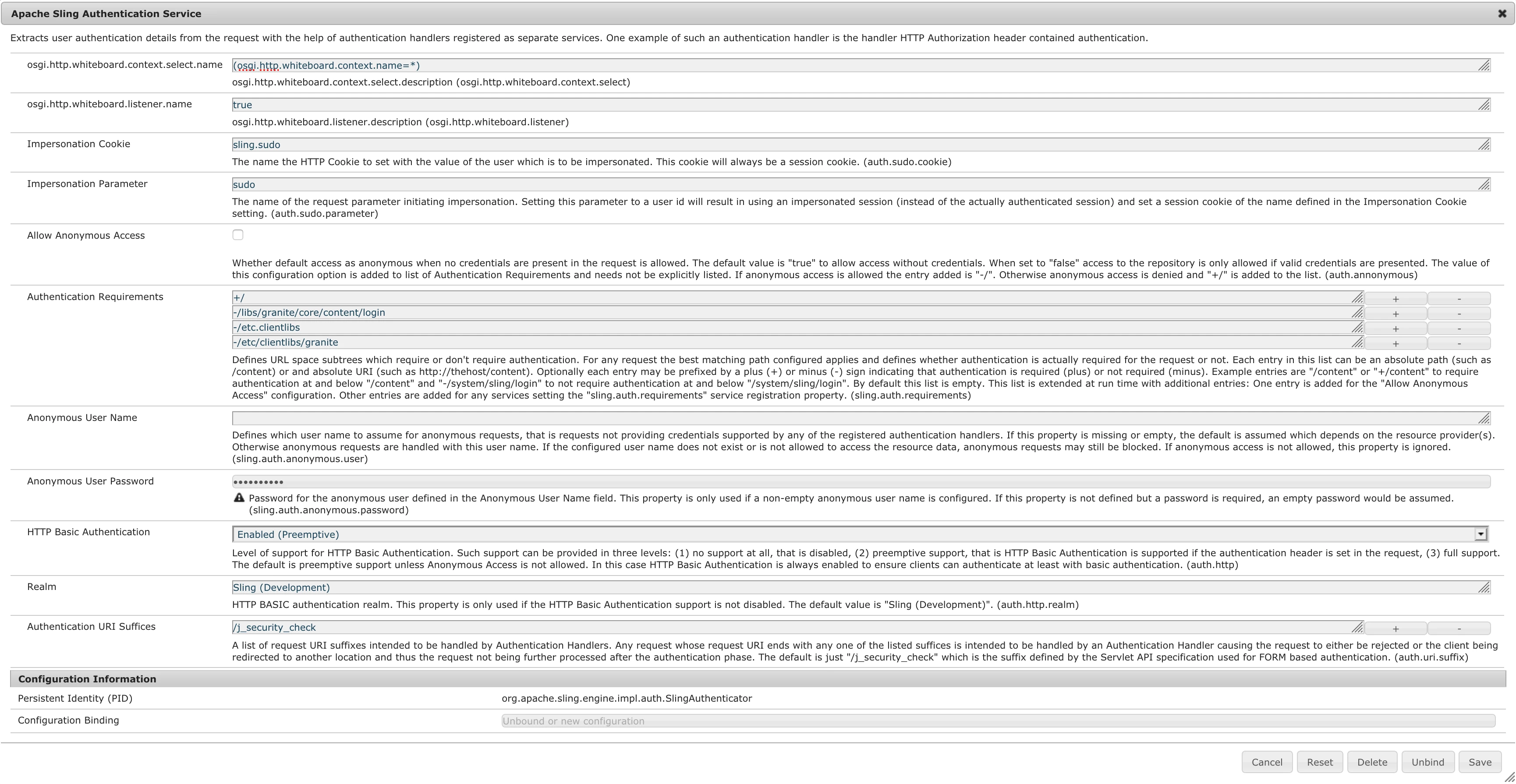
This was the culprit.

8 replies

crazy4aemAuthorAccepted solution
Level 2
Feb 1, 2019 3:12 PM UTC

This was the culprit.

Translate
Gaurav-Behl
Level 10
Feb 1, 2019 2:28 PM UTC
crazy4aemAuthor
Level 2
Feb 1, 2019 2:00 PM UTC

I am not sure actually. I can confirm that while logged in everything loads properly. It's only when a user outside of AEM logs in that this situation occurs.

Translate
Gaurav-Behl
Level 10
Feb 1, 2019 1:57 PM UTC

Why does it throw you to login.html. The embedded token should allow access without logging-in.

check the url in my case above it has --- sh=b9e262cf_5215_422a_bb50_fef385e5b2f3.ejJ58PdI4mMDpABpddLa7nJwf2Zk1Bf5rBWWXudgTXY

Translate
crazy4aemAuthor
Level 2
Feb 1, 2019 1:29 PM UTC

The errors I am getting in chrome web console are actually:

test2.mp4:1 Refused to execute script from 'https://localhost:4502/libs/granite/core/content/login.html?resource=%2Flibs%2Fdam%2Fcomponents%2Fscene7%2Fcommon%2Fclientlibs%2Fi18n.min.js&$$login$$=%24%24login%24%24&j_reason=unknown&j_reason_code=unknown' because its MIME type ('text/html') is not executable, and strict MIME type checking is enabled.

test2.mp4:1 Refused to execute script from 'https://localhost:4502/libs/granite/core/content/login.html?resource=%2Flibs%2Fcq%2Fgui%2Fcomponents%2Fcoral%2Fcommon%2Fadmin%2Fcustomsearch%2Fsearchpredicates%2Fhiddenpredicate%2Fclientlibs%2Fhiddenpredicate.min.js&$$login$$=%24%24login%24%24&j_reason=unknown&j_reason_code=unknown' because its MIME type ('text/html') is not executable, and strict MIME type checking is enabled.

test2.mp4:1 Refused to execute script from 'https://localhost:4502/libs/granite/core/content/login.html?resource=%2Flibs%2Fcq%2Fgui%2Fcomponents%2Fcommon%2Fclientlibs%2Fcommon.min.js&$$login$$=%24%24login%24%24&j_reason=unknown&j_reason_code=unknown' because its MIME type ('text/html') is not executable, and strict MIME type checking is enabled.

test2.mp4:1 Refused to execute script from 'https://localhost:4502/libs/granite/core/content/login.html?resource=%2Flibs%2Fcq%2Fgui%2Fcomponents%2Fcommon%2Fadmin%2Fcustomsearch%2Fsearchpredicates%2Fhiddenpredicate%2Fclientlibs%2Fhiddenpredicate.min.js&$$login$$=%24%24login%24%24&j_reason=unknown&j_reason_code=unknown' because its MIME type ('text/html') is not executable, and strict MIME type checking is enabled.

I thought the solution would be permissions. This does not appear to be the case.

Translate
Gaurav-Behl
Level 10
Jan 31, 2019 6:06 PM UTC

If it works for you in FF but not in Chrome, then it could be an issue with your Chrome extensions/plugins. Check if you are able to access the thumbnail image in Chrome?

It would be something like /libs/dam/gui/content/assets/assetlinkshare.html/content/dam/eaem-decrypt-assets-filter-6420.mp4.thumb.319.319.png?ch_ck=1548415046000&sh=b9e262cf_5215_422a_bb50_fef385e5b2f3.ejJ58PdI4mMDpABpddLa7nJwf2Zk1Bf5rBWWXudgTXY&path=

If the 'javascript' is not accessible to un-authenticated users then grant read access to 'anonymous' user for that path via /useradmin or otherwise share the equivalent publish-server link.

Translate
crazy4aemAuthor
Level 2
Jan 31, 2019 5:18 PM UTC

Thank you very much for the reply.

I'm curious now, can you test this the link in a non-aem-authenticated tab/window (i.e. incognito tab)? I've found that there is javascript that is not accessible if you are not authenticated to aem. This use case would be for an external user.

Translate
Gaurav-Behl
Level 10
Jan 31, 2019 4:56 PM UTC

Check the console logs/network tab for any errors/warning?

works fine in chrome:

Translate