Button in component dialog | Community
Skip to main content
This post is no longer active and is closed to new replies. Need help? Start a new post to ask your question.
Best answer by lukasz-m

Hi @sanjana12,

You can use one of below:

Here is simple code example of Button usage.

<cq:dialog jcr:primaryType="nt:unstructured" jcr:title="Properties" sling:resourceType="cq/gui/components/authoring/dialog">
    <content jcr:primaryType="nt:unstructured" sling:resourceType="granite/ui/components/coral/foundation/fixedcolumns">
        <items jcr:primaryType="nt:unstructured">
            <column jcr:primaryType="nt:unstructured" sling:resourceType="granite/ui/components/coral/foundation/container">
                <items jcr:primaryType="nt:unstructured">
                    <text jcr:primaryType="nt:unstructured" fieldLabel="Text" name="./text" sling:resourceType="granite/ui/components/coral/foundation/form/textfield"/>
                    <path jcr:primaryType="nt:unstructured" fieldLabel="Path" filter="nosystem" name="./path" rootPath="/content/dam" sling:resourceType="granite/ui/components/coral/foundation/form/pathfield"/>
                    <button jcr:primaryType="nt:unstructured" sling:resourceType="granite/ui/components/coral/foundation/button" text="Button" type="button" />
                </items>
            </column>
        </items>
    </content>
</cq:dialog>

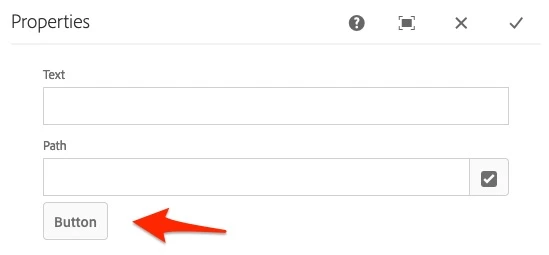
And the result:
3 replies

HeenaMadan
New Participant
September 1, 2022

Add button resource in component dialog xml

<button jcr:primaryType="nt:unstructured"
sling:resourceType="granite/ui/components/coral/foundation/button"
text="Button"
type="button" />

  Button resource-https://developer.adobe.com/experience-manager/reference-materials/6-5/granite-ui/api/jcr_root/libs/granite/ui/components/coral/foundation/button/index.html


arunpatidar
New Participant
September 1, 2022
Arun Patidar
lukasz-m
lukasz-mAccepted solution
New Participant
September 1, 2022

Hi @sanjana12,

You can use one of below:

Here is simple code example of Button usage.

<cq:dialog jcr:primaryType="nt:unstructured" jcr:title="Properties" sling:resourceType="cq/gui/components/authoring/dialog">
    <content jcr:primaryType="nt:unstructured" sling:resourceType="granite/ui/components/coral/foundation/fixedcolumns">
        <items jcr:primaryType="nt:unstructured">
            <column jcr:primaryType="nt:unstructured" sling:resourceType="granite/ui/components/coral/foundation/container">
                <items jcr:primaryType="nt:unstructured">
                    <text jcr:primaryType="nt:unstructured" fieldLabel="Text" name="./text" sling:resourceType="granite/ui/components/coral/foundation/form/textfield"/>
                    <path jcr:primaryType="nt:unstructured" fieldLabel="Path" filter="nosystem" name="./path" rootPath="/content/dam" sling:resourceType="granite/ui/components/coral/foundation/form/pathfield"/>
                    <button jcr:primaryType="nt:unstructured" sling:resourceType="granite/ui/components/coral/foundation/button" text="Button" type="button" />
                </items>
            </column>
        </items>
    </content>
</cq:dialog>

And the result: