Calling a specific Replication Agent in Workflow Process which Activates Pages | Community
Skip to main content
New Participant
January 1, 2023
Solved

Calling a specific Replication Agent in Workflow Process which Activates Pages

  • January 1, 2023
  • 1 reply
  • 1139 views

I have a custom workflow process to activate content, I want to replicate my content to a specific publisher using a specific replication agent(with Agent user ID). I'm not getting how I can use this to achieve my goal.

Can anyone please help me with code snippet or the java method or class which may be helpful in achieving this.

This post is no longer active and is closed to new replies. Need help? Start a new post to ask your question.
Best answer by lukasz-m

Hi @avi_infy,

You can achieve your goal using replication api:

First you will need to know replication agent id you would like to use, you can check this under /miscadmin#/etc/replication/agents.author, getting value from Name column
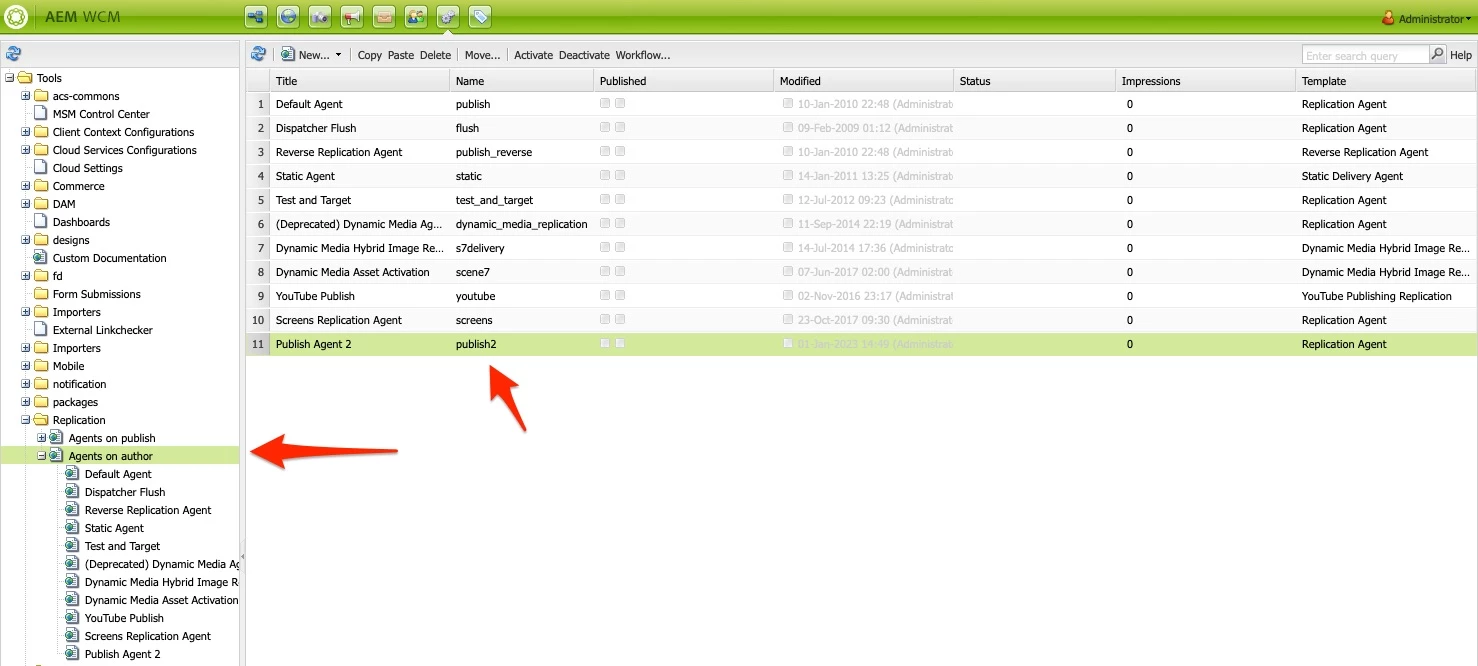
Next you can use below snippet of the code. It use AgentIdFilter to use only specific replication Agent. Below is sample workflow step, you may need to change the way how you are getting path you wanted to replicate, as well as agent id. But it should give you clear idea how to use replication api. Please also make sure workflow user you are using has replication permission.

package com.mysite.core.workflow; import com.adobe.granite.workflow.WorkflowException; import com.adobe.granite.workflow.WorkflowSession; import com.adobe.granite.workflow.exec.WorkItem; import com.adobe.granite.workflow.exec.WorkflowProcess; import com.adobe.granite.workflow.metadata.MetaDataMap; import com.day.cq.replication.*; import org.osgi.service.component.annotations.Component; import org.osgi.service.component.annotations.Reference; import javax.jcr.Session; @Component( service = WorkflowProcess.class, property = "process.label=CustomReplicationStep" ) public class ReplicationStep implements WorkflowProcess { @Reference private Replicator replicator; private final static String agentId = "publish2"; @Override public void execute(WorkItem workItem, WorkflowSession workflowSession, MetaDataMap metaDataMap) throws WorkflowException { AgentIdFilter agentIdFilter = new AgentIdFilter(agentId); ReplicationOptions replicationOptions = new ReplicationOptions(); replicationOptions.setFilter(agentIdFilter); String path = workItem.getWorkflowData().getPayload().toString(); try { replicator.replicate(workflowSession.adaptTo(Session.class), ReplicationActionType.ACTIVATE, path, replicationOptions); } catch (ReplicationException e) { e.printStackTrace(); } } }


1 reply

lukasz-m
lukasz-mAccepted solution
New Participant
January 1, 2023

Hi @avi_infy,

You can achieve your goal using replication api:

First you will need to know replication agent id you would like to use, you can check this under /miscadmin#/etc/replication/agents.author, getting value from Name column

Next you can use below snippet of the code. It use AgentIdFilter to use only specific replication Agent. Below is sample workflow step, you may need to change the way how you are getting path you wanted to replicate, as well as agent id. But it should give you clear idea how to use replication api. Please also make sure workflow user you are using has replication permission.

package com.mysite.core.workflow; import com.adobe.granite.workflow.WorkflowException; import com.adobe.granite.workflow.WorkflowSession; import com.adobe.granite.workflow.exec.WorkItem; import com.adobe.granite.workflow.exec.WorkflowProcess; import com.adobe.granite.workflow.metadata.MetaDataMap; import com.day.cq.replication.*; import org.osgi.service.component.annotations.Component; import org.osgi.service.component.annotations.Reference; import javax.jcr.Session; @Component( service = WorkflowProcess.class, property = "process.label=CustomReplicationStep" ) public class ReplicationStep implements WorkflowProcess { @Reference private Replicator replicator; private final static String agentId = "publish2"; @Override public void execute(WorkItem workItem, WorkflowSession workflowSession, MetaDataMap metaDataMap) throws WorkflowException { AgentIdFilter agentIdFilter = new AgentIdFilter(agentId); ReplicationOptions replicationOptions = new ReplicationOptions(); replicationOptions.setFilter(agentIdFilter); String path = workItem.getWorkflowData().getPayload().toString(); try { replicator.replicate(workflowSession.adaptTo(Session.class), ReplicationActionType.ACTIVATE, path, replicationOptions); } catch (ReplicationException e) { e.printStackTrace(); } } }


avi_infyAuthor
New Participant
January 2, 2023

Thank you @lukasz-m , It worked perfectly.