Can't get Core Form Container JCR values into Angular component | Community
Skip to main content
New Participant
March 15, 2023
Solved

Can't get Core Form Container JCR values into Angular component

  • March 15, 2023
  • 2 replies
  • 789 views

I'm trying to use the AEM Core Form container using a proxy component. I am able to author the container in AEM, and when I check CRXDE's content for the page, all of my entered info is in the JCR as it should be.  However, the values in the JCR are not being passed to my Angular component. When I log all the values that should be getting passed through, I just get undefined for all of them. Not a single value is passed.


I've tried multiple things, making sure angular component is mapping to the right path using MapTo in the Angular component, full re-install of AEM, checked the template and component policies, re-installed the core components in the package manager, etc.


As a test, I created proxy components of the AEM Core Form Text and Core Form Button without defining my own Java class, similar to the container component that isn't working, and that stores values in the JCR and passes them to Angular and logs them in the console no problem.  However, when I switch that same component to instead be a child of the Core Container component, no values from the JCR are getting passed once again.


Anyone ever encountered this or have any suggestions? I'm thinking it has to be some type of config issue with my AEM but not sure what else to try.


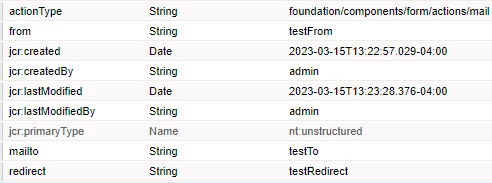
Here is my jcr which contains the authored values using the Core Form Container proxy cqdialog:


This post is no longer active and is closed to new replies. Need help? Start a new post to ask your question.
Best answer by EstebanBustamante

I assume you are using AEM SPA Editor, if so, the way the properties are injectet into the Angular components it's via the Sling Model exporter. You need to check 2 things:

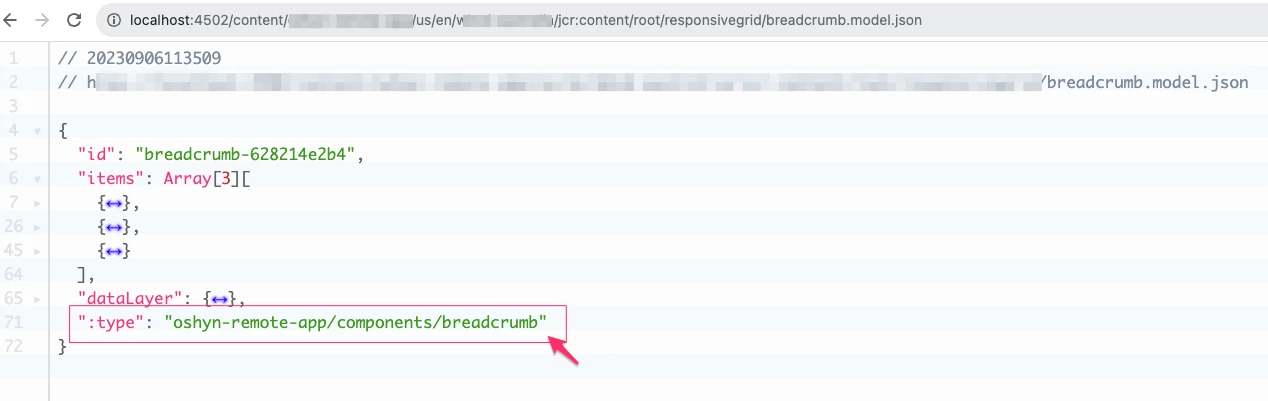
1. The Core Form Container proxy is able to export successfully its content via Sling Model exporter ".model.json", please make sure the ":type" attribute is present. Below you can see an example of how this should be looking for my breadcrumb component: 

2. Make sure your Angular component is mapped to the value in the ":type" attribute. by using the mapTo() method.


2 replies

kautuk_sahni
Employee
September 8, 2023

@dms879090 Do you find the suggestion from Esteban useful? Please let us know if more information is required. Otherwise, please mark the answer as correct for posterity. 

Kautuk Sahni
EstebanBustamante
EstebanBustamanteAccepted solution
New Participant
September 6, 2023

I assume you are using AEM SPA Editor, if so, the way the properties are injectet into the Angular components it's via the Sling Model exporter. You need to check 2 things:

1. The Core Form Container proxy is able to export successfully its content via Sling Model exporter ".model.json", please make sure the ":type" attribute is present. Below you can see an example of how this should be looking for my breadcrumb component: 

2. Make sure your Angular component is mapped to the value in the ":type" attribute. by using the mapTo() method.


Esteban Bustamante