Can we call a background service in AEM through normal html page | Community
Skip to main content
arjuns71585267
Level 4
Feb 13, 2019 2:29 PM UTC
Solved

Can we call a background service in AEM through normal html page

I want to capture data from my html form and post it to a jsp servlet residing in AEM. Is this possible? Also is it possible to call a OSGI method which may be running as a background service directly from an HTML page?

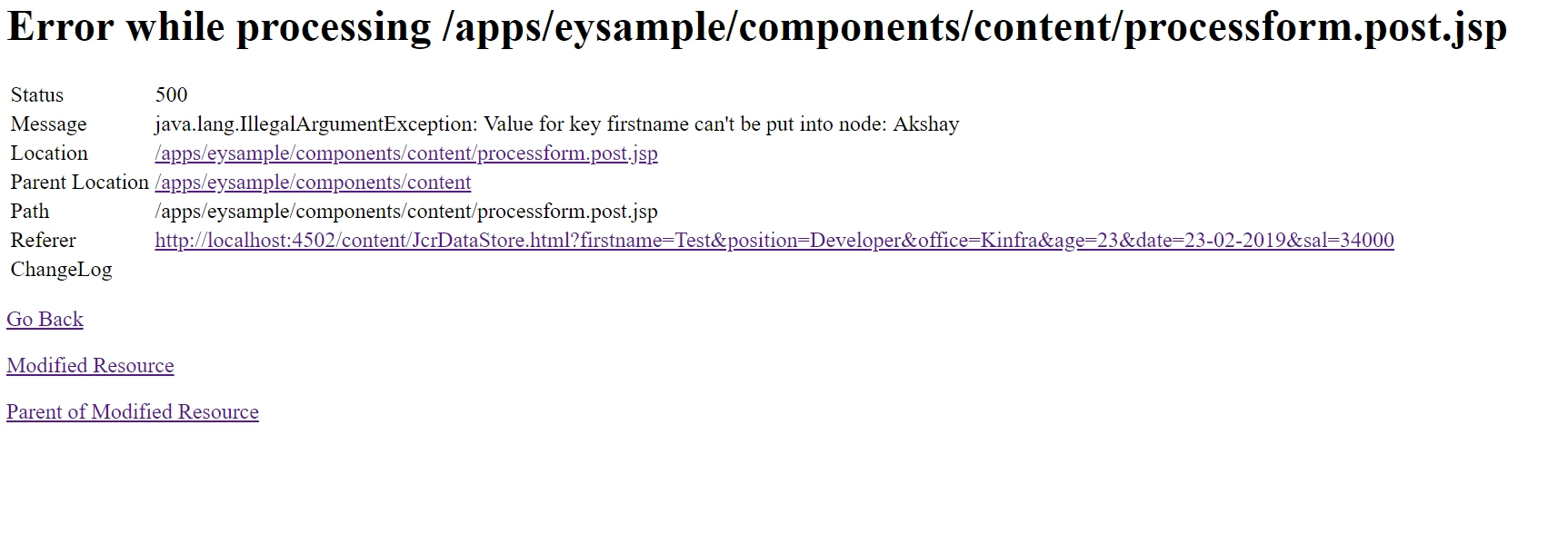
I am getting error:500 when I try to post data into a jsp file which is residing in AEM. The following image shows my error.

Please help.

This post is no longer active and is closed to new replies. Need help? Start a new post to ask your question.
antoniom5495929
antoniom5495929Accepted solution
Level 7
Feb 14, 2019 10:30 AM UTC

Hi,

you just only need to create your HTML without using jsp.

In your components you could insert an HTML like the following:

<form id="myform">

  ${properties.firstname}:<br>

  <input type="text" name="firstname" value="">

  <br>

  ${properties.lastname}:<br>

  <input type="text" name="lastname" value="">

  <br><br>

  <input class="action" type="submit" value="${properties.submit}">

</form>

Inside your clientlibs you could use ajax in order to get data and then send this data to your servlet:

function attachEvent(){

$(".action").click(function(e) {

    e.preventDefault();

    sendDataToAEM();

    });

}

function sendDataToAEM() {

var dataForm = $("#myform").serializeArray();

    $.post("/content/we-retail.aemtestservice.html", dataForm);

}

$(document).ready(function() {

attachEvent();

});

And in java you need to create your servlet that get your data and then call your service:

@SlingServlet(resourceTypes = {"cq:Page"}, methods = {"GET,POST"},

  selectors = {"aemtestservice"},

  extensions = {"html"})

public class AEMTestServiceServlet extends SlingAllMethodsServlet {

   private static final Logger LOGGER = LoggerFactory.getLogger(AEMTestServiceServlet.class);

   @Reference
   private HelloService helloService;

   protected void doPost(SlingHttpServletRequest request, SlingHttpServletResponse response) throws ServletException, IOException {

  String data = request.getParameter("firstname");

   //...
   helloService.mymethod();

   //...
   }

Let us know.

Thanks,

Antonio

11 replies

arjuns71585267
Level 4
Feb 15, 2019 9:16 AM UTC

Thanks. I am kind of confused beginner who knows things here and there! I hope wknd tutorial is something with a predefined order for learning

Translate
antoniom5495929
Level 7
Feb 14, 2019 11:40 AM UTC

Hi,

you are right. The servlet is running in background until an ajax request is performed.

And also, yes, you need to create this servlet inside a maven module (bundle) and deploy it by using maven.

If you are a beginner i can suggest you to read the following "tour" [0] that explain in a very good way how AEM works and how develop on it.

[0] Getting Started with AEM Sites - WKND Tutorial

Thanks,

Antonio

Translate
arjuns71585267
Level 4
Feb 14, 2019 11:36 AM UTC

So This servlet will be running in background and checking for the ajax request. Once it arrives the servlet will work, Am I right?

Another thing is I have to create this java code as a bundle and deploy it using maven?

Translate
antoniom5495929
antoniom5495929Accepted solution
Level 7
Feb 14, 2019 10:30 AM UTC

Hi,

you just only need to create your HTML without using jsp.

In your components you could insert an HTML like the following:

<form id="myform">

  ${properties.firstname}:<br>

  <input type="text" name="firstname" value="">

  <br>

  ${properties.lastname}:<br>

  <input type="text" name="lastname" value="">

  <br><br>

  <input class="action" type="submit" value="${properties.submit}">

</form>

Inside your clientlibs you could use ajax in order to get data and then send this data to your servlet:

function attachEvent(){

$(".action").click(function(e) {

    e.preventDefault();

    sendDataToAEM();

    });

}

function sendDataToAEM() {

var dataForm = $("#myform").serializeArray();

    $.post("/content/we-retail.aemtestservice.html", dataForm);

}

$(document).ready(function() {

attachEvent();

});

And in java you need to create your servlet that get your data and then call your service:

@SlingServlet(resourceTypes = {"cq:Page"}, methods = {"GET,POST"},

  selectors = {"aemtestservice"},

  extensions = {"html"})

public class AEMTestServiceServlet extends SlingAllMethodsServlet {

   private static final Logger LOGGER = LoggerFactory.getLogger(AEMTestServiceServlet.class);

   @Reference
   private HelloService helloService;

   protected void doPost(SlingHttpServletRequest request, SlingHttpServletResponse response) throws ServletException, IOException {

  String data = request.getParameter("firstname");

   //...
   helloService.mymethod();

   //...
   }

Let us know.

Thanks,

Antonio
Translate
arjuns71585267
Level 4
Feb 14, 2019 8:43 AM UTC

So I would be able to call the service directly without using a jsp?

Translate
arjuns71585267
Level 4
Feb 14, 2019 8:42 AM UTC

I am a bit confused since I am a beginner. Could you give an example code?

Translate
joerghoh
Employee
Feb 13, 2019 9:01 PM UTC

This is a output of the Default Post Servlet. It tries to persist the parameters to the location you are posting to.

/apps is reserved for application code, and not for editable content. That means you are unlikely to have write permissions to that location, which is probably the root cause for this message.

Translate
antoniom5495929
Level 7
Feb 13, 2019 5:27 PM UTC

Hi,

if you are using a jsp you could invoke a service by using the following command:

<%

    //YourServiceClass      seriviceClass       = sling.getService(YourServiceClass.class);

    RequestResponseFactory requestResponseFactory = sling.getService(RequestResponseFactory.class);

%>

Just reading your post seems that you are developing in an old style. Consider that by using sightly you need to create a model in order to separate the view from the business logic. I suggest you to try to change your approach in order to make your feature more maintenable.

The correct approach for developing what you describe is to:

- make an ajax call to a slingservlet in order to capture your data

- create a sling model or use the sling servlet (if you need to invoke a service after saving the data that comes from the form) in order to reference your service as described by @smacdonald2008.

Thanks,

Antonio

Translate
smacdonald2008
Level 10
Feb 13, 2019 3:01 PM UTC

For a normal form built with HTML tags - you can use AJAX and send to an AEM Servlet. THen from the Servlet - you can use @Reference and pass to a service.

Translate
arjuns71585267
Level 4
Feb 13, 2019 2:56 PM UTC

You're right. But I need it when I am creating a page without using the inbuilt form contents in AEM and uses normal html tags like <form><input> etc. I am actually trying to replicate the same action in a page created using static template.When I click on the submit button the data should be submitted to the post.POST.jsp file as a form action.

Is there any way to achieve this?

Translate