
Card images not displaying correctly on iOS devices | Community
Skip to main content
well_dunn
New Participant
September 21, 2018
Solved

Card images not displaying correctly on iOS devices

  • September 21, 2018
  • 13 replies
  • 14794 views

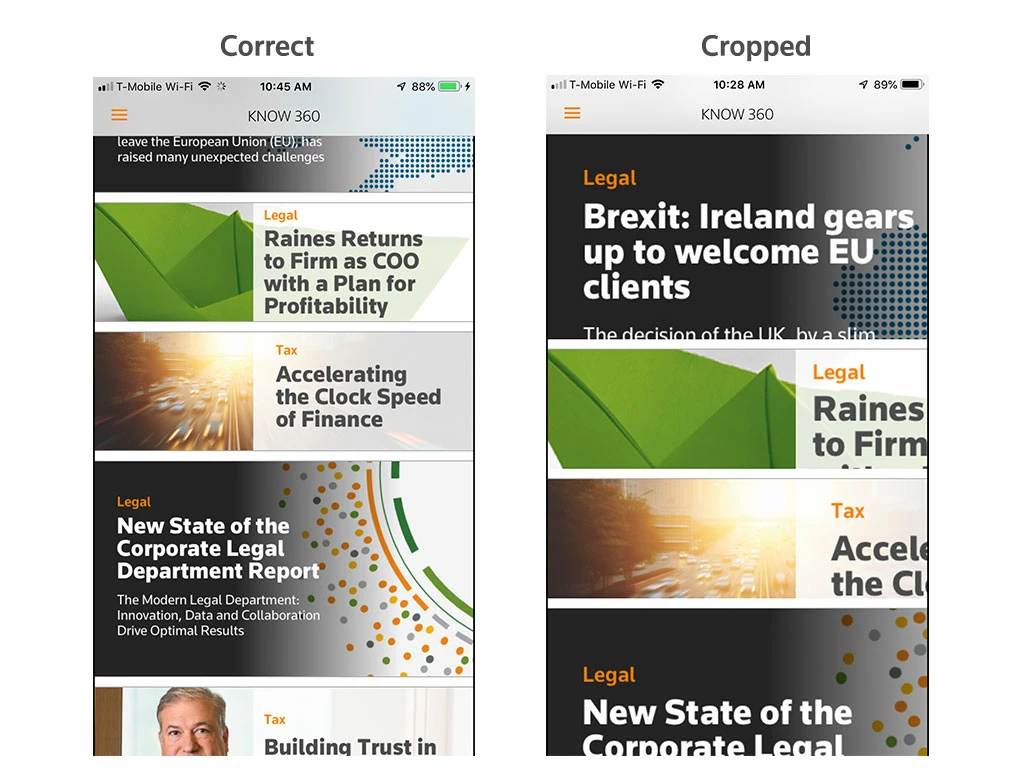
Recently card images seem to load at their proper size and then increase in size getting cropped within the card. It's happening in the two apps I work on, and in the AEM preflight app. I have see in happen in iOS 12 and 11 on an iPhone 5, 6+, and iPads. Did something change? or is this a bug?
Quitting and restarting the apps or devices didn't solve the problem. I've attached screen shots of when I open one of the apps, and a few moments later what happens to the card images when they enlarge within their frame.
This post is no longer active and is closed to new replies. Need help? Start a new post to ask your question.
Best answer by Mobile_Support

Hi there,

We actually caught this one quite recently in our in-house testing and have a pending-release fix that we hope to get out in the next few weeks. Stay tuned and monitor: Bug fix release notes for Adobe Experience Manager Mobile

thanks,

Darren

13 replies

Darren_Melanson
Employee
September 24, 2018

Hi there,

There's no immediate work around for this issue, however we have identified a fix and are working towards a release once it's fully tested.

thanks,

Darren

well_dunn
well_dunnAuthor
New Participant
September 24, 2018

Thanks for the update, but this is significantly impacting the content we're trying to deliver. Is there anything that can be done in the meantime?

Mobile_Support
Mobile_SupportAccepted solution
New Participant
September 21, 2018

Hi there,

We actually caught this one quite recently in our in-house testing and have a pending-release fix that we hope to get out in the next few weeks. Stay tuned and monitor: Bug fix release notes for Adobe Experience Manager Mobile

thanks,

Darren