Change image resolution on Cloud | Community
Skip to main content
This post is no longer active and is closed to new replies. Need help? Start a new post to ask your question.
Steu86Accepted solution
Level 2
Sep 15, 2021 1:30 PM UTC

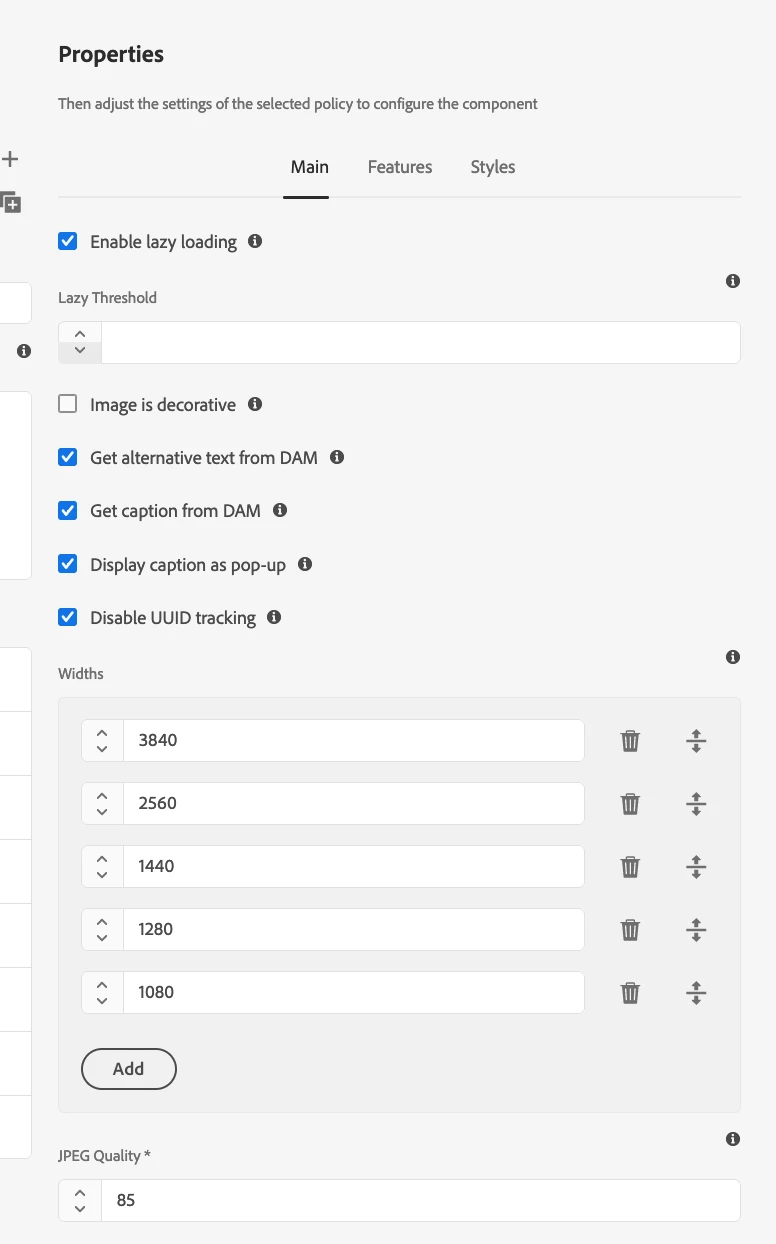
Please check policy of IMAGE core component itself and setup accordingly your required configuration. You also find there the lazy load functionality for your frontend.

5 replies

Steu86Accepted solution
Level 2
Sep 15, 2021 1:30 PM UTC

Please check policy of IMAGE core component itself and setup accordingly your required configuration. You also find there the lazy load functionality for your frontend.

Translate
Kishore_Kumar_
Level 9
Sep 13, 2021 12:09 PM UTC

Hi @ad-engineer 


Please check with Tools -> Assets -> Processing Profiles, and try adding a renditions and check. 


and regarding access to configMgr, We cannot access system console directly in cloud , Instead we need to make use of Developer Console to access it.


and also if you want to change any OSGI Configuration it has to be changed through code and it has to deployed via CI/CD pipeline.

Translate
Asutosh_Jena_
New Participant
Sep 13, 2021 11:55 AM UTC

When you say image resolution, does this mean you want to change the default renditions that are generated while uploading the assets?

If you mean by that it's not the correct place. That needs to be updated as part of the Asset Upload Workflow.


If you want to update this configuration, this needs to be pushed as part of the code and cannot be changed directly on system/console.


Thanks!

Translate
Level 3
Sep 13, 2021 11:57 AM UTC

Yes! By default is generated 1280, and big images look bad. Where can i change this?

Translate
Asutosh_Jena_
New Participant
Sep 13, 2021 12:02 PM UTC