Change type of bullets in RTE | Community
Skip to main content
Level 2
Jun 22, 2020 10:25 AM UTC
Solved

Change type of bullets in RTE

Hi All,


We have a requirement to change the type of bullets in rte, do we have any plugin for this?


for example:

While authoring i can see in dialog preview different bullets indentation 
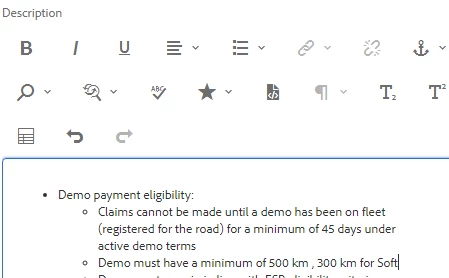
but after submitting bullets are changed.
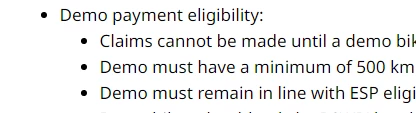


This post is no longer active and is closed to new replies. Need help? Start a new post to ask your question.
Ravi_Pampana
Ravi_PampanaAccepted solution
New Participant
Jun 22, 2020 4:14 PM UTC

Hi,


You can add custom styles to override the OOB rte styles and add "cq.authoring.editor" category to the css file.  This will be universal change which will apply in all components.


If you want to apply for a single component try using "extraClientlibs" property and add the clientlibs to cq:dialog


.cq-RichText-editable ul li:before {
    color: #0072ce;
}
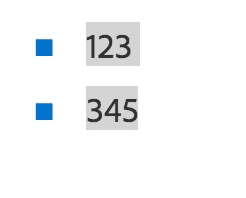
Will display like below


The above change will apply inside the dialog and if you need the same change to reflect on the page, the same styles can be added to your site css.


Hope this helps!

5 replies

VeenaVikraman
New Participant
Jun 23, 2020 5:15 AM UTC

@sagar_verliani Sagar, the bullet styles displayed on your page should be controlled by UI. Please inspect the element by clicking F12 and check what style is appearing right now for your bullet and modify and check what you need . The content and styling on the webpage is completely handled by CSS on the HTML page.


Veena ✌

Translate
arunpatidar
New Participant
Jun 22, 2020 9:52 PM UTC

Please check if this helps :

http://experience-aem.blogspot.com/2017/05/aem-62-touch-ui-extend-rte-list-plugin-for-adding-selected-css-class.html


Using above plugin you can add a class and based on that you can apply styles to the child HTML elements.

If you have only one list style throughout the site the no need to add a plugin, just add CSS suggested in other responses.


The behavior is different because of dialog load a different CSS(OOTB) and site has different CSS.

Translate
Arun Patidar
Ravi_Pampana
Ravi_PampanaAccepted solution
New Participant
Jun 22, 2020 4:14 PM UTC

Hi,


You can add custom styles to override the OOB rte styles and add "cq.authoring.editor" category to the css file.  This will be universal change which will apply in all components.


If you want to apply for a single component try using "extraClientlibs" property and add the clientlibs to cq:dialog


.cq-RichText-editable ul li:before {
    color: #0072ce;
}
Will display like below


The above change will apply inside the dialog and if you need the same change to reflect on the page, the same styles can be added to your site css.


Hope this helps!

Translate
VeenaVikraman
New Participant
Jun 22, 2020 2:40 PM UTC

Do you want to change the bullet type in the RTE or displayed on the page ? 

Translate
Level 2
Jun 23, 2020 3:42 AM UTC
I have content in word document , when I am copy pasting in rte it is showing correct bullets in dialog preview but in the page it is changing the bullet type. So i need whatever is authored in rte dialog same should reflect in page.
Translate