Character count for a simple text field (not enforce character limit) | Community
Skip to main content
Level 2
Jul 31, 2020 5:37 PM UTC
Solved

Character count for a simple text field (not enforce character limit)

I would like the dialog textfield to show character count right below the text field and possibly change the color after certain count. Is there a pre-built configuration for this?

This post is no longer active and is closed to new replies. Need help? Start a new post to ask your question.
BrianKasingli
BrianKasingliAccepted solution
New Participant
Aug 2, 2020 3:28 PM UTC

@aem-explorer 

You can register a new validator to the foundation-registry (the foundation-registry is used in the Granite UI framework) via JavaScript utilising the Jquery Validation Library.

To register a new validator is simple and looks like this:


$(window).adaptTo('foundation-registry').register('foundation.validation.validator', { selector: '.coral3-Textfield', validate: function (el) { var $textField = $(el); // validation code } });


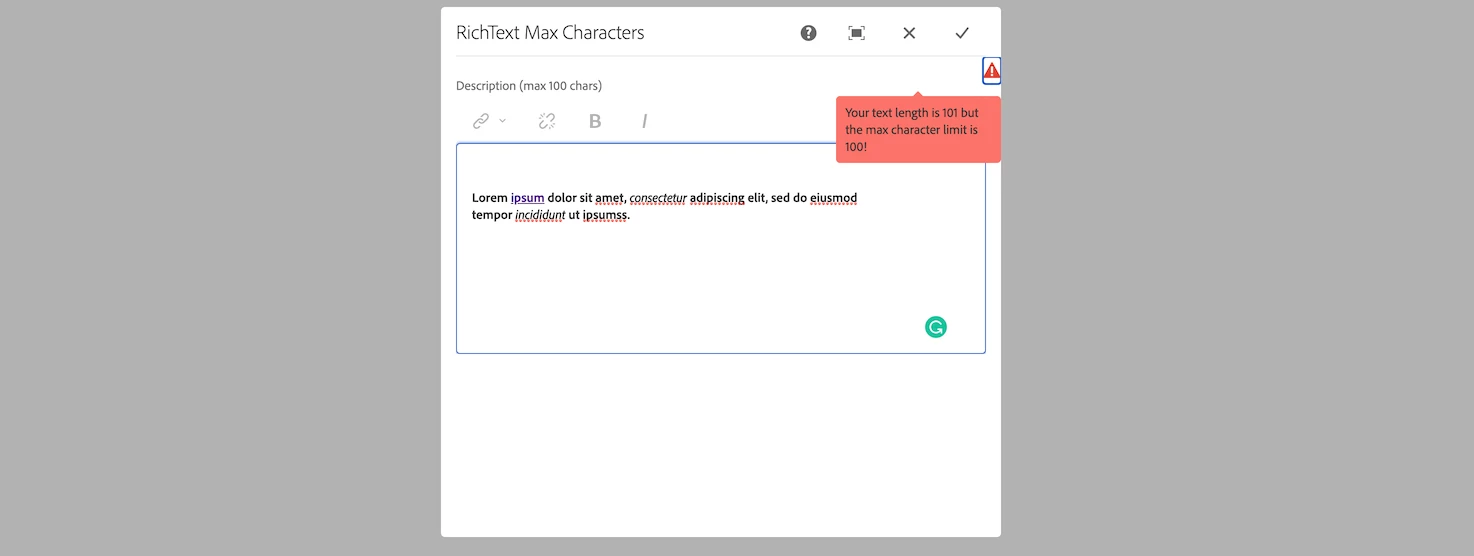
Check out this article on how to enable AEM RichText Max Characters Validation, where you can see how the validation logic is implemented. https://sourcedcode.com/blog/aem/touch-ui/aem-richtext-max-characters-length-validation

Result:
5 replies

BrianKasingli
BrianKasingliAccepted solution
New Participant
Aug 2, 2020 3:28 PM UTC

@aem-explorer 

You can register a new validator to the foundation-registry (the foundation-registry is used in the Granite UI framework) via JavaScript utilising the Jquery Validation Library.

To register a new validator is simple and looks like this:


$(window).adaptTo('foundation-registry').register('foundation.validation.validator', { selector: '.coral3-Textfield', validate: function (el) { var $textField = $(el); // validation code } });


Check out this article on how to enable AEM RichText Max Characters Validation, where you can see how the validation logic is implemented. https://sourcedcode.com/blog/aem/touch-ui/aem-richtext-max-characters-length-validation

Result:

Translate
Shashi_Mulugu
New Participant
Aug 1, 2020 1:23 AM UTC

@aem-explorer you can write a dialog field validator and put your logic of displaying message such as 20/100, 50/100 characters entered messages.

Please refer to below community post, in that they refer to regex instead you can get character count and display message.


https://experienceleaguecommunities.adobe.com/t5/adobe-experience-manager/custom-validation-for-dialog-field-touch-ui/qaq-p/274114

Translate
Vaibhavi_J
Level 7
Jul 31, 2020 5:58 PM UTC

Hi @aem-explorer , 

You can achieve this using granite validator. 

Please check the below thread which has details on the same. 

https://experienceleaguecommunities.adobe.com/t5/adobe-experience-manager-forms/text-field-content-limits/qaq-p/366507


Translate
Level 2
Jul 31, 2020 6:22 PM UTC
Hi- that has character limits - I don't want to limit but provide a helper that shows word count that's it
Translate