character displayed in text box when filled | Community
Skip to main content
New Participant
February 22, 2023
Solved

character displayed in text box when filled

  • February 22, 2023
  • 1 reply
  • 665 views

Hello!

I have a dynamic form created with AEM Designer Forms and when it is filled in some fields display the following character in the right bottom corner of the text field:
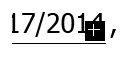
I noticed it usually appears if the text that is being filled in has an empty space at the end or if the text has been copied from a word file and pasted back here.

Is there a way for this character to not be displayed anymore?

Thanks!

This post is no longer active and is closed to new replies. Need help? Start a new post to ask your question.
Best answer by vanegi

Please post this query in AEM Forms section to get the right traction:

https://experienceleaguecommunities.adobe.com/t5/adobe-experience-manager-forms/ct-p/adobe-experience-manager-forms-community

Thanks!!

1 reply

vanegi
vanegiAccepted solution
Employee
February 22, 2023