Client Libraries JavaScript Page Head Not Loading into Publisher | Community
Skip to main content
FrancescaBueti
New Participant
May 2, 2019
Solved

Client Libraries JavaScript Page Head Not Loading into Publisher

  • May 2, 2019
  • 7 replies
  • 5052 views

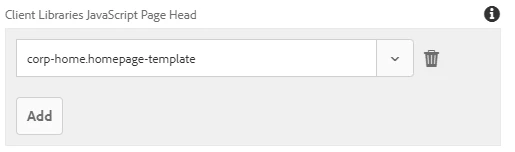
I have configured a Client Library JavaScript Page Head like so:

In author is appears as expected:

In publisher, however, it does not appear. All pages and packages are active/published.

Is there anything that could be preventing this from appearing in the publisher instance?

Thanks,

Francesca

This post is no longer active and is closed to new replies. Need help? Start a new post to ask your question.
Best answer by Ravi_Pampana

If your clientlibs files are under /apps (which is recommended by adobe from AEM 6.4 onwards) you need to add "allowProxy" property so that clientlibs will be loaded via etc.clientlibs

jcr:primaryType="cq:ClientLibraryFolder"

allowProxy="{Boolean}true"

Also, make sure in publisher /etc is having read access for everyone user

From Adobe Documentation:

In order for the client libraries under /apps to be accessible, a proxy servelt is used. The ACLs are still enforced on the client library folder, but the servlet allows for the content to be read via /etc.clientlibs/ if the allowProxy property is set to true.

A static resource can only be accessed via the proxy, if it resides below a resource below the client library folder.

As an example:

  • You have a clientlib in /apps/myproject/clientlibs/foo
  • You have a static image in /apps/myprojects/clientlibs/foo/resources/icon.png

Then you set the allowProxy property on foo to true.

  • You can then request /etc.clientlibs/myprojects/clientlibs/foo.js
  • You can then reference the image via /etc.clientlibs/myprojects/clientlibs/foo/resources/icon.png

7 replies

VuongNguyen
New Participant
January 14, 2024

In practice, when configuring webpack.dev.js, webpack.prod.js, or webpack.common.js, you will encounter a configuration similar to the one below:

devServer: { inline: false, proxy: [{ context: ['/content', '/etc.clientlibs'], target: 'http://localhost:4502', }], writeToDisk, liveReload: !writeToDisk }

If you examine the index.html file in the ui.front-end module, you will find a sample declaration as follows:

<!DOCTYPE HTML> <html lang="en"> <head> <meta charset="UTF-8"/> <title>Flagtick Frontend file</title> <meta name="template" content="page-content"/> <meta name="viewport" content="width=device-width, initial-scale=1"/> <link rel="stylesheet" href="/etc.clientlibs/flagtick/clientlibs/clientlib-base/css/site.css" type="text/css"> <link rel="stylesheet" href="/etc.clientlibs/flagtick/clientlibs/clientlib-site/site.css" type="text/css"> ... </head>

We utilize the ui.front-end code, which depends on resources served by the AEM instance. The primary method involves leveraging /etc.clientlibs. Alternatively, the second approach is to load resources directly from the front-end dist folder, referencing the stats.json file.

Way 1: <link rel="stylesheet" href="/etc.clientlibs/flagtick/clientlibs/clientlib-site/site.css" type="text/css"> Way 2: stats.json { "type": "asset", "name": "clientlib-site/site.css", "size": 8501, "emitted": false, "comparedForEmit": false, "cached": true, "info": { "size": 8501 }, "chunkNames": [ "site" ], "chunkIdHints": [], "auxiliaryChunkNames": [], "auxiliaryChunkIdHints": [], "related": {}, "chunks": [ "site" ], "auxiliaryChunks": [], "isOverSizeLimit": false }, Then we have: <link rel="stylesheet" href="/clientlib-site/site.css" type="text/css">

You can see picture as below to understand why we need allowProxy="true".

Ravi_Pampana
New Participant
May 3, 2019

You can add read permission to everyone and anonymous user in publish instance (/etc/designs, /etc/clientlibs) by going to useradmin console and search for below users

Everyone

Anonymous

FrancescaBueti
New Participant
May 3, 2019

Hi,

The script tag is generated by referencing the library via the template policy:

Is including libraries at the template-level like so not best practice?

Best,

Francesca

FrancescaBueti
New Participant
May 3, 2019

Hi Ravi,

Thank you for your response! I have updated the allowProxy property and the path has been updated accordingly:

However, it is still missing on publish. Though it seems to be able to pull in other clientlibs without issue:

Can you elaborate on how to "make sure in publisher /etc is having read access for everyone user"?

Thanks,

Francesca

smacdonald2008
New Participant
May 3, 2019

As Ravi points out - you should include Clientlibs the correct way - using a script tag does not address best practice.

Ravi_Pampana
Ravi_PampanaAccepted solution
New Participant
May 3, 2019

If your clientlibs files are under /apps (which is recommended by adobe from AEM 6.4 onwards) you need to add "allowProxy" property so that clientlibs will be loaded via etc.clientlibs

jcr:primaryType="cq:ClientLibraryFolder"

allowProxy="{Boolean}true"

Also, make sure in publisher /etc is having read access for everyone user

From Adobe Documentation:

In order for the client libraries under /apps to be accessible, a proxy servelt is used. The ACLs are still enforced on the client library folder, but the servlet allows for the content to be read via /etc.clientlibs/ if the allowProxy property is set to true.

A static resource can only be accessed via the proxy, if it resides below a resource below the client library folder.

As an example:

  • You have a clientlib in /apps/myproject/clientlibs/foo
  • You have a static image in /apps/myprojects/clientlibs/foo/resources/icon.png

Then you set the allowProxy property on foo to true.

  • You can then request /etc.clientlibs/myprojects/clientlibs/foo.js
  • You can then reference the image via /etc.clientlibs/myprojects/clientlibs/foo/resources/icon.png

Employee
May 2, 2019

francesca​ You might have to reference using /etc.clientlibs but before that you need to configure "Client Library Folder and Using the Proxy Client Libraries Servlet" - Please check Using Client-Side Libraries - read section "Locating Client Library Folder and Using the Proxy Client Libraries Servlet"