Commerce Data not Migrated using Lazy content Migration in AEM 6.5 | Community
Skip to main content
New Participant
January 23, 2020
Solved

Commerce Data not Migrated using Lazy content Migration in AEM 6.5

  • January 23, 2020
  • 1 reply
  • 1792 views

We are upgrading from AEM 6.3 to 6.5 . 


AEM 6.5 was stated with -Dcom.adobe.upgrade.forcemigration=true, however the commerce data is not getting migrated.


This is what we got in the upgrade log:-


23.01.2020 08:06:09.741 *INFO* [FelixStartLevel] com.adobe.cq.upgradesexecutor.Activator Skipped CodeUpgradeTask CQ64LegacyCloudSettingsCleanupTask due to CodeUpgradeTaskFilter VersionRangeTaskIgnorelist 23.01.2020 08:06:09.741 *INFO* [FelixStartLevel] com.adobe.cq.upgradesexecutor.Activator Skipped CodeUpgradeTask CQ64CommunitiesConfigsCleanupTask due to CodeUpgradeTaskFilter VersionRangeTaskIgnorelist 23.01.2020 08:06:09.741 *INFO* [FelixStartLevel] com.adobe.cq.upgradesexecutor.Activator Skipped CodeUpgradeTask CQ64CommerceMigrationTask due to CodeUpgradeTaskFilter VersionRangeTaskIgnorelist 23.01.2020 08:06:09.741 *INFO* [FelixStartLevel] com.day.cq.compat.codeupgrade.impl.MigrationModeCheckImpl System property com.adobe.upgrade.forcemigration=true - CodeUpgradeExecutor forcing execution of remaining CodeUpgradeTasks


This is status in CRXde
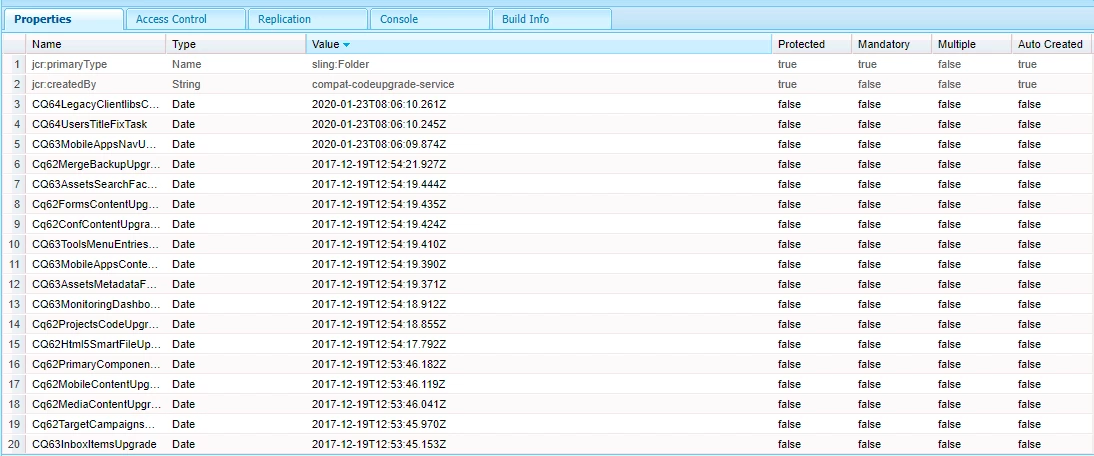


What is meaning of "VersionRangeTaskIgnorelist". Apart from starting AEM with argument -Dcom.adobe.upgrade.forcemigration=true is there any other step that needs to be performed?

This post is no longer active and is closed to new replies. Need help? Start a new post to ask your question.
Best answer by user05162

The upgrade tasks were not run as they are part of lazy migration[2]. So, you can ignore the message and start the AEM instance with "-Dcom.adobe.upgrade.forcemigration=true"


VersionRangeTaskIgnorelist[1]: The VersionRangeFilter defines the VersionRange for which a CodeUpgradeTask needs to be run. VersionRangeTaskIgnorelist as will compare this range against the bundlelist of the source instance to evaluate the need to run the CodeUpgradeTask. If the version of the linked bundle is outside of the defined range the CodeUpgradeTask. will be skipped


[1] https://helpx.adobe.com/experience-manager/6-5/sites/developing/using/reference-materials/javadoc/com/day/cq/compat/codeupgrade/annotations/VersionRangeFilter.html


[2] https://docs.adobe.com/content/help/en/experience-manager-65/deploying/upgrading/lazy-content-migration.html

1 reply

user05162Accepted solution
Employee
January 23, 2020

The upgrade tasks were not run as they are part of lazy migration[2]. So, you can ignore the message and start the AEM instance with "-Dcom.adobe.upgrade.forcemigration=true"


VersionRangeTaskIgnorelist[1]: The VersionRangeFilter defines the VersionRange for which a CodeUpgradeTask needs to be run. VersionRangeTaskIgnorelist as will compare this range against the bundlelist of the source instance to evaluate the need to run the CodeUpgradeTask. If the version of the linked bundle is outside of the defined range the CodeUpgradeTask. will be skipped


[1] https://helpx.adobe.com/experience-manager/6-5/sites/developing/using/reference-materials/javadoc/com/day/cq/compat/codeupgrade/annotations/VersionRangeFilter.html


[2] https://docs.adobe.com/content/help/en/experience-manager-65/deploying/upgrading/lazy-content-migration.html

New Participant
January 24, 2020
@user05162 - Thanks for the response, we started the AEM '-Dcom.adobe.upgrade.forcemigration=true', However a day has been passed but there is no movement of '/etc/commerce' data to '/var/commerce'