configuring RTE plugin for content fragment editor | Community
Skip to main content
mohanb
New Participant
September 22, 2016
Solved

configuring RTE plugin for content fragment editor

  • September 22, 2016
  • 15 replies
  • 20577 views

Hi 

Has anyone configuration RTE plugin for content fragment editor? I am looking for node structure where default RTE config is stored for content fragment editor and whether it can be customized as per user needs

Best answer by sureshr19072451

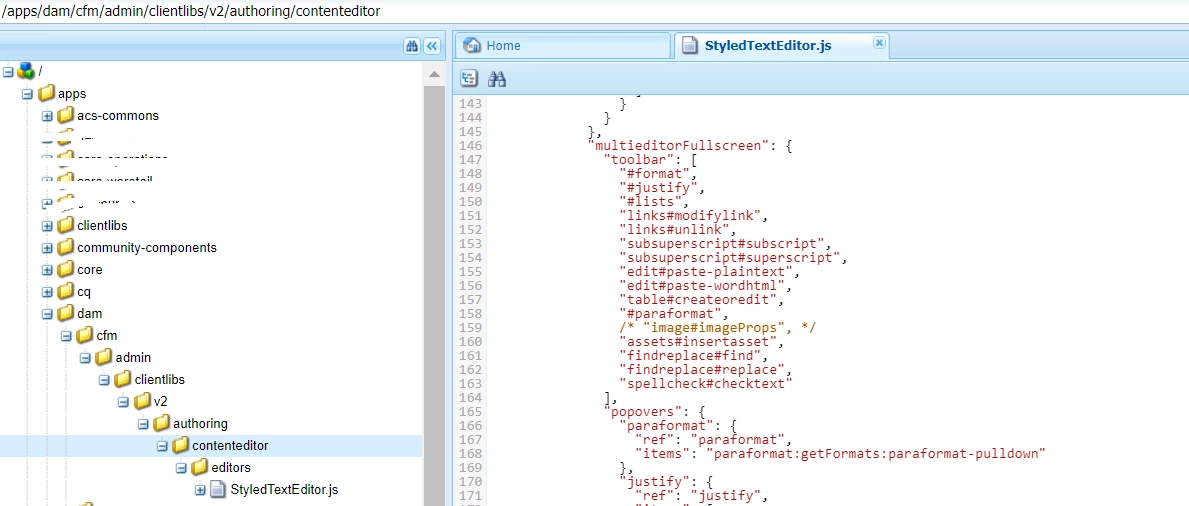
You could try manually overlaying the StyleTextEditor.js file under /apps  -

Don't forget to define the categories and dependencies as done for clientLibraryFolders under /libs.

For ex:

Thanks.

15 replies

New Participant
July 19, 2021

I think there might be a bug in /libs/dam/cfm/admin/clientlibs/v2/authoring/contenteditor/editors/StyledTextEditor.js that is preventing the normal node-based configuration that relies on loading data-config-path during the ._start() method, because it sets $editable.data('config') with the default rte plugins during the .start() method before delegating to the ._start() method.


/libs/clientlibs/granite/richtext/js/rte/ConfigUtils.js defines a loadConfigAndStartEditing() method that follows this flow:

var config = {}; var configObj = $editable.data('config'); if (configObj) { config = ... } else { var configPath = $editable.data('config-path'); config = ... }


If $editable.data('config') is already set, it skips the $editable.data('config-path') loading logic, which is where the node-based configuration would come from.


This method is called during the StyledTextEditor._start() method, which is executed by StyledTextEditor.start() only after setting $editable.data('config') with the defaultCFMRTEConfig.

ns.StyledTextEditor.prototype.start = function() { this.$formViewContainer.removeClass("hidden"); this.$editable = this.$formViewContainer.find(this.options.selectorForEditable); this.$editable.data("config", $.extend(true, {}, defaultCFMRTEConfig)); var self = this; if (this.options.customStart) { this.$editable.on("rte-start", function() { if (self.$editable.data("useFixedInlineToolbar")) { self._start(); } }); } else { if (this.$editable.data("useFixedInlineToolbar")) { this._start(); } } };


New Participant
December 4, 2019

Is there a reason Images were disabled in AEM 6.4.4?

giurged74926129
New Participant
October 29, 2019

I tried to enabled image#imageProps but doesn't work.

I don't know why the files under admin are like disable or something like this.

I want to add a property in rich text for the image (align: left, right).

sureshr19072451
sureshr19072451Accepted solution
New Participant
February 19, 2019

You could try manually overlaying the StyleTextEditor.js file under /apps  -

Don't forget to define the categories and dependencies as done for clientLibraryFolders under /libs.

For ex:

Thanks.

New Participant
August 23, 2022

How can we custom the js for rte not appending .html to links

sureshr19072451
New Participant
January 21, 2019

One quickest way to add subscript & superscript to CF Content Editor by editing /libs/dam/cfm/admin/clientlibs/v2/authoring/contenteditor/editors/StyledTextEditor.js

Here's my updates that adds these two plugins for both normal and full screen mode editors -

1.  "inline": {

              "toolbar": [

                "#format",

                "#justify",

                "#lists",

                "links#modifylink",

                "links#unlink",

                "subsuperscript#subscript",

                "subsuperscript#superscript" 

              ],

2.  "multieditorFullscreen": {

              "toolbar": [

                "#format",

                "#justify",

                "#lists",

                "links#modifylink",

                "links#unlink",

               "subsuperscript#subscript",

                "subsuperscript#superscript",

                "edit#paste-plaintext",

                "edit#paste-wordhtml",

                "table#createoredit",

                "#paraformat",

                /* "image#imageProps", */

                "assets#insertasset",

                "findreplace#find",

                "findreplace#replace",

                "spellcheck#checktext"

              ],

Full Screen Mode -

Someone from Adobe or Customizations Master Sreekanth to comment on this or take this little further so that many devs can get advantage of this information.

Gaurav-Behl
New Participant
January 6, 2019

Sample js for subscript/superscript plugin for CF that worked for me in 6.4.3 but may have couple bugs.

The key is to register a plugin and use relayCmd(..) if the feature exists OOB otherwise create a custom command. There could be better ways to achieve this type of customization..

Categories: dam.cfm.authoring.contenteditor.v2

Dependencies:  lodash

(function ($, $document) {

    var SUBSUPERSCRIPT_PLUGIN_ID = "subsuperscript",

    SUBSCRIPT_FEATURE = "subscript",

        SUBSCRIPT_ICON = SUBSUPERSCRIPT_PLUGIN_ID + "#" + SUBSCRIPT_FEATURE,


        SUPERSCRIPT_FEATURE = "superscript",

        SUPERSCRIPT_ICON = SUBSUPERSCRIPT_PLUGIN_ID + "#" + SUPERSCRIPT_FEATURE,

        url = document.location.pathname;

    if( url.indexOf("/editor.html") == 0 ){

        extendStyledTextEditor();

        registerPlugin();

    }

    function extendStyledTextEditor(){

        var origFn = Dam.CFM.StyledTextEditor.prototype._start;

        Dam.CFM.StyledTextEditor.prototype._start = function(){

            addPlugin(this);

            origFn.call(this);

        }

    }

    function addPlugin(editor){

        var config = editor.$editable.data("config");

        config.rtePlugins[SUBSUPERSCRIPT_PLUGIN_ID] = {

            features: "*"

        };

        config.uiSettings.cui.multieditorFullscreen.toolbar.push(SUBSCRIPT_ICON);  // icon would appear in multieditor fullscreen only

        config.uiSettings.cui.multieditorFullscreen.toolbar.push(SUPERSCRIPT_ICON);  // icon would appear in multieditor fullscreen only

    }

    function registerPlugin(){

        var CFM_SUBSUPERSCRIPT_PLUGIN = new Class({

            toString: "CFMSubsuperscriptPlugin",

            extend: CUI.rte.plugins.Plugin,

            textSubscriptUI:  null,

            textSuperscriptUI:  null,

            getFeatures: function () {

                return [ SUBSCRIPT_FEATURE, SUPERSCRIPT_FEATURE ];

            },

             //to mark the icon selected/unselected

     updateState: function(selDef) {

    if (this.textSubscriptUI != null) {

this.textSubscriptUI.setSelected(this.editorKernel.queryState(SUBSCRIPT_FEATURE, selDef));

    }

    if (this.textSuperscriptUI != null) {

    this.textSuperscriptUI.setSelected(this.editorKernel.queryState(SUPERSCRIPT_FEATURE, selDef));

    }

     },


     notifyPluginConfig: function (pluginConfig) {

                pluginConfig = pluginConfig || {};

                var defaults = {

                    tooltips: {}

                };

                defaults.tooltips[SUBSCRIPT_FEATURE] = {

                    title: "Subscript"

                };

                defaults.tooltips[SUPERSCRIPT_FEATURE] = {

    title: "Superscript"

                };

                CUI.rte.Utils.applyDefaults(pluginConfig, defaults);

                this.config = pluginConfig;

            },

            initializeUI: function (tbGenerator) {

                var plg = CUI.rte.plugins;

                if (!(this.isFeatureEnabled(SUBSCRIPT_FEATURE) || this.isFeatureEnabled(SUPERSCRIPT_FEATURE))) {

                    return;

                }

                this.textSubscriptUI = new tbGenerator.createElement(SUBSCRIPT_FEATURE, this, false,

                                        this.config.tooltips[SUBSCRIPT_FEATURE]);

tbGenerator.addElement(SUBSCRIPT_FEATURE, plg.Plugin.SORT_FORMAT, this.textSubscriptUI, 799);

if (tbGenerator.registerIcon) {

    tbGenerator.registerIcon(SUBSCRIPT_ICON, "coral-Icon coral-Icon--textSubscript");

}

                this.textSuperscriptUI = new tbGenerator.createElement(SUPERSCRIPT_FEATURE, this, false,

this.config.tooltips[SUPERSCRIPT_FEATURE]);

tbGenerator.addElement(SUPERSCRIPT_FEATURE, plg.Plugin.SORT_FORMAT, this.textSuperscriptUI, 899);

if (tbGenerator.registerIcon) {

    tbGenerator.registerIcon(SUPERSCRIPT_ICON, "coral-Icon coral-Icon--textSuperscript");

                }

            },

            isValidSelection: function(){

                var winSel = window.getSelection();

                return winSel && winSel.rangeCount == 1 && winSel.getRangeAt(0).toString().length > 0;

            },

            execute: function (pluginCommand, value, envOptions) {

                var context = envOptions.editContext;

                if (pluginCommand != SUBSCRIPT_FEATURE && pluginCommand != SUPERSCRIPT_FEATURE) {

                    return;

                }

                if(!this.isValidSelection()){

                    return;

                }

                if (pluginCommand == SUBSCRIPT_FEATURE) {

this.editorKernel.relayCmd(SUBSCRIPT_FEATURE);

                }else {

                this.editorKernel.relayCmd(SUPERSCRIPT_FEATURE);

                }

           }

        });

CUI.rte.plugins.PluginRegistry.register(SUBSUPERSCRIPT_PLUGIN_ID, CFM_SUBSUPERSCRIPT_PLUGIN);

    }

}(jQuery, jQuery(document)));

anupampat
New Participant
January 4, 2019

smacdonald2008, any way to add a superscript in the content fragment rte?

anupampat
New Participant
January 2, 2019

Anyone found any solution? What I found was these editing options come from /libs/dam/cfm/admin/components/authoring/contenteditor/toolbar/toolbar.jsp and as it's a OOTB functionality we must overlay this jsp file. Any leads will work wonders for me. Thanks

sureshr19072451
New Participant
October 24, 2018

Even though this is an old thread, I am hoping Adobe is working towards identifying solution to these valid use cases.

I will give some example scenario's

One of the solutions we are proposing to the customer involves shifting all the page level disclaimers to content fragments in DAM. Authors are used to enter the content for the disclaimers on every page and sometimes the same disclaimer is being used on multiple pages, so more authoring effort. In order to solve the problem, we proposed using content fragments to create once and use many times.

However, the text of the disclaimer looks like this  - 

----------------------------------------

* Special rate offer available only for a new, high-blah blah blah Variable Flex Mortgage® of an owner-occupied property where the principal amount of the mortgage is $10,000 or more and the amortization is 29 years or less. Rate is not available for the mortgage loan component of a Home Power Plan®. Rates shown for the applicable term are Blahh’s special discounted rates and are not posted rates of blachh Application must be submitted by October 21, 2017 and mortgage must fund within 120 days of application date. All applicants must meet the Blah.. lending criteria. Rate is subject to change or may be withdrawn without notice at any time. Other conditions and restrictions apply."

---------------------------------------

Note the special symbols and characters in above text. Without custom rte plugin, these special characters cannot be added to the text above. Even though Content Fragments is a great solution but this small limitation is blocking us from moving forward.

One possible solution I could think of is using the Import Content Option in Full Screen mode of RTE but that's not a good way to enter content.

Please let us all know if there is way to reference the custom RTE plugin for CF elements.