Content Fragment Model GraphQL Properties | Community
Skip to main content
New Participant
October 29, 2021
Solved

Content Fragment Model GraphQL Properties

  • October 29, 2021
  • 2 replies
  • 1097 views

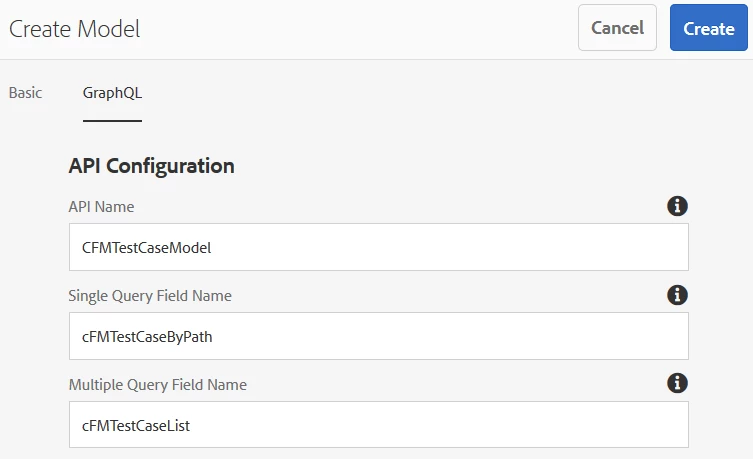
I have been reviewing the new GraphQL integration in sp10. The content fragment model's Properties has a new tab.

GraphQL

  • API Configuration
    • API Name
    • Single Query Field Name
    • Multiple Query Field Name
  • Cache Configuration
    • Browser Cache duration...
    • CDN Cache duration...

I checked the Adobe Content Fragment Model doc and revisited some of the AEM tutorial docs, but none discuss this tab. What can I do with it and where can I find more documentation? 
This post is no longer active and is closed to new replies. Need help? Start a new post to ask your question.
Best answer by KurtHo1

I get it now. Here's what it is in case anyone else is looking and has the same experience.


API Name - Model Name
Single Query Field Name - Adobe's ByPath query option
Multiple Query Field Name - Adobe's List query option


When I upgraded to SP10, all existing cfm API Configuration fields were left blank so I had no idea what they were doing and couldn't find additional information about it. When @kishore_kumar_ asked for a screenshot, I created a new model. The fields were auto-populated and follow the naming convention in the GraphiQL Docs section. This GraphQL Tab gives me the ability to use my own naming convention for Query Type names if needed.

2 replies

KurtHo1AuthorAccepted solution
New Participant
November 3, 2021

I get it now. Here's what it is in case anyone else is looking and has the same experience.


API Name - Model Name
Single Query Field Name - Adobe's ByPath query option
Multiple Query Field Name - Adobe's List query option


When I upgraded to SP10, all existing cfm API Configuration fields were left blank so I had no idea what they were doing and couldn't find additional information about it. When @kishore_kumar_ asked for a screenshot, I created a new model. The fields were auto-populated and follow the naming convention in the GraphiQL Docs section. This GraphQL Tab gives me the ability to use my own naming convention for Query Type names if needed.

Kishore_Kumar_
New Participant
November 3, 2021

Hi @kurtho1 ,


Could you please attach a screenshot, I could not see these properties in CF Model.