Contexthub Tool bar issue in AEM 6.3 | Community
Skip to main content
divyak96999766
Level 2
Sep 12, 2017 2:53 PM UTC
Solved

Contexthub Tool bar issue in AEM 6.3

Hi All,

While including Contexthub in my custom template, I have added

'<sling:include path="contexthub" resourceType="granite/contexthub/components/contexthub"/>'.

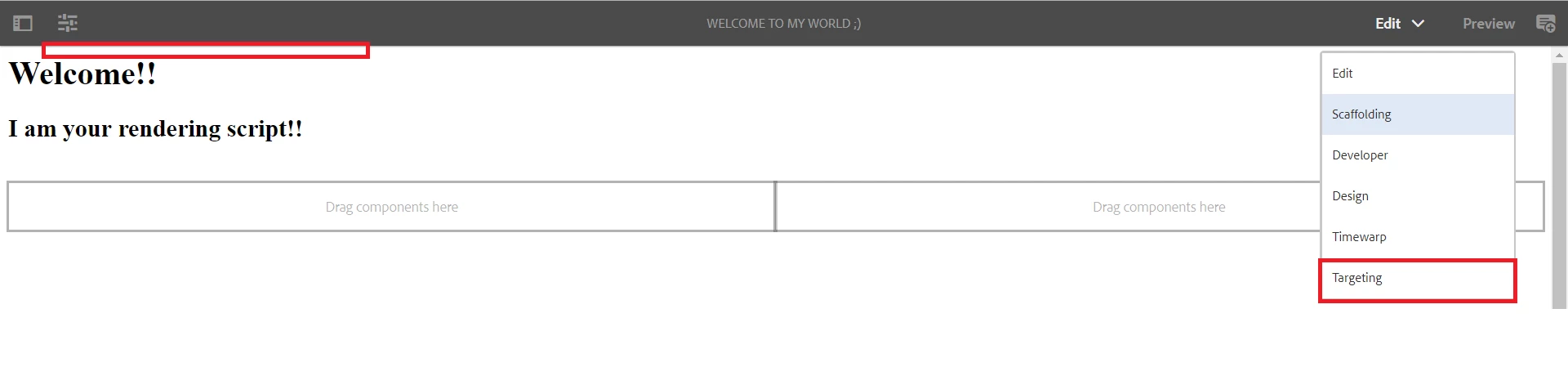
The toolbar appears on custom page (on preview mode) in  AEM 6.2. The same way doesn't work in AEM 6.3, I had to add clientlibs (<cq:includeClientLib categories="contexthub.ui.segment-editor"/>) to get the tool bar appear on the page. but, this is disabling the 'Targeting' option under modes.

Below is the image that illustrates:
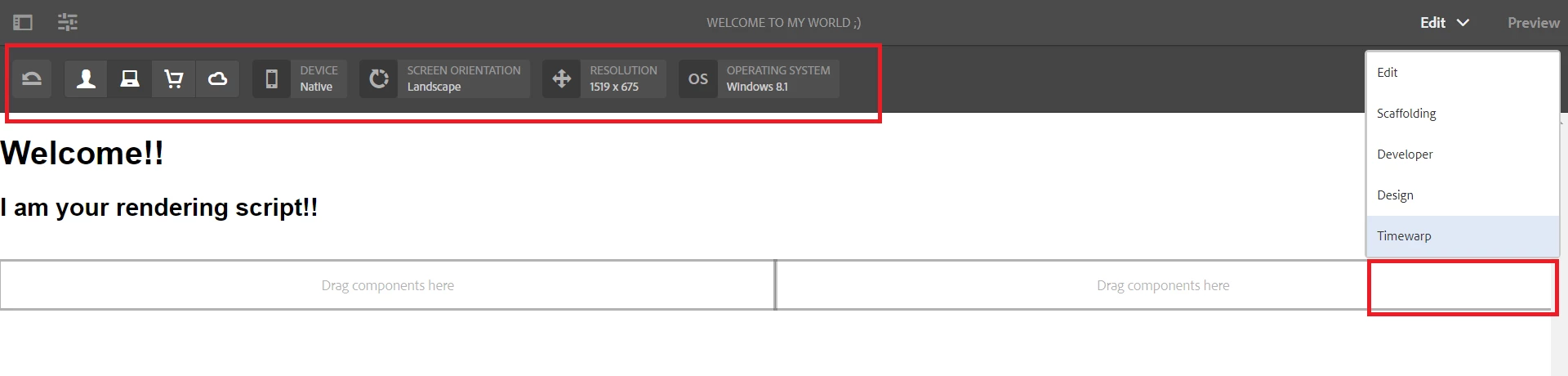
But when we remove the same clientlibs, the targeting mode is enabled back (as shown below). Can someone please help me fix this issue, to have both in place?
Thanks in Advance!

This post is no longer active and is closed to new replies. Need help? Start a new post to ask your question.
smacdonald2008
smacdonald2008Accepted solution
Level 10
Sep 12, 2017 3:28 PM UTC

See this HELPX Article - the ContextHub bar appears:

Scott's Digital Community: Using the ContextHub with the Experience Manager Toy Store site

Hope this helps....

10 replies

Employee
Sep 30, 2019 2:41 PM UTC

In case someone is facing this issue for editable template - it worked when dependency to granite.csrf.standalone is also added.

Translate
divyak96999766
Level 2
Sep 14, 2017 1:18 PM UTC

Hi Scott,

The article works. I missed out adding granite.utils and granite.jquery dependencies to my clientlibs. Its working fine now.

Thanks a lot!

Translate
smacdonald2008
Level 10
Sep 13, 2017 5:21 PM UTC

I justed loaded the 3 packages in that article and ContextHub loaded - see:

Also - we are running Ask the AEM Community Experts on this subject this month - see: Scott's Digital Community: Ask the AEM Community Experts for Sept 2017

Translate
smacdonald2008
Level 10
Sep 13, 2017 4:44 PM UTC

Did you load the package in the Toy Store article - it works there. Compare that with your setup.

Translate
divyak96999766
Level 2
Sep 13, 2017 4:28 PM UTC

I tried converting to HTL, and it works neither. I debugged and found there is an issue with

'com.adobe.granite.contexthub.ui.allow-embedding' setting to true. This can probably fix the issue. Do you have any idea on how to set this property? I couldn't find this property in configuration.

Translate
smacdonald2008
Level 10
Sep 12, 2017 5:05 PM UTC

I asked one of out internal experts to look here and they stated:

I think this is a core client libraries mismatch and may be coming from the page component itself.

Based on their code <sling:include path="contexthub" resourceType="granite/contexthub/components/contexthub"/>

They are pointing to a JSP page component instead of HTL. Try to convert the page component itself to HTL (the components inside can still be JSP)

Context Hub is systematically replacing Client Context so I don’t think it’s worth the effort to try and find how to keep making a JSP page component work in Granite.

The other added advantage; upgrading your primary page component to HTL will allow you to leverage Content Fragments, Experience Fragments and other new features.

We are not going to update the foundation to my knowledge and using a Classic UI page in the Granite UI is going to have a lot of other problems as well…

Translate
smacdonald2008
Level 10
Sep 12, 2017 3:42 PM UTC

Did you load the example in the Toy Store site - where you can see it working:

Translate
divyak96999766
Level 2
Sep 12, 2017 3:38 PM UTC

On the mere inclusion of contexthub component, the tool bar is not enabled and it was throwing errors which later got resolved on addition of clientlibs. But this clientlibs is disabling the Targeting mode on the page.

I am getting this issue on v6.3 and it works fine in v6.2.

Translate
Ratna_Kumar
Level 10
Sep 12, 2017 3:32 PM UTC
smacdonald2008
smacdonald2008Accepted solution
Level 10
Sep 12, 2017 3:28 PM UTC

See this HELPX Article - the ContextHub bar appears:

Scott's Digital Community: Using the ContextHub with the Experience Manager Toy Store site

Hope this helps....

Translate