Coral 3 Select dropdown renders icons twice when using SVGs | Community
Skip to main content
arthurcavallari
Level 1
May 16, 2019 6:38 AM UTC
Solved

Coral 3 Select dropdown renders icons twice when using SVGs

Hi all,

I'm running AEM 6.4.4 and I'm trying to create a select dropdown with custom svg icons using the the new Coral 3 Select component (Select — Granite UI 1.0 documentation ), but the icons always get duplicated when the component is rendered.

Does Coral-Icon support SVGs? If not, what is the proposed solution to render a select dropdown with icons?

My previous implementation was setting the icons using javascript, but I got excited when I saw the Coral 3 component had an icon property.

Here's what happens when I set the icon attribute to an svg, vs an icon built in to AEM.
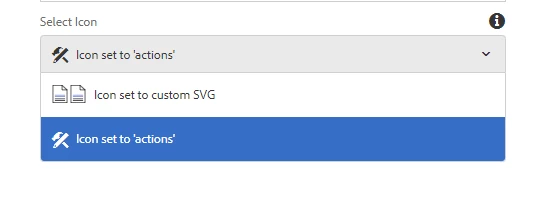
Here's a snippet of the dialog xml for this component

<select

   jcr:primaryType="nt:unstructured"

   sling:resourceType="granite/ui/components/coral/foundation/form/select"

   fieldLabel="Select Icon"

   name="./iconTest">

  <items jcr:primaryType="nt:unstructured">

     <option1

        jcr:primaryType="nt:unstructured"

        icon="/etc/designs/sitename/assets/svgs/icon-document.svg"

        selected="{Boolean}true"

        text="Icon set to custom SVG"

        value="value1"/>

     <option2

        jcr:primaryType="nt:unstructured"

        icon="actions"

        text="Icon set to 'actions'"

        value="value2"/>

  </items>

</select>

This post is no longer active and is closed to new replies. Need help? Start a new post to ask your question.
arunpatidar
arunpatidarAccepted solution
New Participant
May 16, 2019 9:33 AM UTC

Hi,

I think this is a bug.

but you can remove the extra icon as soon as dialog loads using js.

(function ($, $document) {

    "use strict";

      $document.on("dialog-ready", function() {

$(".cq-dialog-content coral-selectlist-item").each(function( index ) {

  $(this).children('coral-icon').find('img.coral3-Icon-image:nth-child(2)').remove();

});

});

})($, $(document));

Arun Patidar

4 replies

arunpatidar
New Participant
May 17, 2019 10:32 AM UTC

yes, css would do a trick as well.

anyways here is complete js code if others are seeking

$(".cq-dialog-content coral-selectlist-item").each(function( index ) {

  $(this).children('coral-icon').find('img.coral3-Icon-image:nth-child(2)').remove();

});

$(".cq-dialog-content button.coral3-Select-button").find('coral-icon').find('img.coral3-Icon-image:nth-child(2)').remove();

Translate
Arun Patidar
arthurcavallari
Level 1
May 16, 2019 11:41 PM UTC

Ah I see, I was hoping I was just using it wrong.

Your javascript fix only removes the duplicates from the select options and misses the currently selected item, you could just hide them all using CSS

img.coral3-Icon-image:nth-child(2) {

    display: none;

}

Translate
New Participant
Mar 4, 2022 4:39 PM UTC

this css solution is way better, it works even on page wizard creation

Translate
arunpatidar
arunpatidarAccepted solution
New Participant
May 16, 2019 9:33 AM UTC

Hi,

I think this is a bug.

but you can remove the extra icon as soon as dialog loads using js.

(function ($, $document) {

    "use strict";

      $document.on("dialog-ready", function() {

$(".cq-dialog-content coral-selectlist-item").each(function( index ) {

  $(this).children('coral-icon').find('img.coral3-Icon-image:nth-child(2)').remove();

});

});

})($, $(document));

Translate
Arun Patidar