
Coral UI select multiple field can't remove all value | Community
Skip to main content
bhoang
New Participant
September 4, 2018
Solved

Coral UI select multiple field can't remove all value

  • September 4, 2018
  • 15 replies
  • 7837 views

Hi Friends,

I am using selected multiple field. But it have problem, when I remove all values that I selected and save it. It can't save with none value selected.

Example: I selected one value and save ok.

after that I go to "Views properties" to edit that field and remove selected value.

When I save it comeback again.

If I selected more than one options and save. After that I remove some option and keep one or more than one selected and save, it work fine. If I remove all options and save it, It come back the option before I remove.

Example: I select 2 options and save ok.
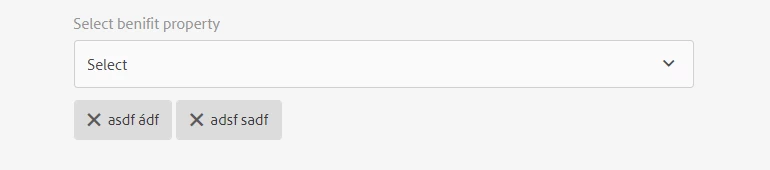
I remove one option and save it work fine.

If I select 2 options and remove all and save, it back to.
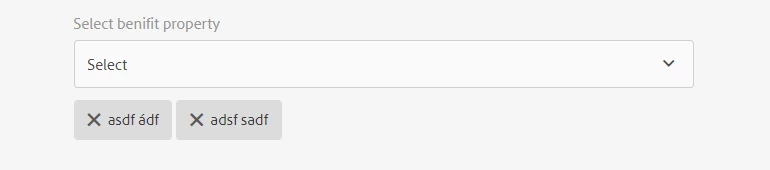
 

My code to bind data into select field and check option fields as below.


The Json data as below: http://localhost:4502/.abcbenefits.json/

[{"id":"1","description":"asdf à","langCode":"en"},{"id":"2","description":"asdf ádf","langCode":"en"},{"id":"3","description":"adsf sadf","langCode":"en"}]


<script>

$(document).ready(function(){


        var host_url = window.location.protocol + "//" + window.location.host + "/.abcbenefits.json/";

        var benefitSelectedValue = abcbenefits.values;


        // load property check on edit page or created page.

        var pageNameID = document.getElementById("cq-sites-properties-form");


// is create page

if(pageNameID === null) {

//loadServiceDataFromURL(host_url);

        }

// is edit page

        else {

        benefitSelectedValue = abcbenefits.values;

loadServiceDataFromURL(host_url);

        }


        function loadServiceDataFromURL(host_url) {

$.ajax(host_url, {

dataType: "json",

                contentType: "application/json",

                async: false,

                success: function(rawData, status, xhr) {

try {

                        benefitBindData(rawData);

                    } catch (err) {

console.log(err);

                    }

                },

                error: function (xhr, status, err) {

console.log(err);

                }

            });

        }


function benefitBindData(data) {

$("#abcbenefits> coral-select-item").remove();

var x = document.getElementById("abcbenefits");

var selectedItem = [];


data.forEach(function(item) {

var option = document.createElement("coral-select-item");

option.innerHTML = item["description"];

option.value = item["id"];


x.appendChild(option);

if (isSelectedBenefit(item["id"], benefitSelectedValue)) {

//option.selected = true;

selectedItem.push(option); //push selected item into an array

}

});


setTimeout(function(_selectedItems){

_selectedItems.forEach(function(option) {

option.selected = true;

});

}, 100, selectedItem)


}


function isSelectedBenefit(benefitId, benefitSelectedValues){

for(var i = 0; i < benefitSelectedValues.length;i++){

if(benefitId == benefitSelectedValues[i]) return true;

}

return false;

}


});

</script>


Please help me,

Thank you so much,

This post is no longer active and is closed to new replies. Need help? Start a new post to ask your question.
Best answer by bhoang

I created a custom field for select and change the render.jsp file of the custom select field. So, I coded a JavaScript function to check the onchange of the select field. It work fine.


%><coral-select id = "abcProperty" <%= attrs.build() %>><%

    if (cfg.get("emptyOption", false)) {

        String value = "";


        AttrBuilder opAttrs = new AttrBuilder(null, xssAPI);

        opAttrs.add("value", value);

        opAttrs.addSelected(cmp.getValue().isSelected(value, false));


        out.println("<coral-select-item " + opAttrs.build() + "></coral-select-item>");

    }


    for (Iterator<Resource> items = itemIterator; items.hasNext();) {

        printOption(out, items.next(), cmp);

    }

%></coral-select><%!


<script>

abcProperty._onSelectionChange = function(){

        setTimeout(function(){

            var coralTaglist = $("#abcProperty> [name='./propertiesBenefits']")

            if(abcProperty._oldSelection.length == 0){

                coralTaglist.append("<input id = \"hiddenProperty\" handle=\"input\" type=\"hidden\" name=\"./propertiesBenefits\" value=\"\">");

coralTaglist[0].hidden = true;

            }

            else{

coralTaglist[0].hidden = false;

            }

        }, 100);


};


</script>

15 replies

smacdonald2008
New Participant
September 4, 2018

Look at the Article that Ratna pointed you too. You can populate a Select Drop down via the WCMUsePojo class. This works! Manipulating the DOM via JS you showed is not best practice.

Ratna_Kumar
New Participant
September 4, 2018

Hi,

You can use WCMUsePojo class to populate the dropdown.

Check this HELPX article: Adobe Experience Manager Help | Using an WCMUsePojo class to populate an Experience Manager Touch UI Select Field

Thanks,

Ratna Kumar.

arunpatidar
New Participant
September 4, 2018

Hi,

Can you try to create a sling servlet and registered with resourceType and use this resource type in datasource node.

Inside Sling servlet you can make a ajax request to get json and parse that json and convert into ValueMap and add to datasource.

Example :

https://github.com/arunpatidar02/aem63app-repo/blob/master/java/HelloWorldCompDDServlet.java

Arun Patidar
bhoang
bhoangAuthor
New Participant
September 4, 2018

I used the datasoure but it have that bug. This is my datasource.

<%@page session="false" import="
  org.apache.sling.api.resource.Resource,
  org.apache.sling.api.resource.ResourceUtil,
  org.apache.sling.api.resource.ValueMap,
  org.apache.sling.api.resource.ResourceResolver,
  org.apache.sling.api.resource.ResourceMetadata,
  org.apache.sling.api.wrappers.ValueMapDecorator,
  java.util.List,
  java.util.ArrayList,
  java.util.HashMap,
  java.util.Locale,
  com.adobe.granite.ui.components.ds.DataSource,
  com.adobe.granite.ui.components.ds.EmptyDataSource,
  com.adobe.granite.ui.components.ds.SimpleDataSource,
  com.adobe.granite.ui.components.ds.ValueMapResource,
  com.day.cq.wcm.api.Page,
  com.day.cq.wcm.api.PageManager,
  com.abc.my.core.dto.PropertyAdminDto"%><%
%><%@taglib prefix="cq" uri="http://www.day.com/taglibs/cq/1.0" %><%
%><cq:defineObjects/><%

   // set fallback
   request.setAttribute(DataSource.class.getName(), EmptyDataSource.instance());
  ResourceResolver resolver = resource.getResourceResolver();

   // Create an ArrayList to hold data
   List<Resource> resourceList = new ArrayList<Resource>();

  ValueMap vm = null;

  com.abc.my.core.models.datasource.PropertiesDataSource propertiesDataSource = new com.abc.my.core.models.datasource.PropertiesDataSource();

  ArrayList<PropertyAdminDto> propertyList = propertiesDataSource.getData(resolver, request);

  for (int i = 0; i < propertyList.size(); i++) {
   // allocate memory to the Map instance
   vm = new ValueMapDecorator(new HashMap<String, Object>());

   // Specify the value and text values
   String value = propertyList.get(i).getPropertyId();
  String text = propertyList.get(i).getPropertyName();

   // populate the map
   vm.put("value", value);
  vm.put("text", text);
  resourceList.add(new ValueMapResource(resolver, new ResourceMetadata(), "nt:unstructured", vm));
  }

   //Create a DataSource that is used to populate the drop-down control
   DataSource ds = new SimpleDataSource(resourceList.iterator());
  request.setAttribute(DataSource.class.getName(), ds);

%>

core\models\datasource\BenefitsDataSource.java

package com.abc.my.core.models.datasource;

import com.abc.my.core.dto.BenefitsDto;
import com.abc.my.core.dto.BenefitsResponseDto;
import com.abc.my.core.dto.PropertyAdminDto;
import com.abc.my.core.dto.ResponseDto;
import com.abc.my.core.models.HostConfigUtill;
import com.abc.my.core.utility.ApiManagementConfiguration;
import com.google.gson.Gson;
import com.google.gson.reflect.TypeToken;
import com.mashape.unirest.http.Unirest;
import com.mashape.unirest.http.exceptions.UnirestException;
import org.apache.sling.api.resource.ResourceResolver;
import org.apache.sling.api.wrappers.SlingHttpServletRequestWrapper;

import javax.servlet.http.HttpServletRequest;
import java.util.ArrayList;
import java.util.List;

public class BenefitsDataSource {

   private static final String URL = "benefit/get?langCode=";

  public static ArrayList<BenefitsDto> getData(ResourceResolver resourceResolver, HttpServletRequest request) {

  Gson gson = new Gson();
   String responseData = "default";

   //get language code
   String langCode = ((SlingHttpServletRequestWrapper) request).getRequest().getLocale().getLanguage();

   ApiManagementConfiguration serviceHost = HostConfigUtill.getHost(resourceResolver);


  try {

  responseData = Unirest.get(serviceHost.getHost() + URL + langCode).headers(serviceHost.toHeaderMap()).asString().getBody();
   } catch (UnirestException e) {

  e.printStackTrace();
   }

  ResponseDto<BenefitsResponseDto> data = gson.fromJson(responseData, new TypeToken<ResponseDto<BenefitsResponseDto>>() {}.getType());

  return  data.getContent().getBenefitDtos();
   }

}

arunpatidar
New Participant
September 4, 2018

Hi,

I would suggest you to first try to populate dropdown using datasource instead of DOM manipulation.

Adobe Experience Manager Help | Using Granite DataSource objects to populate AEM Touch UI objects

Thanks
Arun

Arun Patidar