Coral UI Xtype | Community
Skip to main content
Level 4
Jul 28, 2017 7:34 PM UTC
Solved

Coral UI Xtype

Hello All,

I am trying to add class property to granite/ui/components/coral/foundation/form/textarea resource type in .content.xml file but the class is not reflecting in the front end?

But when I add class to granite/ui/components/foundation/form/textfield resource type the class is reflecting in the front end inspect element.

Is this a limitation with Coral UI ?

thanks,

Vish

This post is no longer active and is closed to new replies. Need help? Start a new post to ask your question.
susheel
susheelAccepted solution
Level 5
Aug 3, 2017 4:38 AM UTC

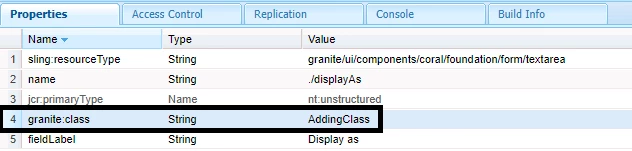
There is nothing much in the above code, it should have worked. We are just trying to read the attribute from properties and adding it to the html.

Anyhow that's not right approach and I just tried to go through the coral code in detail and realized we can use as below:

granite:class - String - classname

Similarly you can use granite:id for id.

Check this document related to common attributes: Common Attributes — Granite UI 1.0 documentation

Check this document which mentions about granite:class : Migration Guide to CoralUI 3-based — Granite UI 1.0 documentation

5 replies

smacdonald2008
Level 10
Aug 3, 2017 6:11 PM UTC

what are you trying to do with these Granite types - are you trying to overlay the look and feel of them?

Translate
susheel
susheelAccepted solution
Level 5
Aug 3, 2017 4:38 AM UTC

There is nothing much in the above code, it should have worked. We are just trying to read the attribute from properties and adding it to the html.

Anyhow that's not right approach and I just tried to go through the coral code in detail and realized we can use as below:

granite:class - String - classname

Similarly you can use granite:id for id.

Check this document related to common attributes: Common Attributes — Granite UI 1.0 documentation

Check this document which mentions about granite:class : Migration Guide to CoralUI 3-based — Granite UI 1.0 documentation

Translate
smacdonald2008
Level 10
Aug 2, 2017 9:09 PM UTC

Using the grainte types like granite/ui/components/foundation/form/textfield is the way to proceed.

Translate
Level 4
Aug 2, 2017 7:48 PM UTC

Hi Susheel,

Unfortunately this didn't work.

Alternatively, I am using the granite UI "granite/ui/components/foundation/form/textfield" resource type for our use.

thanks,

Vish

Translate
susheel
Level 5
Jul 29, 2017 8:18 AM UTC

Hi Vishwanath,

The below code is not present in coral UI components, whereas its present in granite ui components. May be there is a reason they removed it. I have not used coral UI yet.

// Start of attrs compatibility; please use cmp.populateCommonAttrs(attrs).

attrs.add("id", cfg.get("id", String.class));

attrs.addClass(cfg.get("class", String.class));

attrs.addRel(cfg.get("rel", String.class));

attrs.add("title", i18n.getVar(cfg.get("title", String.class)));

attrs.addOthers(cfg.getProperties(), "id", "class", "rel", "title", "type", "name", "value", "emptyText", "disabled", "required", "validation", "maxlength", "fieldLabel", "fieldDescription", "renderReadOnly", "ignoreData");

// End of attrs compatibility.

You can overlay your field and add this line but let me know your requirement why you need class or id ?

Translate