
CORS issue whn sending request from React | Community
Skip to main content
aliaksandr_hvoz
Level 2
Sep 9, 2023 11:42 AM UTC
Solved

CORS issue whn sending request from React

Hi.

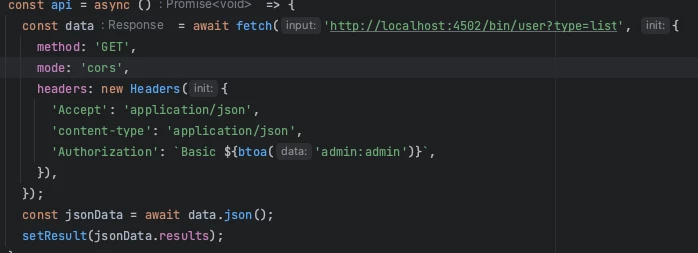
I'm trying to send a request to AEM from React. But I get either a CORS error or an empty response with status 200, but from the browser the response has a body.

Tell me how to set it up if:

AEM localhost:4502

React localhost:3000


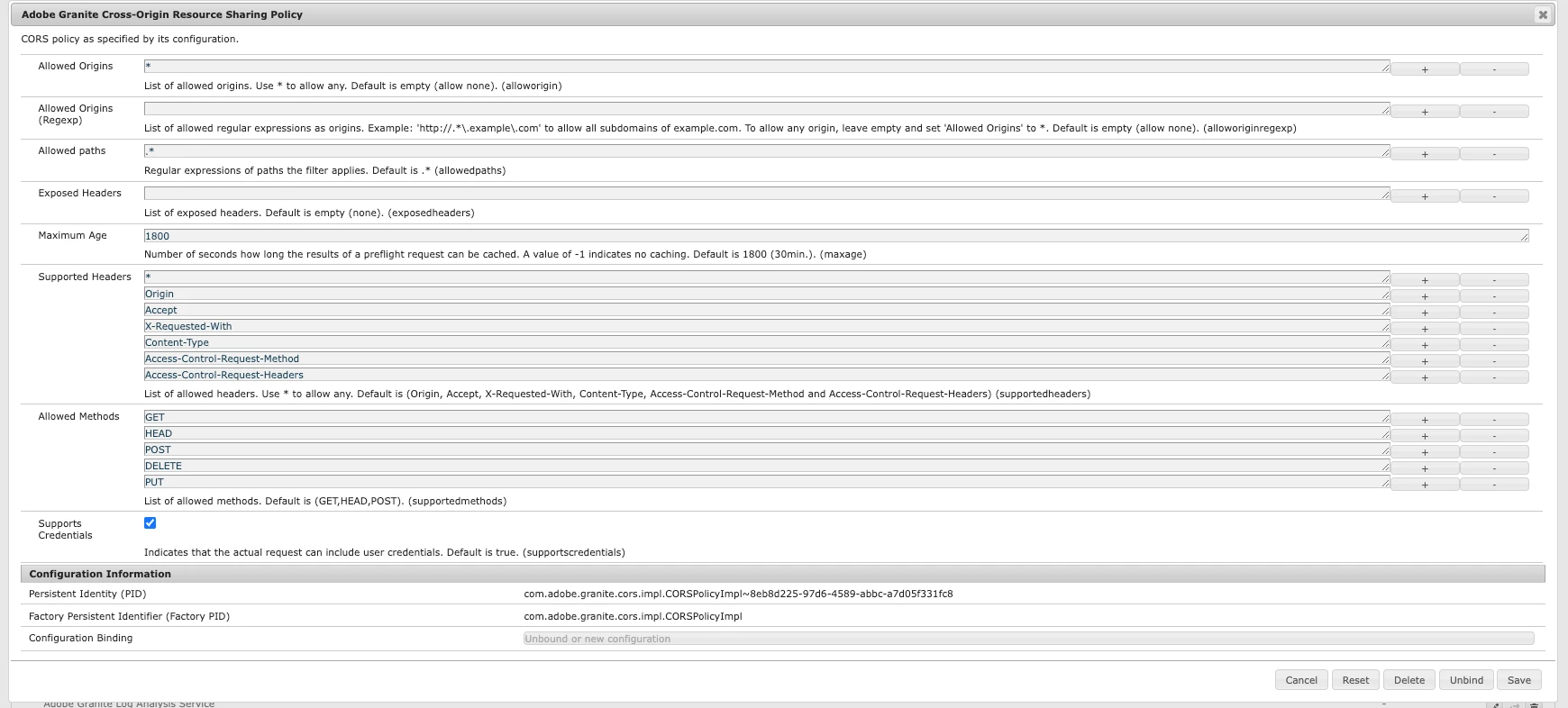
Config
React fetch
Thank you very much in advance)

This post is no longer active and is closed to new replies. Need help? Start a new post to ask your question.
aanchal-sikka
aanchal-sikkaAccepted solution
New Participant
Sep 9, 2023 3:59 PM UTC

Hello @aliaksandr_hvoz 


There is a detailed adobe documentation on how to deal with CORS errors. Please refer to https://experienceleague.adobe.com/docs/experience-manager-learn/foundation/security/understand-cross-origin-resource-sharing.html?lang=en


One would have to update :

  •  Publish -> "Adobe Granite Cross Origin Resource Sharing Policy" OSGi config to declared allowed origins, methods etc
  • Dispatcher:
    • Allowing CORS request headers
    • Caching CORS resposne headers


Even steps for debugging are available on the link


Aanchal Sikka

3 replies

kautuk_sahni
Employee
Sep 11, 2023 11:43 AM UTC

@aliaksandr_hvoz Do you find the suggestions from users useful? Please let us know if more information is required. Otherwise, please mark the answer as correct for posterity. 

Translate
Kautuk Sahni
aanchal-sikka
aanchal-sikkaAccepted solution
New Participant
Sep 9, 2023 3:59 PM UTC

Hello @aliaksandr_hvoz 


There is a detailed adobe documentation on how to deal with CORS errors. Please refer to https://experienceleague.adobe.com/docs/experience-manager-learn/foundation/security/understand-cross-origin-resource-sharing.html?lang=en


One would have to update :

  •  Publish -> "Adobe Granite Cross Origin Resource Sharing Policy" OSGi config to declared allowed origins, methods etc
  • Dispatcher:
    • Allowing CORS request headers
    • Caching CORS resposne headers


Even steps for debugging are available on the link


Translate
Aanchal Sikka
Mahedi_Sabuj
New Participant
Sep 9, 2023 2:42 PM UTC

You may consider adding "Authorization" in the Supported Headers. Please refer to the Site 2 example, which requires authentication. https://experienceleague.adobe.com/docs/experience-manager-learn/foundation/security/understand-cross-origin-resource-sharing.html?lang=en#example-configurations 

"supportedheaders":[ "Origin", "Accept", "X-Requested-With", "Content-Type", "Access-Control-Request-Method", "Access-Control-Request-Headers", "Authorization", // New "CSRF-Token" // New ]


Translate
Mahedi Sabuj