
Solved
cq-dialog-checkbox-showhide not working for checkbox
Hi Team
I am working on a component where on the dialog based on checkbox selection I want to display next field.
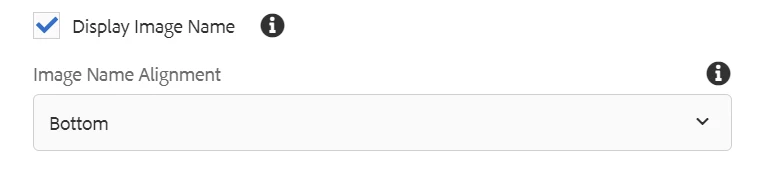
I have written granite:class and data attribute but something I am missing so it is not hiding when checkbox is selected.
below is the xml structure. Please correct me if doing anything wrong.
Thanks in advance
<display_image_name
granite:class="cq-dialog-checkbox-showhide"
jcr:primaryType="nt:unstructured"
sling:resourceType="granite/ui/components/coral/foundation/form/checkbox"
fieldDescription="Display Name to an Image"
fieldLabel="Display Image Name"
name="./displayImageName"
text="Display Image Name"
uncheckedValue="false"
value="true">
<granite:data
jcr:primaryType="nt:unstructured"
cq-dialog-checkbox-showhide-target=".togglefield"/>
</display_image_name>
<content
granite:class="togglefield"
jcr:primaryType="nt:unstructured"
sling:resourceType="granite/ui/components/coral/foundation/container">
<items jcr:primaryType="nt:unstructured">
<image_name
jcr:primaryType="nt:unstructured"
sling:resourceType="granite/ui/components/coral/foundation/form/select"
fieldDescription="Image Name Alignment"
fieldLabel="Image Name Alignment"
name="./imageNameAlignment">
<items
jcr:primaryType="nt:unstructured"
sling:hideChildren="[radio,multiDropDown]">
<top
jcr:primaryType="nt:unstructured"
name="./top"
text="Top"
value="top"/>
<bottom
jcr:primaryType="nt:unstructured"
name="./bottom"
text="Bottom"
value="bottom"/>
</items>
</image_name>
</items>
<granite:data
jcr:primaryType="nt:unstructured"
showhidetargetvalue="true"/>
</content>
granite:class="cq-dialog-checkbox-showhide"
jcr:primaryType="nt:unstructured"
sling:resourceType="granite/ui/components/coral/foundation/form/checkbox"
fieldDescription="Display Name to an Image"
fieldLabel="Display Image Name"
name="./displayImageName"
text="Display Image Name"
uncheckedValue="false"
value="true">
<granite:data
jcr:primaryType="nt:unstructured"
cq-dialog-checkbox-showhide-target=".togglefield"/>
</display_image_name>
<content
granite:class="togglefield"
jcr:primaryType="nt:unstructured"
sling:resourceType="granite/ui/components/coral/foundation/container">
<items jcr:primaryType="nt:unstructured">
<image_name
jcr:primaryType="nt:unstructured"
sling:resourceType="granite/ui/components/coral/foundation/form/select"
fieldDescription="Image Name Alignment"
fieldLabel="Image Name Alignment"
name="./imageNameAlignment">
<items
jcr:primaryType="nt:unstructured"
sling:hideChildren="[radio,multiDropDown]">
<top
jcr:primaryType="nt:unstructured"
name="./top"
text="Top"
value="top"/>
<bottom
jcr:primaryType="nt:unstructured"
name="./bottom"
text="Bottom"
value="bottom"/>
</items>
</image_name>
</items>
<granite:data
jcr:primaryType="nt:unstructured"
showhidetargetvalue="true"/>
</content>