Creating a nested Style Systems navigation | Community
Skip to main content
New Participant
February 26, 2020
Solved

Creating a nested Style Systems navigation

  • February 26, 2020
  • 1 reply
  • 939 views

This is more of a feature request type post, but would be curious if there are any thoughts around its feasibility currently.


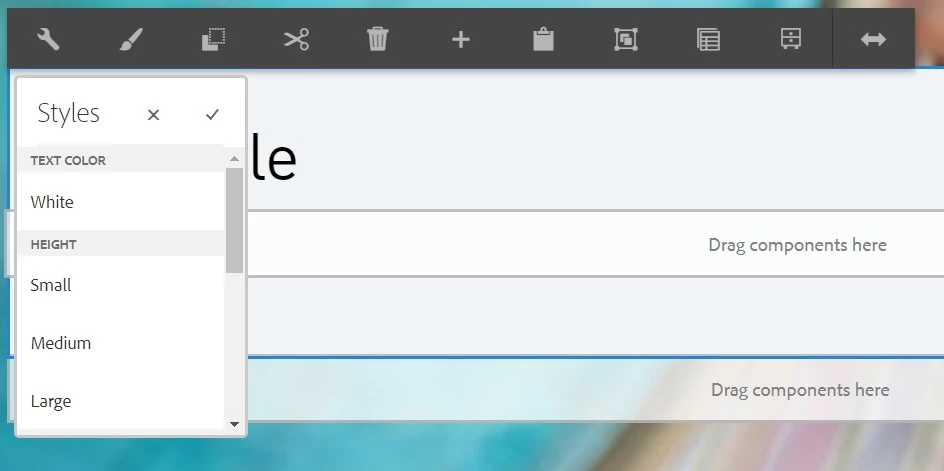
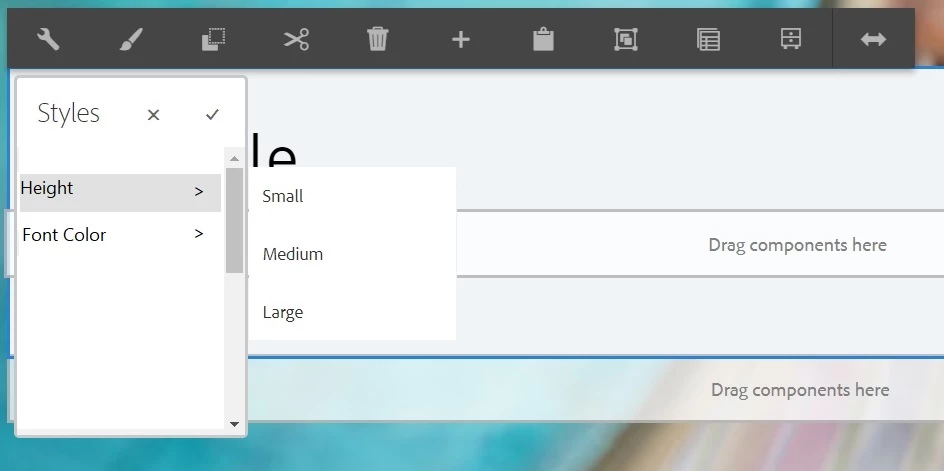
In an effort to reduce the number of components made available to content producers, we're creating style systems that apply the look/feel of the component. In doing so, however, I've noticed that very quickly, the number of options available causes the Style System dropdown to scroll. I've attached screenshots of what I think would be very useful functionality; the ability to organize the Style Systems in a more column-based navigation structure. Is this something that could be customized?


Current:
Proposed:
This post is no longer active and is closed to new replies. Need help? Start a new post to ask your question.
Best answer by arunpatidar

You can create a custom implementation but it will be not very friendly in case of multi select i.e. selecting style from different groups. To see all the style user has to click on every group to see selected style. if you have one or large number or group(more than 4) then you should not go for this.


if there are 2-3 groups and each group has > 5 items then it make sense.

1 reply

arunpatidar
arunpatidarAccepted solution
New Participant
February 27, 2020

You can create a custom implementation but it will be not very friendly in case of multi select i.e. selecting style from different groups. To see all the style user has to click on every group to see selected style. if you have one or large number or group(more than 4) then you should not go for this.


if there are 2-3 groups and each group has > 5 items then it make sense.

Arun Patidar