creating dialog of multifield field in touch ui | Community
Skip to main content
New Participant
December 6, 2024
Solved

creating dialog of multifield field in touch ui

  • December 6, 2024
  • 3 replies
  • 663 views

<?xml version="1.0" encoding="UTF-8"?>
<jcr:root xmlns:sling="http://sling.apache.org/jcr/sling/1.0" xmlns:cq="http://www.day.com/jcr/cq/1.0" xmlns:jcr="http://www.jcp.org/jcr/1.0" xmlns:nt="http://www.jcp.org/jcr/nt/1.0" xmlns:granite="http://www.adobe.com/jcr/granite/1.0"
jcr:primaryType="nt:unstructured"
jcr:title="Employee Properties"
sling:resourceType="cq/gui/components/authoring/dialog">
<content
granite:class="tabtest"
jcr:primaryType="nt:unstructured"
sling:resourceType="granite/ui/components/coral/foundation/tabs">
<employeeDetails

jcr:primaryType="nt:unstructured"
jcr:title="Employee Details"
sling:resourceType="granite/ui/components/coral/foundation/fixedcolumns">
<items jcr:primaryType="nt:unstructured">
<column
jcr:primaryType="nt:unstructured"
sling:resourceType="granite/ui/components/coral/foundation/container">
<items jcr:primaryType="nt:unstructured">
<empDeparment
jcr:primaryType="nt:unstructured"
sling:resourceType="granite/ui/components/coral/foundation/form/textfield"
fieldLabel="Emplpyee-Department"
name="./empDepartment"/>
<employee
jcr:primaryType="nt:unstructured"
sling:resourceType="granite/ui/components/coral/foundation/form/multifield"
composite="{Boolean}true"
fieldLabel="employee">
<field
jcr:primaryType="nt:unstructured"
sling:resourceType="granite/ui/components/coral/foundation/container"
name="./employee">
<items jcr:primaryType="nt:unstructured">
<column
jcr:primaryType="nt:unstructured"
sling:resourceType="granite/ui/components/coral/foundation/container">
<items jcr:primaryType="nt:unstructured">
<employeeName
jcr:primaryType="nt:unstructured"
sling:resourceType="granite/ui/components/coral/foundation/textfield"
fieldLabel="Employee Name"
name="./employeeName"/>
<employeeId
jcr:primaryType="nt:unstructured"
sling:resourceType="granite/ui/components/coral/foundation/textfield"
fieldLabel="Employee Id"
name="./employeeId"/>
<employeeFeedback
jcr:primaryType="nt:unstructured"
sling:resourceType="granite/ui/components/coral/foundation/text"
fieldLabel="Feedback"
name="./employeeFeedback"/>


</items>
</column>
</items>
</field>
</employee>
</items>
</column>
</items>
</employeeDetails>
</content>
</jcr:root>


i am using aem6.5 version and i not sure what exactly i am doing the mistake but the dialog box is created but doesn't show any field in it not even the textfield. 

This post is no longer active and is closed to new replies. Need help? Start a new post to ask your question.
Best answer by BrianKasingli

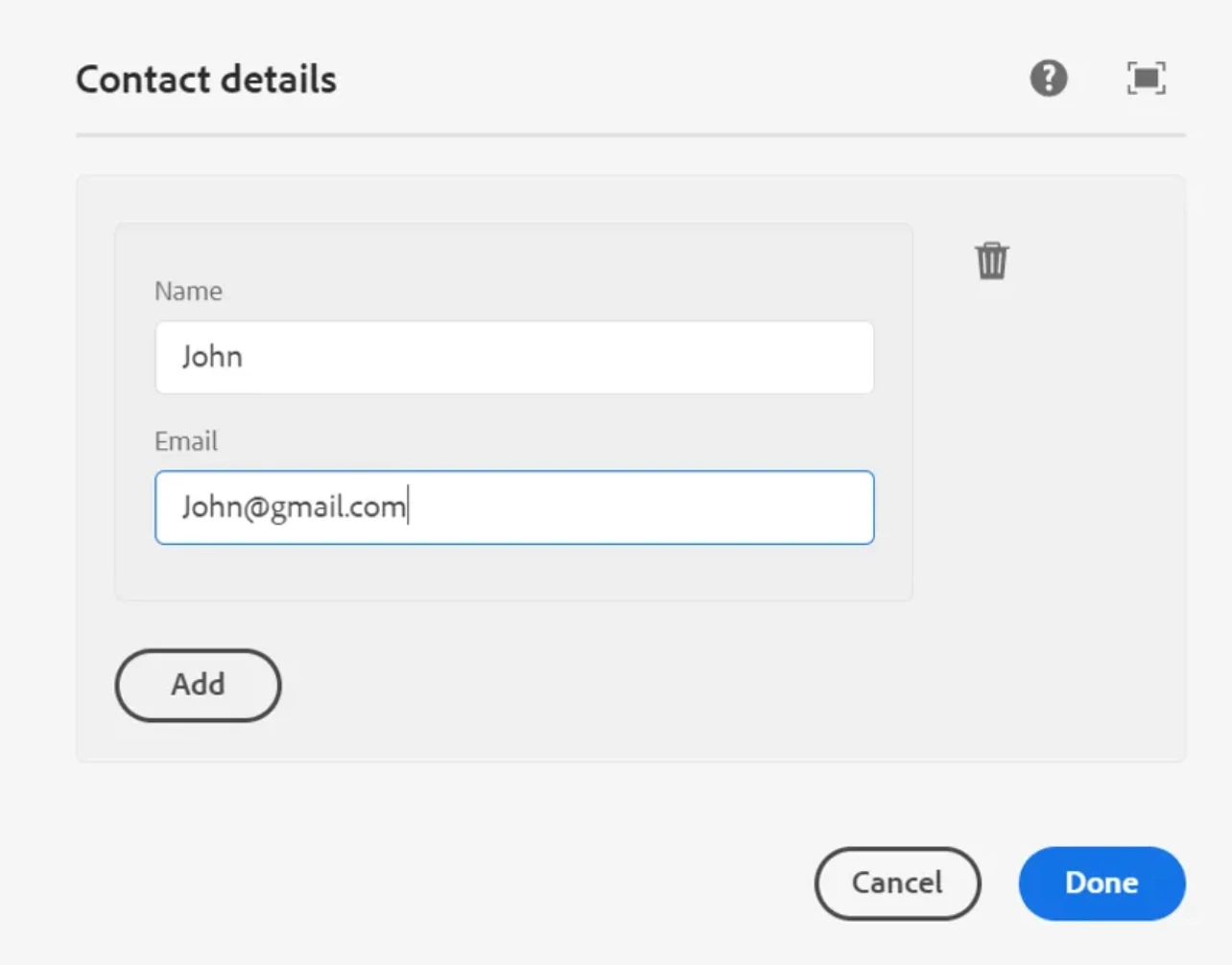
@nidhiku , follow this tutorial and you will be soon on your way In the tutorial you'll learn how to setup multi-field, next you will be abler to iterate through each item and render HTML elements on the page.


<?xml version="1.0" encoding="UTF-8"?> <jcr:root xmlns:jcr="http://www.jcp.org/jcr/1.0" xmlns:nt="http://www.jcp.org/jcr/nt/1.0" xmlns:cq="http://www.day.com/jcr/cq/1.0" xmlns:sling="http://sling.apache.org/jcr/sling/1.0" jcr:primaryType="nt:unstructured" jcr:title="Contact details" sling:resourceType="cq/gui/components/authoring/dialog"> <content jcr:primaryType="nt:unstructured" sling:resourceType="granite/ui/components/coral/foundation/container"> <items jcr:primaryType="nt:unstructured"> <contact jcr:primaryType="nt:unstructured" sling:resourceType="granite/ui/components/coral/foundation/form/multifield" composite="{Boolean}true"> <field jcr:primaryType="nt:unstructured" sling:resourceType="granite/ui/components/coral/foundation/container" name="./contact"> <items jcr:primaryType="nt:unstructured"> <contactGroup jcr:primaryType="nt:unstructured" sling:resourceType="granite/ui/components/coral/foundation/well"> <items jcr:primaryType="nt:unstructured"> <name jcr:primaryType="nt:unstructured" sling:resourceType="granite/ui/components/coral/foundation/form/textfield" fieldLabel="Name" name="./contactName"/> <email jcr:primaryType="nt:unstructured" sling:resourceType="granite/ui/components/coral/foundation/form/textfield" fieldLabel="Email" name="./contactEmail"/> </items> </contactGroup> </items> </field> </contact> </items> </content> </jcr:root>

https://medium.com/activate-aem/create-multifield-dialog-in-aem-f3e4a616f041


3 replies

BrianKasingli
BrianKasingliAccepted solution
New Participant
December 7, 2024

@nidhiku , follow this tutorial and you will be soon on your way In the tutorial you'll learn how to setup multi-field, next you will be abler to iterate through each item and render HTML elements on the page.


<?xml version="1.0" encoding="UTF-8"?> <jcr:root xmlns:jcr="http://www.jcp.org/jcr/1.0" xmlns:nt="http://www.jcp.org/jcr/nt/1.0" xmlns:cq="http://www.day.com/jcr/cq/1.0" xmlns:sling="http://sling.apache.org/jcr/sling/1.0" jcr:primaryType="nt:unstructured" jcr:title="Contact details" sling:resourceType="cq/gui/components/authoring/dialog"> <content jcr:primaryType="nt:unstructured" sling:resourceType="granite/ui/components/coral/foundation/container"> <items jcr:primaryType="nt:unstructured"> <contact jcr:primaryType="nt:unstructured" sling:resourceType="granite/ui/components/coral/foundation/form/multifield" composite="{Boolean}true"> <field jcr:primaryType="nt:unstructured" sling:resourceType="granite/ui/components/coral/foundation/container" name="./contact"> <items jcr:primaryType="nt:unstructured"> <contactGroup jcr:primaryType="nt:unstructured" sling:resourceType="granite/ui/components/coral/foundation/well"> <items jcr:primaryType="nt:unstructured"> <name jcr:primaryType="nt:unstructured" sling:resourceType="granite/ui/components/coral/foundation/form/textfield" fieldLabel="Name" name="./contactName"/> <email jcr:primaryType="nt:unstructured" sling:resourceType="granite/ui/components/coral/foundation/form/textfield" fieldLabel="Email" name="./contactEmail"/> </items> </contactGroup> </items> </field> </contact> </items> </content> </jcr:root>

https://medium.com/activate-aem/create-multifield-dialog-in-aem-f3e4a616f041


PRATHYUSHA_VP
New Participant
December 6, 2024

Hi @nidhiku ,


Looks like you're trying to convert granite UI dialog to coral UI AEM dialog. 


You need to tweak structure a bit and follow core components dialog structure as mentioned by @arunpatidar 


Attached is the dialog content.xml for your reference. Please compare and check the issues

arunpatidar
New Participant
December 6, 2024