CRX PckgMngr missing metadata node while building package of assets | Community
Skip to main content
New Participant
January 9, 2019
Solved

CRX PckgMngr missing metadata node while building package of assets

  • January 9, 2019
  • 4 replies
  • 2929 views

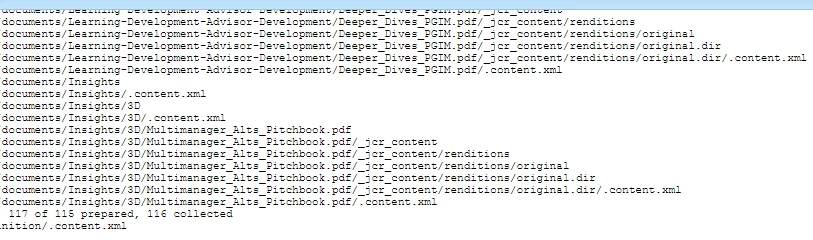
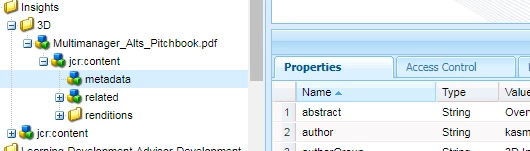
When I am trying to take package of assets while building it is missing metadata node which is already present.

I am unable to understand what is wrong here?
This post is no longer active and is closed to new replies. Need help? Start a new post to ask your question.
Best answer by Gaurav-Behl

As mentioned, first check the '.content.xml' file for metadata node. If you can see the metadata node in xml but not in /crx/de then it is an issue with the package filters. open 'filter.xml' and validate that you have "merge" or "update" as applicable based on your requirements

path of filter.xml -  META-INF/vault/filter.xml

Jackrabbit Filevault - Workspace Filter

filter elements

The filter elements are independent of each other and define include and exclude patters for subtrees. The root of a subtree is defined by the root attribute, which must be an absolute path.

The filter element can have an optional mode attribute which specified the import mode used when importing content. the following values are possible:

“replace”
This is the normal behavior. Existing content is replaced completely by the imported content, i.e. is overridden or deleted accordingly.
“merge”
Existing content is not modified, i.e. only new content is added and none is deleted or modified.
“update”
Existing content is updated, new content is added and none is deleted
Share the results based on your findings.

4 replies

New Participant
January 24, 2019

Thank you gauravb10066713

Gaurav-Behl
Gaurav-BehlAccepted solution
New Participant
January 22, 2019

As mentioned, first check the '.content.xml' file for metadata node. If you can see the metadata node in xml but not in /crx/de then it is an issue with the package filters. open 'filter.xml' and validate that you have "merge" or "update" as applicable based on your requirements

path of filter.xml -  META-INF/vault/filter.xml

Jackrabbit Filevault - Workspace Filter

filter elements

The filter elements are independent of each other and define include and exclude patters for subtrees. The root of a subtree is defined by the root attribute, which must be an absolute path.

The filter element can have an optional mode attribute which specified the import mode used when importing content. the following values are possible:

“replace”
This is the normal behavior. Existing content is replaced completely by the imported content, i.e. is overridden or deleted accordingly.
“merge”
Existing content is not modified, i.e. only new content is added and none is deleted or modified.
“update”
Existing content is updated, new content is added and none is deleted
Share the results based on your findings.
New Participant
January 22, 2019

Hi Gaurav,

We are unable to see in CRXde where we want as shown in metadata node image above.

Gaurav-Behl
New Participant
January 9, 2019

can you check the contents of .content.xml under .pdf file or parallel to jcr:content folder?  You should see metadata in that.