CRX SQL2 Query works in AEM 6.1 but not in 6.4 | Community
Skip to main content
New Participant
December 26, 2018
Solved

CRX SQL2 Query works in AEM 6.1 but not in 6.4

  • December 26, 2018
  • 11 replies
  • 7882 views

Hello everyone,

We are currently migrating our applications from AEM 6.1 to AEM 6.4. One of these applications makes use of SQL2 to access certain nodes.

While these queries give expected results in AEM 6.1, the same query gives 0 results in the 6.4 environment.

The content nodes are the same as we built the content package from the already working 6.1 environment and installed it in the local 6.4 environment.

e.g:

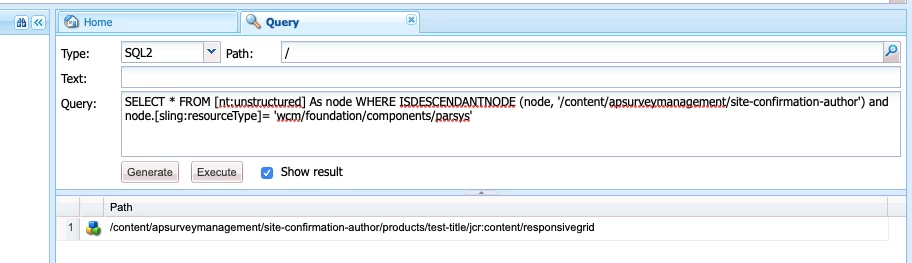
SELECT * FROM [nt:unstructured] As node WHERE ISDESCENDANTNODE (node, '/content/surveymanagement/site-confirmation-author') and node.[sling:resourceType]= 'wcm/foundation/components/parsys'

The above query returns the expected node in 6.1 but gives no nodes in 6.4

When I remove the "node.[sling:resourceType]" condition, it atleast lists out the relevant nodes. So it seems there is something off with the sling:resouceType condition. Is there anything that has changed in the querying syntax? I am unable to get any information on this elsewhere.

Also, when I replaced the sling:resourceType condition with a NAME() condition, the query works. There are other queries that are giving similar issues, so I would much rather get the old queries to work than to look for workarounds.

I hope someone can help me with this. Thanks in advance!
This post is no longer active and is closed to new replies. Need help? Start a new post to ask your question.
Best answer by arunpatidar

Hi,

I tried with your content structure, working for me in my local instance.

I think you can raise a Day care Support Ticket to get it resolved.

11 replies

Ankur_Khare
New Participant
October 10, 2019

Make sure the system user have relevant permissions..

Without proper permission, this will not work from java.

KChAuthor
New Participant
October 10, 2019

Hi Satish,

Yes. Please try with a fresh crx-quickstart installation and see if it helps.

In my case, it was an issue with that particular instance installation although we couldn't identify what went wrong with it. Creating a fresh instance resolved the matter for me.

Regards,

Kavya

New Participant
October 9, 2019

I am facing the same issue. Did you get it resolved?

smacdonald2008
New Participant
December 26, 2018

It could be an upgrade bug as Arun suggests.

arunpatidar
arunpatidarAccepted solution
New Participant
December 26, 2018

Hi,

I tried with your content structure, working for me in my local instance.

I think you can raise a Day care Support Ticket to get it resolved.

Arun Patidar
KChAuthor
New Participant
December 26, 2018

Hi Arun,

Nope. No errors. Just a trace of all steps:

26.12.2018 18:44:31.889 *DEBUG* [0:0:0:0:0:0:0:1 [1545830071774] GET /libs/cq/search/content/querydebug.html HTTP/1.1] com.day.cq.search.impl.builder.QueryImpl executing query (URL):

p.limit=-1&path=%2fcontent%2fapsurveymanagement%2fsite-confirmation-author%2f&property=sling%3aresourceType&property.value=wcm%2ffoundation%2fcomponents%2fparsys&type=nt%3aunstructured

26.12.2018 18:44:31.889 *DEBUG* [0:0:0:0:0:0:0:1 [1545830071774] GET /libs/cq/search/content/querydebug.html HTTP/1.1] com.day.cq.search.impl.builder.QueryImpl executing query (predicate tree):

ROOT=group: limit=-1[

    {path=path: path=/content/apsurveymanagement/site-confirmation-author/}

    {property=property: property=sling:resourceType, value=wcm/foundation/components/parsys}

    {type=type: type=nt:unstructured}

]

26.12.2018 18:44:31.912 *DEBUG* [0:0:0:0:0:0:0:1 [1545830071774] GET /libs/cq/search/content/querydebug.html HTTP/1.1] com.day.cq.search.impl.builder.QueryImpl xpath query: /jcr:root/content/apsurveymanagement/site-confirmation-author//element(*, nt:unstructured)[(@sling:resourceType = 'wcm/foundation/components/parsys')]

26.12.2018 18:44:31.957 *DEBUG* [0:0:0:0:0:0:0:1 [1545830071774] GET /libs/cq/search/content/querydebug.html HTTP/1.1] com.day.cq.search.impl.builder.QueryImpl xpath query creation took 68 ms

26.12.2018 18:44:32.028 *DEBUG* [0:0:0:0:0:0:0:1 [1545830071774] GET /libs/cq/search/content/querydebug.html HTTP/1.1] com.day.cq.search.impl.builder.QueryImpl >> xpath query returned 0 results (getSize)

26.12.2018 18:44:32.029 *DEBUG* [0:0:0:0:0:0:0:1 [1545830071774] GET /libs/cq/search/content/querydebug.html HTTP/1.1] com.day.cq.search.impl.builder.QueryImpl entire query execution took 140 ms

arunpatidar
New Participant
December 26, 2018

ok, Can you check error.log? try to see if any errors when you execute query.

Arun Patidar
KChAuthor
New Participant
December 26, 2018

Hi,

I have attached the results of the debugger here. I haven't ever used this debugger so I am not sure if there is any configurable option that I need to choose.

arunpatidar
New Participant
December 26, 2018

Hi,

Can you try with QueryBuilder

http://localhost:4502/libs/cq/search/content/querydebug.html

Query

path=/content/surveymanagement/site-confirmation-author/

type=nt:unstructured

property=sling:resourceType

property.value=wcm/foundation/components/parsys

p.limit=-1

Arun Patidar
KChAuthor
New Participant
December 26, 2018

Hi,

Thank you for the reply. But unfortunately this still doesn't work for me. I am able to query nodes in another project based on the sling:resourceType value. I am not sure if it is project related. Ideally, I don't think it will be.

I am sharing screenshots of the query and it's response. I am also attaching a screenshot of the node that should ideally be returned.Am I doing something wrong here?