Curl Command to start a workflow on a DAM Asset | Community
Skip to main content
New Participant
June 30, 2022
Solved

Curl Command to start a workflow on a DAM Asset

  • June 30, 2022
  • 2 replies
  • 1469 views

Hi, I'm trying to run Scene7 workflow on DAM Asset via curl command.
Command:

curl -u admin:admin -H User-Agent:curl -F "payload=/content/aemdesign-showcase/images/publications/demo-video-848x477.jpg" -F "payloadType=JCR_PATH" -F "workflowTitle=CurlTitle" -F "startComment=CurlComment" -F "model=/var/workflow/models/Scene7" http://192.168.27.2:4502/etc/workflow/instances

I am getting responses as 
1. Workflow model not found 
OR

2. 
<td>Status</td>
<td><div id="Status">500</div></td>
</tr>
<tr>
<td>Message</td>
<td><div id="Message">java.lang.IllegalArgumentException: Value for key payload can&apos;t be put into node: /content/aemdesign-showcase/images/publications/demo-video-848x477.jpg</div></td>
</tr>
Reference link used:
https://github.com/paulrohrbeck/aem-links/blob/master/curl_cheatsheet.md


Any thoughts on this?
This post is no longer active and is closed to new replies. Need help? Start a new post to ask your question.
Best answer by ShaileshBassi

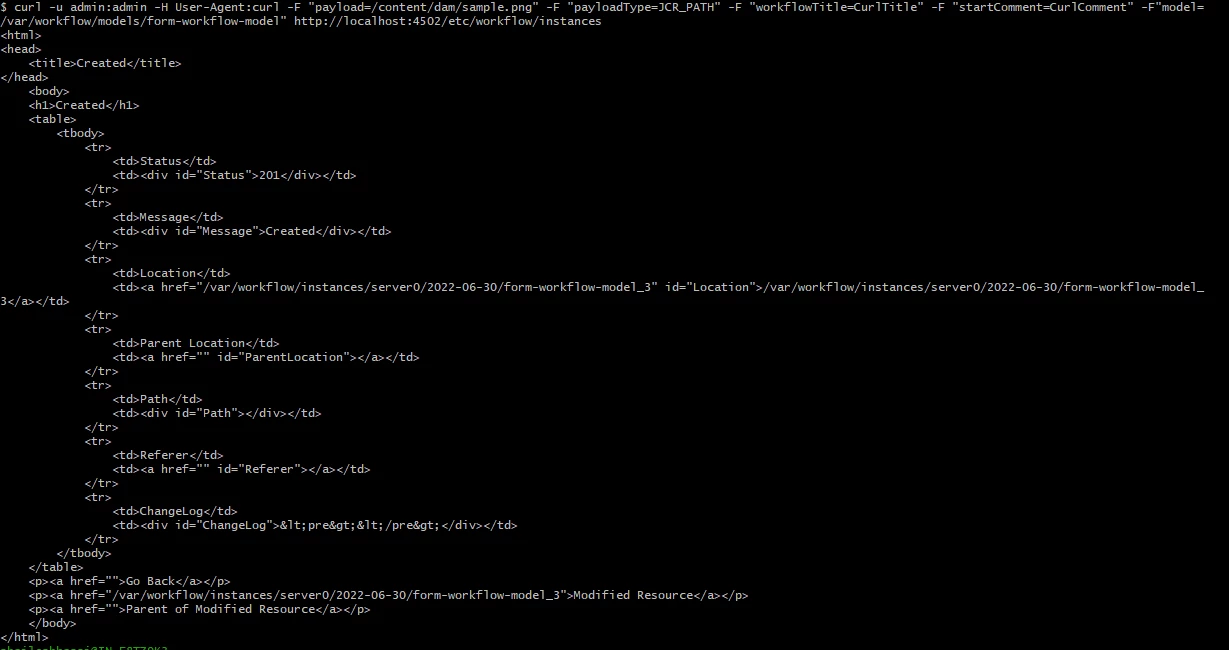
@user21583 Yes, I have tried that for assets as well. It is also working for me. PFB for the screenshot. Same command but now this time, the path is for asset.

curl -u admin:admin -H User-Agent:curl -F "payload=/content/dam/sample.png" -F "payloadType=JCR_PATH" -F "workflowTitle=CurlTitle" -F "startComment=CurlComment" -F"model=/var/workflow/models/form-workflow-model" http://localhost:4502/etc/workflow/instances


2 replies

SantoshSai
New Participant
June 30, 2022

Hi @user21583 ,

Could you tell us what version of AEM you are using? If it's AEM 6.5, I believe you are aware of Common Repository Restructuring in AEM 6.5 for Workflow Instances

Previous location	
/etc/workflow/instances
New location(s) /var/workflow/instances

Also, please verify if your workflow model exists at the location you are trying to hit curl on. 
Hope that helps!

Regards,

Santosh

Santosh Sai
user21583Author
New Participant
July 1, 2022

Thank you for the input @santoshsai , we use 6.5.10.

The above command worked for me after whitelisting my public IPs appropriately.

ShaileshBassi
New Participant
June 30, 2022

@user21583 PFB for the command for starting the workflow

curl -u admin:admin -H User-Agent:curl -F "payload=/content/sample/en" -F "payloadType=JCR_PATH" -F "workflowTitle=CurlTitle" -F "startComment=CurlComment" -F"model=/var/workflow/models/form-workflow-model" http://localhost:4502/etc/workflow/instances

I will getting the workflow started after hitting the curl command

Hope this helps.

Thanks 


user21583Author
New Participant
June 30, 2022

Hi @shaileshbassi ,

You are trying for a page.. could you please try for a DAM Asset?

ShaileshBassi
ShaileshBassiAccepted solution
New Participant
June 30, 2022

@user21583 Yes, I have tried that for assets as well. It is also working for me. PFB for the screenshot. Same command but now this time, the path is for asset.

curl -u admin:admin -H User-Agent:curl -F "payload=/content/dam/sample.png" -F "payloadType=JCR_PATH" -F "workflowTitle=CurlTitle" -F "startComment=CurlComment" -F"model=/var/workflow/models/form-workflow-model" http://localhost:4502/etc/workflow/instances