Custom actions on toolbar in Touch UI | Community
Skip to main content
Level 2
Aug 17, 2018 7:44 PM UTC
Solved

Custom actions on toolbar in Touch UI

Hello everyone,

I found this article: Re: Adding custom actions to the toolbar in Touch UI

,but noticed that it is a bit hard for me, I'm not sure that it is my answer.

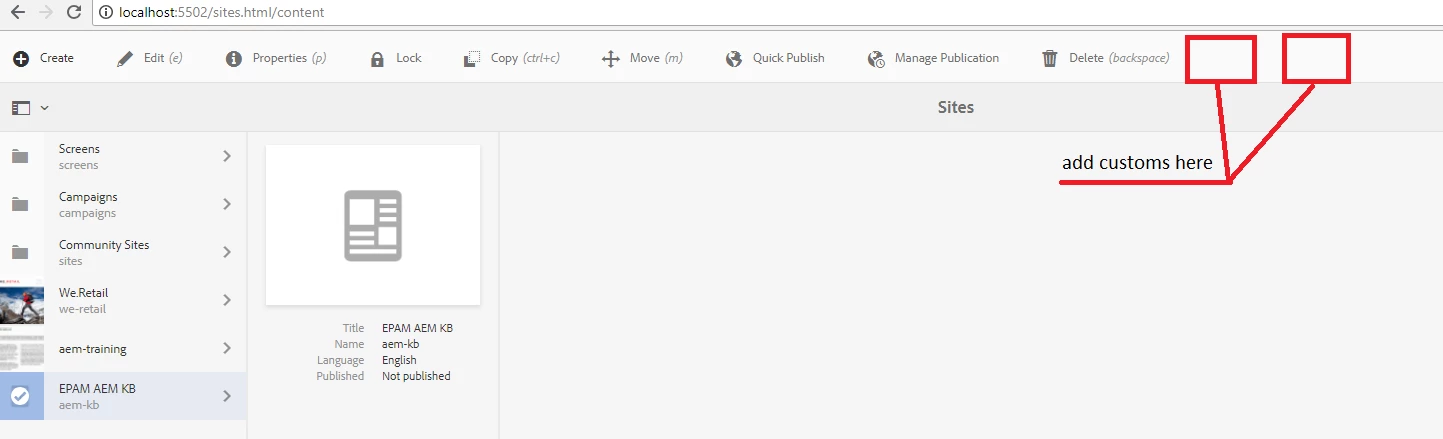
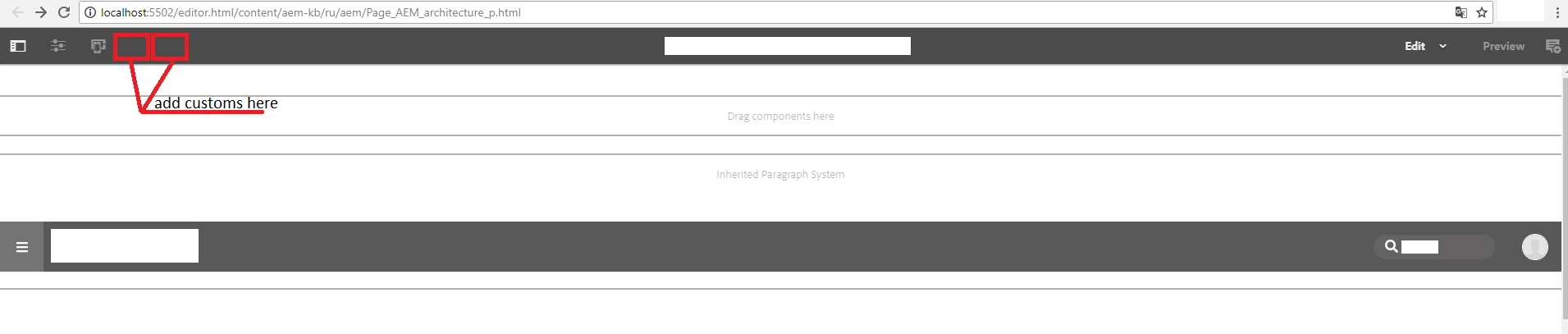
I want to add some actions to my pages, they should be possible to use by users with different permissions and can be called up on different pages.

Are there any tutorials or hints, that can teach it to me?

Following are screenshots to improve understanding of my goal:

Thanks,

Dmitriy.

This post is no longer active and is closed to new replies. Need help? Start a new post to ask your question.
arunpatidar
arunpatidarAccepted solution
New Participant
Aug 18, 2018 11:17 PM UTC

Hi Dmitriy,

1. for page edit option you need to add one more item at /libs/wcm/core/content/sites/jcr:content/actions/selection like other.

If you want to do some action on button you can add action granite resource like lock action /libs/wcm/core/content/sites/jcr:content/actions/selection/lockpage

and we you want to open another page on click you can add item like 'edit' or 'properties' /libs/wcm/core/content/sites/jcr:content/actions/selection/viewproperties

2. For adding items in editor bar, you need to add new nodes at /libs/wcm/core/content/editor/jcr:content/content/items/content/header/items/headerbar/items

For restriction this action based on user permission you need to add RenderCondition to node, example /libs/wcm/core/content/sites/jcr:content/actions/selection/lockpage/granite:rendercondition to hide lack button if user doesn't have jcr:readAccessControl privilages more info Render Conditions — Granite UI 1.0 documentation  and How to prevent page locking (through user rights or other means)?

Note : Don't make any changes inside /libs/ folder overlay nodes in /apps/ folder and then modify.

I did not found any tutorial for this but you can check any existing action for reference.

Thanks

Arun
Arun Patidar

1 reply

arunpatidar
arunpatidarAccepted solution
New Participant
Aug 18, 2018 11:17 PM UTC

Hi Dmitriy,

1. for page edit option you need to add one more item at /libs/wcm/core/content/sites/jcr:content/actions/selection like other.

If you want to do some action on button you can add action granite resource like lock action /libs/wcm/core/content/sites/jcr:content/actions/selection/lockpage

and we you want to open another page on click you can add item like 'edit' or 'properties' /libs/wcm/core/content/sites/jcr:content/actions/selection/viewproperties

2. For adding items in editor bar, you need to add new nodes at /libs/wcm/core/content/editor/jcr:content/content/items/content/header/items/headerbar/items

For restriction this action based on user permission you need to add RenderCondition to node, example /libs/wcm/core/content/sites/jcr:content/actions/selection/lockpage/granite:rendercondition to hide lack button if user doesn't have jcr:readAccessControl privilages more info Render Conditions — Granite UI 1.0 documentation  and How to prevent page locking (through user rights or other means)?

Note : Don't make any changes inside /libs/ folder overlay nodes in /apps/ folder and then modify.

I did not found any tutorial for this but you can check any existing action for reference.

Thanks

Arun
Translate
Arun Patidar
