Custom component with subcomponent not appearing correctly in content tree
Hello Everyone!
Have a quick question regarding calling components inside another component.
I have a main navigation custom component, where I am pulling in the 'image' and 'navigation' core components using the data-sly-resource. Please refer to the below code snippet.
<sly data-sly-resource="${ 'image' @ resourceType='appId/components/image', decorationTagName='div', cssClassName='cmp-mainnav__logo'}"></sly>
<sly data-sly-resource="${ 'navigation' @ resourceType='appId/components/navigation', decorationTagName='div'}"></sly>
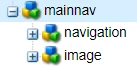
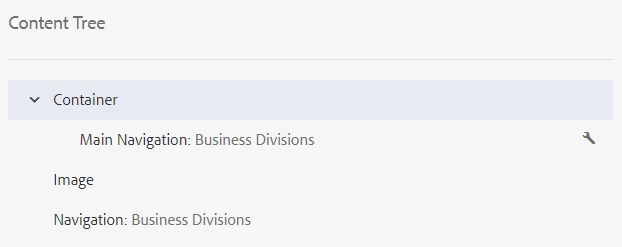
Everything is working fine except the one thing that I noticed is that in the Content Tree of Edit Mode of the page, those resources are not appearing under the main navigation component. It's appearing outside of the container though (Screenshot 2). Things appear correctly in CRXDE (Screenshot 1).
1. CRXDE
2. Content Tree (Edit Mode)
Not sure if this is the default behavior. Or is there anything I am doing wrong here?
I want the resources I am loading using data-sly-resource to appear under the mainnav component in Content Tree view.
Any feedback would be appreciated.
Thank you!