Custom DAM Update Asset workflow | Community
Skip to main content
Level 4
Sep 9, 2020 8:47 AM UTC
Solved

Custom DAM Update Asset workflow

When we upload an Asset, the OOTB DAM Update Asset workflow gets triggered automatically. But, i need to trigger my custom workflow instead of the OOTB workflow. Which paths/js files do i have to update to get the required results? Thanks!
This post is no longer active and is closed to new replies. Need help? Start a new post to ask your question.
AlbinIs1Accepted solution
Level 2
Sep 9, 2020 12:51 PM UTC

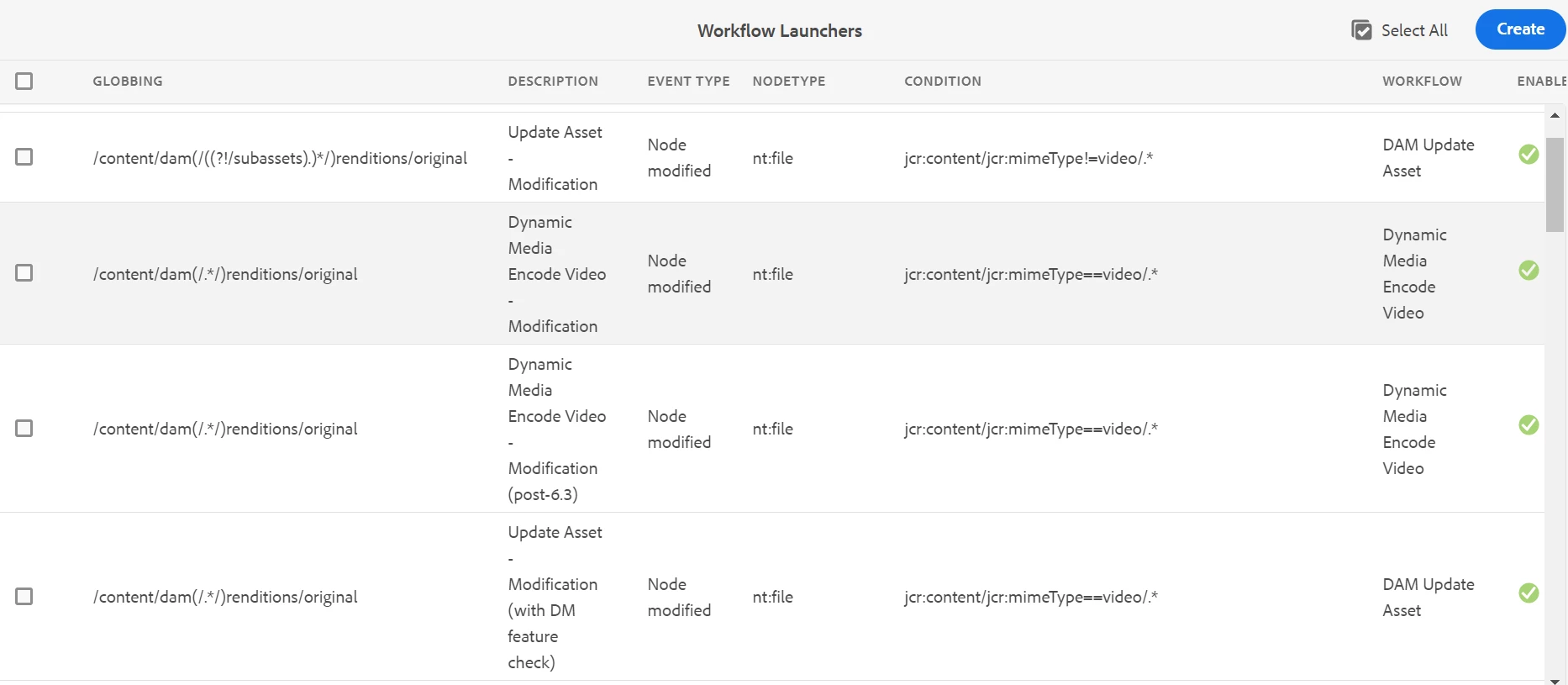
The workflows are started through the workflow launcher configurations

Disable the launcher starting(launchers configured for creating and updating nodes) the OOTB workflow and create a new launcher to start the custom workflow.

http://localhost:4502/libs/cq/workflow/admin/console/content/launchers.html


Regards

Albin I

www.albinsblog.com

3 replies

Nikhil-Kumar
New Participant
Sep 9, 2020 3:12 PM UTC

@shaheena_sk 

Disable the existing DAM Update Asset workflow and add use your custom workflow.

NOTE: On disabling the exiting OOTB workflow you are totally making it applicable throughout your AEM instance.  Make sure you custom workflow handles that smartly.

Thanks,
Nikhil

Translate
Vaibhavi_J
Level 7
Sep 9, 2020 1:12 PM UTC

Hi @shaheena_sk , 

You can achieve this by disabling the DAM update workflow from launcher console.

Disabling the DAM update workflow will have a global impact on assets which will upload on DAM. If your custom implementation cover the functionally you can go ahead and disable it. 

  • Navigate to Tools->workflow->launchers

http://localhost:4502/libs/cq/workflow/admin/console/content/launchers.html.

  • Select the DAM Update Asset workflow
  • Open the properties and select disable 


Have a look at below thread for similar issue. 

https://experienceleaguecommunities.adobe.com/t5/adobe-experience-manager/how-to-disable-dam-update-asset-workflow-for-a-specific-path/qaq-p/248040

Translate
AlbinIs1Accepted solution
Level 2
Sep 9, 2020 12:51 PM UTC

The workflows are started through the workflow launcher configurations

Disable the launcher starting(launchers configured for creating and updating nodes) the OOTB workflow and create a new launcher to start the custom workflow.

http://localhost:4502/libs/cq/workflow/admin/console/content/launchers.html


Regards

Albin I

www.albinsblog.com

Translate