Custom html structure in page component
Hi all,
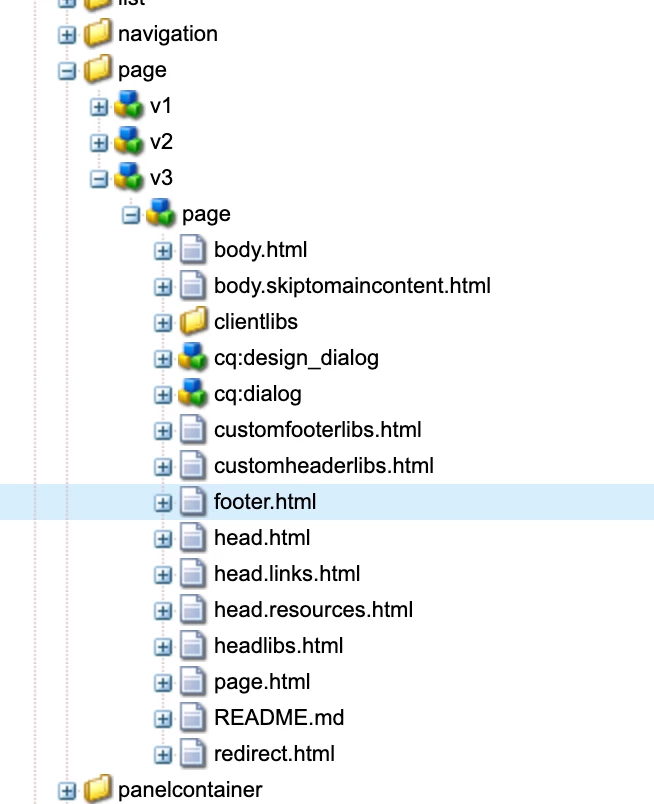
I am working on AEMaaCS and need to make some changes to the page component. Basically I have to add some html structure to the footer section of the page component. My proxy page component is referring to the v3 of Page component. As per my understanding, following code in footer.html is rendering my footer XF inside of the footer tag:
<sly data-sly-list="${page.htmlPageItems}"><script data-sly-test="${item.location.name == 'footer'}"
data-sly-element="${item.element.name @ context='unsafe'}" data-sly-attribute="${item.attributes}"></script>
</sly>
Writing my code after this creates the following structure:
<body class="basicpage">
<script>...</script>
<div class="body-wrapper">
<div class="root container responsivegrid">
... ... ...
<header>...</header>
<main>...</main>
</footer>my footer XF</footer>
... ..
</div
</div>
<script>....</script>
<div> My custom html code</div>
</body>
I want my code to be added right after the <footer> tag or inside the <footer> resulting in the following structure:
<body class="basicpage">
<script>...</script>
<div class="body-wrapper">
<div class="root container responsivegrid">
... ... ...
<header>...</header>
<main>...</main>
</footer>my footer XF</footer>
<div> My custom html code</div>
... ..
</div
</div>
<script>....</script>
</body>
Is there a way to make changes in my proxy page component for this requirement?
Thanks!