Custom publish page button next to Edit in Edit mode | Community
Skip to main content
Level 4
Mar 16, 2023 4:11 PM UTC
Solved

Custom publish page button next to Edit in Edit mode

Hi, 

I would like to add a Publish Page button next to the Edit Button on top right side of the header in Edit mode of a page. 
Can this be achieved by overriding? 

This post is no longer active and is closed to new replies. Need help? Start a new post to ask your question.
SivakumarKanoori
SivakumarKanooriAccepted solution
New Participant
Mar 17, 2023 5:06 AM UTC

@shibani06 : You can achieve this by overlay.


Go to this path :

/libs/wcm/core/content/editor/jcr:content/content/items/content/header/items/headerbar/items/pageinfopopover

under this items/list/items you can see publish node. You can copy the publish node to parallell to parent node pageinfopopover.


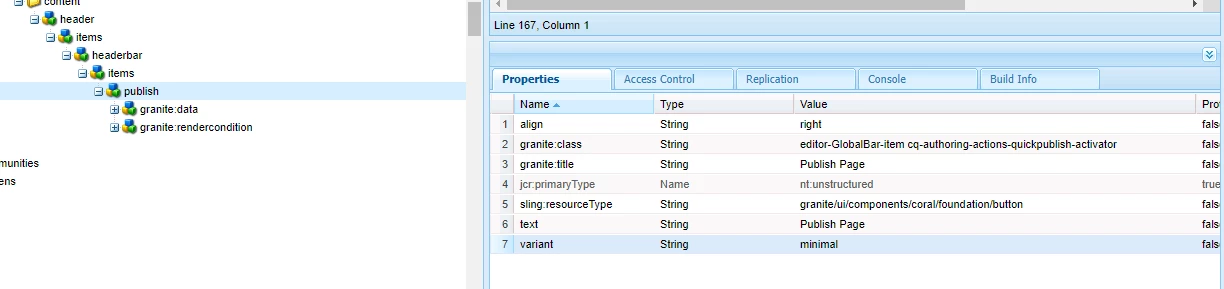
then go to the publish node and right click and select overlay node. once its overlayed under the /apps/ just go to publish node and add property align , variant and granite:class as below.


then it shows the publish page option and which is publishing properly when click on that .


Thanks,

Siva


Thanks,Siva

9 replies

SivakumarKanoori
SivakumarKanooriAccepted solution
New Participant
Mar 17, 2023 5:06 AM UTC

@shibani06 : You can achieve this by overlay.


Go to this path :

/libs/wcm/core/content/editor/jcr:content/content/items/content/header/items/headerbar/items/pageinfopopover

under this items/list/items you can see publish node. You can copy the publish node to parallell to parent node pageinfopopover.


then go to the publish node and right click and select overlay node. once its overlayed under the /apps/ just go to publish node and add property align , variant and granite:class as below.


then it shows the publish page option and which is publishing properly when click on that .


Thanks,

Siva


Translate
Thanks,Siva
SHIBANI06Author
Level 4
Mar 17, 2023 5:44 AM UTC

Thanks for the detailed explanation. This should work for custom project pages as well right? Im not sure why it isn't working for me.
Is this correct? Also before overlaying, we have to copy the publish node and paste under this path ? 
/libs/wcm/core/content/editor/jcr:content/content/items/content/header/items/headerbar/items/pageinfopopover


Translate
SHIBANI06Author
Level 4
Mar 17, 2023 5:53 AM UTC

It worked !!! Thank you !

Translate
Parusharam
Level 2
Mar 16, 2023 6:02 PM UTC

You can achieve this by overlaying  /libs/wcm/core/content/sites/actions/publish.

Translate
arunpatidar
New Participant
Mar 16, 2023 4:27 PM UTC

Yes, this can be achieved with overlay

Translate
Arun Patidar
SHIBANI06Author
Level 4
Mar 17, 2023 10:17 AM UTC

Can we do it for Rollout as well ? Could you pls let me know the steps if possible as the overlaid rollout is not showing up in my editor page.

Translate