Custom workflow should called on click to “Publish to brand portal” | Community
Skip to main content
chetan001
New Participant
July 28, 2021
Solved

Custom workflow should called on click to “Publish to brand portal”

  • July 28, 2021
  • 1 reply
  • 750 views

Hi,


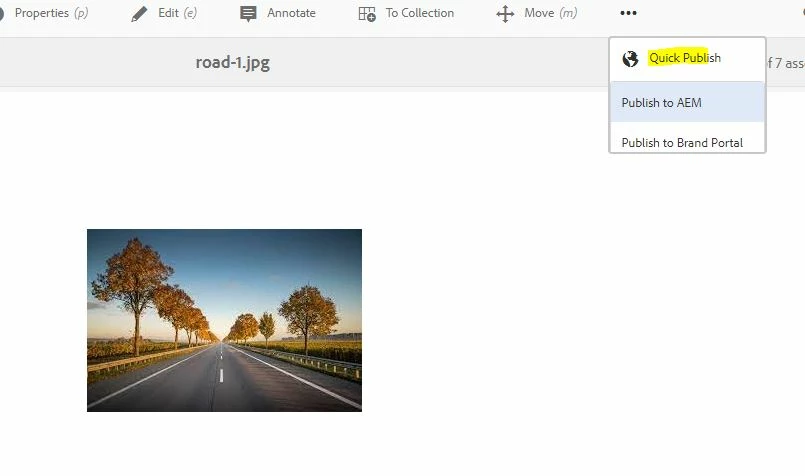
I have a requirement where I need to call my custom asset workflow on click of “Publish to brand portal” in quick publish tab.


Can I overlay this Ui and call custom workflow ?


Appreciate for any lead..


Thanks in advance


This post is no longer active and is closed to new replies. Need help? Start a new post to ask your question.
Best answer by RajaShankar

Hi @chetan001 

For this you need to overlay the /libs/dam/gui/content/assetdetails/jcr:content/actions/selection/quickpublish and also in /libs/dam/gui/content/asset/jcr:content/actions/selection/quickpublish to your apps layer 

Overlay in apps /apps/dam/gui/content/assetdetails/jcr:content/actions/selection/quickpublish

Now browse to “<asset and assetdetails path>/jcr:content/head/clientlibs

Overlay clientlibs node in “/apps”. In the client lib categories you can see dam.gui.admin.publishasset.coral .You can get the specific path of this category using dumplib and similar to that client library create your own custom client library under above created apps node.


Refer below for more details:

https://techrevel.blog/2018/02/09/customizing-aem-assets-toolbar/

Hope this helps.

Regards,

Rajashankar.R

 

1 reply

RajaShankar
RajaShankarAccepted solution
New Participant
July 28, 2021

Hi @chetan001 

For this you need to overlay the /libs/dam/gui/content/assetdetails/jcr:content/actions/selection/quickpublish and also in /libs/dam/gui/content/asset/jcr:content/actions/selection/quickpublish to your apps layer 

Overlay in apps /apps/dam/gui/content/assetdetails/jcr:content/actions/selection/quickpublish

Now browse to “<asset and assetdetails path>/jcr:content/head/clientlibs

Overlay clientlibs node in “/apps”. In the client lib categories you can see dam.gui.admin.publishasset.coral .You can get the specific path of this category using dumplib and similar to that client library create your own custom client library under above created apps node.


Refer below for more details:

https://techrevel.blog/2018/02/09/customizing-aem-assets-toolbar/

Hope this helps.

Regards,

Rajashankar.R
 

chetan001
chetan001Author
New Participant
August 4, 2021
Thanks Rajashankar for your comments. I tried your approach but that did not work for my use case. The solution, I have implemented overriding the “FolderSyncHandler” servlet and called my custom workflow. This is removing existing brand portal publisher configuration and using my custom workflow to approve assets