Customise the Granite Workflow Queue config for custom workflow. | Community
Skip to main content
Employee
December 10, 2024
Solved

Customise the Granite Workflow Queue config for custom workflow.

  • December 10, 2024
  • 2 replies
  • 813 views

Hi,

I need to add job queue config for my custom workflow. I need to change the queue type to ordered. In OOTB config it's parallel. I have added new config for my workflow, still it's picking the OOTB config and calling the wf in parallel queue.

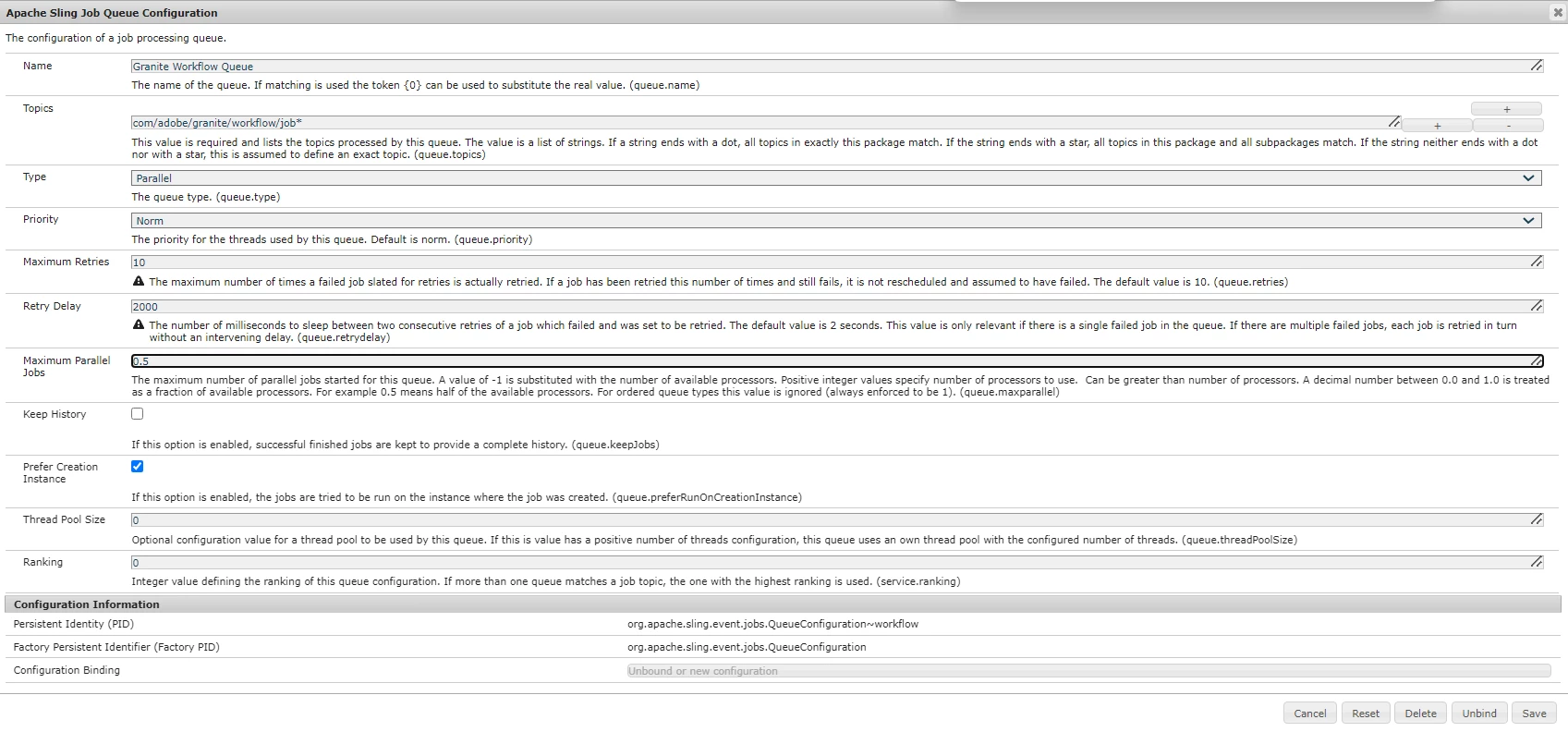
OOTB config:
topic: "com/adobe/granite/workflow/job*"

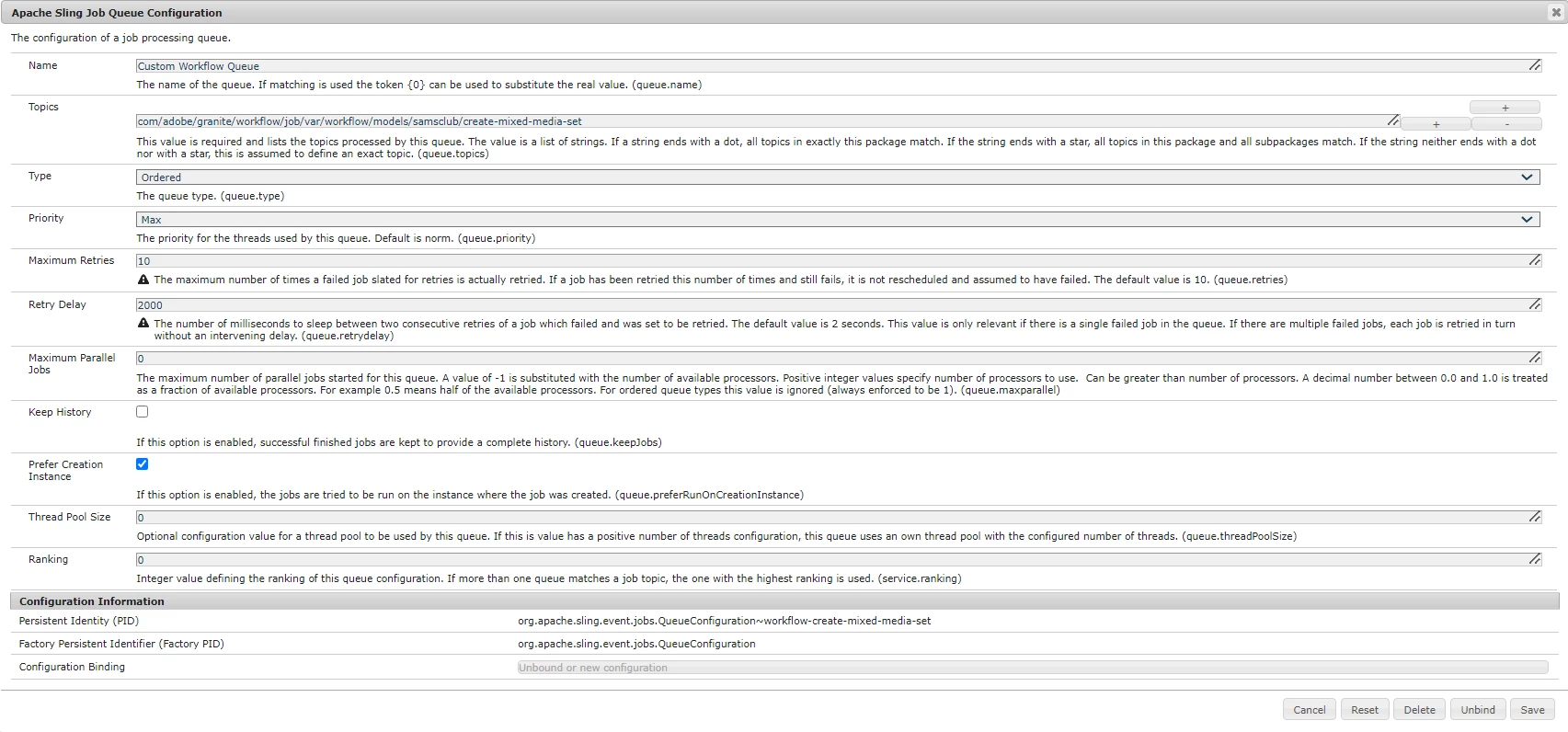
Custom Config:
I have added the wf /var path as the topic "com/adobe/granite/workflow/job/var/workflow/models/samsclub/create-mixed-media-set"
 

I don't want to change the ootb config considering it might impact other wf's. Please let me what am I missing in my custom config and what should be changed.

Thank you,
Keerthana H N

 

Best answer by lukasz-m

Hi @keerthana_h_n,

I think the problem could be the topic name. If you will look into description of Topics field in configuration:

This value is required and lists the topics processed by this queue. The value is a list of strings. If a string ends with a dot, all topics in exactly this package match. If the string ends with a star, all topics in this package and all subpackages match. If the string neither ends with a dot nor with a star, this is assumed to define an exact topic. (queue.topics)

Base on above it looks that your custom topic

com/adobe/granite/workflow/job/var/workflow/models/samsclub/create-mixed-media-set

matches to OOTB config rule:

com/adobe/granite/workflow/job*

You can try one of below options:

  • Rename your topic to something unique which will not include com/adobe/granite/workflow - this should clearly indicates which queue configuration will be used.
  • Increase Ranking value of your custom configuration, so there is a chance it will be picked up instead of OOTB one.

2 replies

kautuk_sahni
Employee
January 7, 2025

@keerthana_h_n Did you find the suggestion helpful? Please let us know if you require more information. Otherwise, please mark the answer as correct for posterity. If you've discovered a solution yourself, we would appreciate it if you could share it with the community. Thank you!

Kautuk Sahni
lukasz-m
lukasz-mAccepted solution
New Participant
December 10, 2024

Hi @keerthana_h_n,

I think the problem could be the topic name. If you will look into description of Topics field in configuration:

This value is required and lists the topics processed by this queue. The value is a list of strings. If a string ends with a dot, all topics in exactly this package match. If the string ends with a star, all topics in this package and all subpackages match. If the string neither ends with a dot nor with a star, this is assumed to define an exact topic. (queue.topics)

Base on above it looks that your custom topic

com/adobe/granite/workflow/job/var/workflow/models/samsclub/create-mixed-media-set

matches to OOTB config rule:

com/adobe/granite/workflow/job*

You can try one of below options:

  • Rename your topic to something unique which will not include com/adobe/granite/workflow - this should clearly indicates which queue configuration will be used.
  • Increase Ranking value of your custom configuration, so there is a chance it will be picked up instead of OOTB one.
Employee
December 10, 2024

Hi @lukasz-m 
There was a document where it said, for workflow queue config I need to pass the /var location of the model after com/adobe/granite/workflow/job. Hence I added "com/adobe/granite/workflow/job/var/workflow/models/samsclub/create-mixed-media-set" as my workflow topic.


Also what should be the ranking?

lukasz-m
New Participant
December 10, 2024

There is no magic number in terms of ranking value, simply set something higher than OOTB value, so it can be 10, 100 etc