
Customize Sites.html in Touch UI | Community
Skip to main content
VeenaVikraman
New Participant
August 29, 2017
Solved

Customize Sites.html in Touch UI

  • August 29, 2017
  • 6 replies
  • 2193 views

Hi All

     Recently I was interacting with few of authors who were for the very first time going to use the Touch UI . One of the questions which was raised in the session was, "How do I know if the content is published or not". Obviously we have a column which specifies that against each page in the list view. But what they were looking at was a more user friendly view . Something like the green and amber color coding we had in classic UI.

     My question to you guys is , if I plan to customize the sites.html and try to bring such a user experience, how to approach the same. How can I customize the existing site admin pages ? Can I restrict that to a particular content tree ?
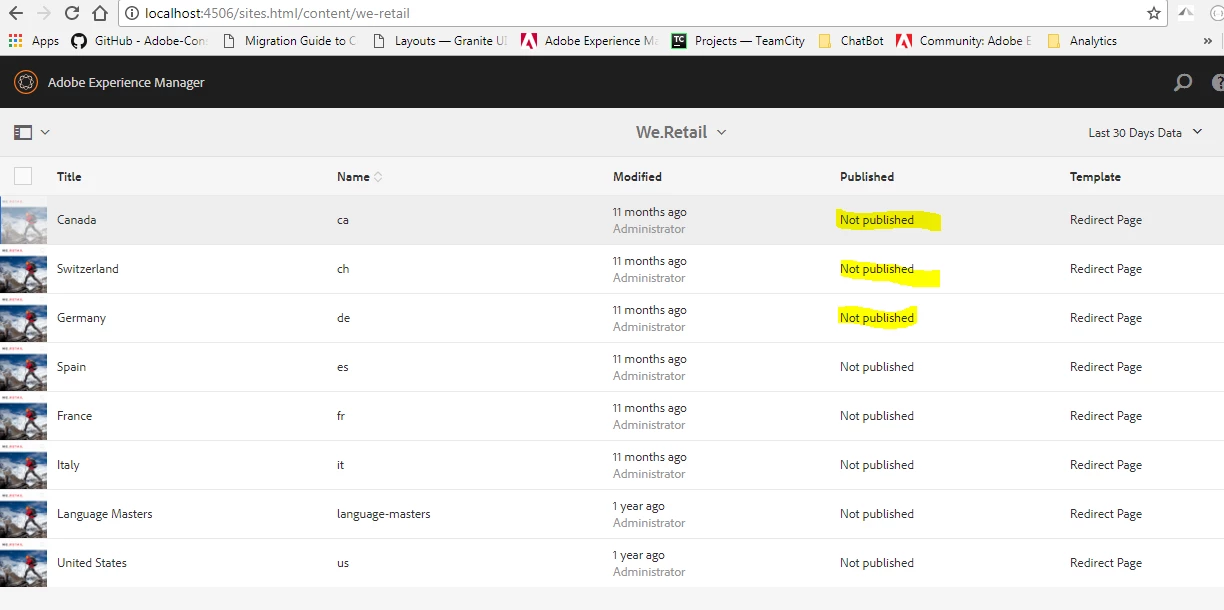
TIA

Veena

This post is no longer active and is closed to new replies. Need help? Start a new post to ask your question.
Best answer by smacdonald2008

If the page is published, the published Column will be updated and shows time - as discussed in this AEM topic:

Publishing Pages

Its not recommend to override this and its not supported. That is, if you break something - this is not covered under support.

6 replies

VeenaVikraman
New Participant
August 30, 2017

Sure . That helps. I can convey the same to the editors.

smacdonald2008
New Participant
August 30, 2017

No - like i said - if it breaks something else - support  typically does not support overriding the AEM UI like this. I would recommend getting used to the new functionality as oppsed to trying to make it look like Classic UI.

VeenaVikraman
New Participant
August 30, 2017

Thanks Scott. So a customization in that level is not recommended right ?

VeenaVikraman
New Participant
August 30, 2017

Thanks for reply Diego . I am aware of Classic UI customization. I would need to do some kind of customization in Touch UI

smacdonald2008
smacdonald2008Accepted solution
New Participant
August 30, 2017

If the page is published, the published Column will be updated and shows time - as discussed in this AEM topic:

Publishing Pages

Its not recommend to override this and its not supported. That is, if you break something - this is not covered under support.

Diego_Fontan
New Participant
August 30, 2017

you can check this document to customize site admin page: Customizing the Websites Console (Classic UI)