
DataSourcePool in WorkflowProcess - unsolved | Community
Skip to main content
crich2784
New Participant
May 27, 2021
Solved

DataSourcePool in WorkflowProcess - unsolved

  • May 27, 2021
  • 2 replies
  • 1467 views

Don't know how my answer was accepted because I didn't accept it

https://experienceleaguecommunities.adobe.com/t5/adobe-experience-manager/datasourcepool-in-workflowprocess/qaq-p/409972


I'll give some more detail because I have RTFM as was answered (and accepted mysteriously).


This is my code for injecting the DataSourcePool Reference.

The SIADB is not found.


public class queryForSingleRow implements WorkflowProcess { private static final Logger log = LoggerFactory.getLogger(queryForSingleRow.class); @3214626 private DataSourcePool dsp; @9944223 public void execute(WorkItem workItem, WorkflowSession workflowSession, MetaDataMap args) throws WorkflowException { String dataSourceName = "SIADB"; Connection connection = null; DataSource ds = null; try { log.info("Checking datasources"); for(Iterator<String> it = dsp.getAllJndiDataSourceNames().iterator(); it.hasNext();) { String dsname = it.next(); log.info("Found datasource " + dsname); } log.info("Using DataSourcePool service lookup to get connection pool " + dataSourceName); ds = (DataSource) dsp.getDataSource(dataSourceName); connection = ds.getConnection(); //More code after

Log file output:

 2021-05-27 13:41:21.737 INFO [com.s360g.aem.workflowcomponent.custom.queryForSingleRow] Checking datasources
2021-05-27 13:41:21.737 INFO [com.s360g.aem.workflowcomponent.custom.queryForSingleRow] Using DataSourcePool service lookup to get connection pool SIADB
2021-05-27 13:41:21.737 INFO [com.s360g.aem.workflowcomponent.custom.queryForSingleRow] Unable to find datasource SIADB.
com.day.commons.datasource.poolservice.DataSourceNotFoundException: No data source found with name 'SIADB' (after asking 0 providers)


I have this in CRX - /apps/source360/com.day.commons.datasource.jdbcpool.JdbcPoolService-SIADB
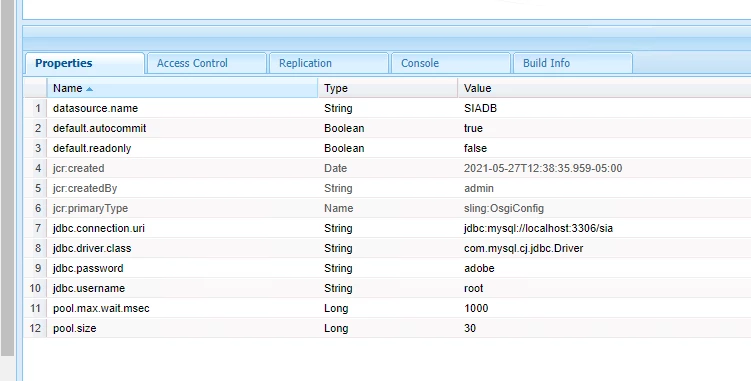


I know it's probably something simple like permissions or proper placement of the sling:OsgiConfig.


Help is appreciated.


This post is no longer active and is closed to new replies. Need help? Start a new post to ask your question.
Best answer by davidjgonzalezzzz

Just a quick note, @3214626 should be @Reference (capital R).


Then, OSGi configs in the JCR must be in folder named "config" (or "config.<runmode>") that is no more than 4 levels from the root; So it should be at: /apps/source360/config/com.day.commons.datasource.jdbcpool.JdbcPoolService-SIADB


Lastly, you should be able to do away with your lookup logic and let OSGi annotations do all the hard work...


@Reference(target="(datasource.name=SIADB)")

private DataSourcePool dsp;

2 replies

davidjgonzalezzzzAccepted solution
Employee
May 27, 2021

Just a quick note, @3214626 should be @Reference (capital R).


Then, OSGi configs in the JCR must be in folder named "config" (or "config.<runmode>") that is no more than 4 levels from the root; So it should be at: /apps/source360/config/com.day.commons.datasource.jdbcpool.JdbcPoolService-SIADB


Lastly, you should be able to do away with your lookup logic and let OSGi annotations do all the hard work...


@Reference(target="(datasource.name=SIADB)")

private DataSourcePool dsp;

crich2784
crich2784Author
New Participant
May 27, 2021
David - Awesome. Thanks. I'm trying to pass the datasource name as a parameter from dialog thus, not putting it in the code. But, this explains why my stuff wasn't working also. The documentation doesn't mention the config directory part. All good. Thanks for replying.
crich2784
crich2784Author
New Participant
May 27, 2021

Ok, I figured it out.


Making an sling:OsgiConfig node in CRX manually does not work as the instructions imply.


Go to ConfigMgr

Search for jdbcpool

Add new configuration.  

The datasource.name is waaay at the bottom - I missed that.

Save it and it works.