Date value is not populating in page and not retain in dialog | Community
Skip to main content
Aug 3, 2017 8:57 AM UTC
Solved

Date value is not populating in page and not retain in dialog

HI,

I am not able to populate the Date value from datepicker. Please find the JCR nodes below:
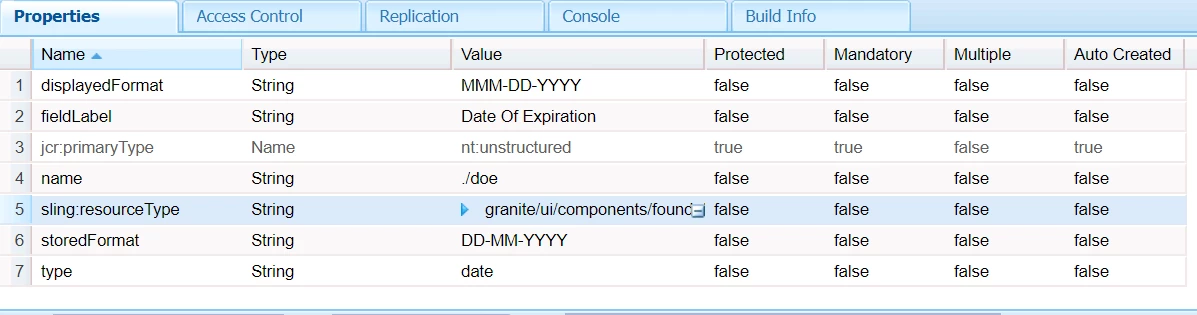
code in sightly <h1>${properties.doe}</h1>

Regards,

Sandhya.

This post is no longer active and is closed to new replies. Need help? Start a new post to ask your question.
susheel
susheelAccepted solution
Level 5
Aug 3, 2017 2:24 PM UTC

Hi sandhya,

For the value storage datetime will work as we discussed. Seems like format in sightly is not working in 6.2. So we need to write a formatter like below for your component.

package apps.project.components.author.componentname;

import java.text.SimpleDateFormat;

import java.util.Calendar;

import com.adobe.cq.sightly.WCMUsePojo;

public class DateFormatter extends WCMUsePojo {

    private String formattedDate;

    @Override

    public void activate() {

    Calendar date  = get("date", Calendar.class);

    String format =  get("format",String.class);

    SimpleDateFormat formatter = new SimpleDateFormat(format);

    formattedDate = formatter.format(date.getTime());

    }   

    public String getFormattedDate() {

        return formattedDate;

    }

}

<sly data-sly-use.date="${'DateFormatter' @ date=properties.doe,format='dd/MM/yyyy'}">
    ${date.formattedDate}
</sly>

14 replies

Aug 3, 2017 10:08 AM UTC

Hi Susheel,

${'YYYY-MM-DD' @ format=properties.doe,type='datetime'}

Couldn't able to reply to your mail,its not delivering.

Translate
susheel
Level 5
Aug 3, 2017 10:03 AM UTC

can you show the stored value node ?

For me Its working fine.

Translate
Aug 3, 2017 9:56 AM UTC

Hi Susheel,

I have tried changing the type="date" to "datetime",Value is retaining in dialog But still it is not displaying on page even after giving

${'MMM-dd-yyyy' @ format=properties.doe,type='datetime'}

It just displaying  "MMM-dd-yyyy" on page.

Regards,

Sandhya.

Translate
susheel
Level 5
Aug 3, 2017 9:24 AM UTC

Hi Sandhya,

Can you check the same thing in firefox browser, if the value is getting retained or not.

If the issue still exists you can use type as datetime to fix it temporarily.

We also faced this issue in chrome due to some browser restrictions.

Coming to display part:

As this is a date picker. It is stored as Date object, so you need to read the values as below.

Date: ${'dd-MM-yyyy' @ format=properties.doe]}
(or)

Date: ${'dd-MM-yyyy HH:mm' @ format=properties.doe, timezone='GMT+05:30'}

Go through this link as well : htl-spec/SPECIFICATION.md at master · Adobe-Marketing-Cloud/htl-spec · GitHub

Translate