Datepicker in multifleld does not show persisted values - AEM 6.2 SP1 | Community
Skip to main content
New Participant
August 29, 2017
Solved

Datepicker in multifleld does not show persisted values - AEM 6.2 SP1

  • August 29, 2017
  • 6 replies
  • 2319 views

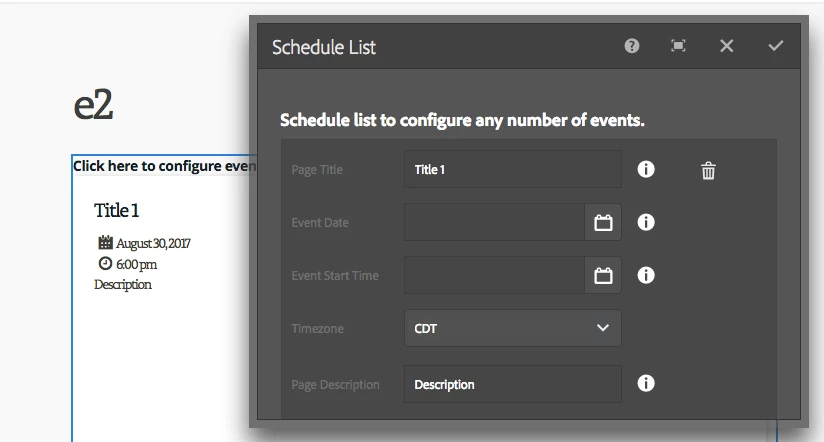
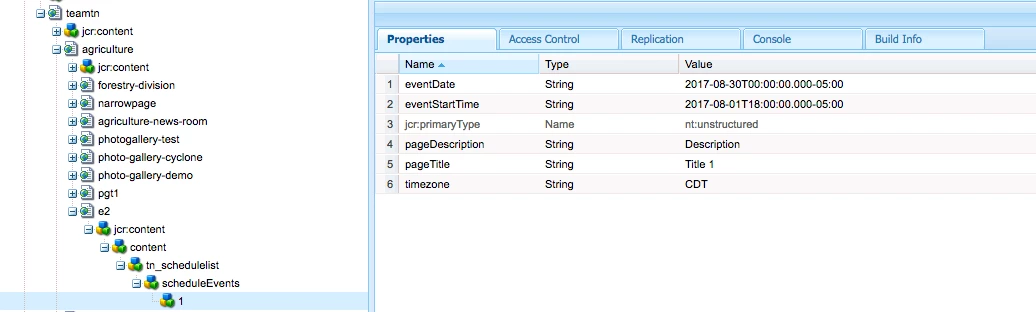
The values saved into "date" and "time" fields are not persisted when we try to edit the component. They are saved as "string" on the node. What maybe causing this?

We are using AEM 6.2 SP1, ACS AEM Commons 3.10.0

_cq_dialog.xml

<eventDate

jcr:primaryType="nt:unstructured"

sling:resourceType="granite/ui/components/foundation/form/datepicker"

type="date"

class="field"

displayedFormat="YYYY-MM-DD"

fieldLabel="Event Date"

fieldDescription="Scheduled date of the event."

name="./eventDate"/>

This post is no longer active and is closed to new replies. Need help? Start a new post to ask your question.
Best answer by konathalasuren

I was able to resolve this. Adding solution.

By default if we leave, acs-commons-nested=“” , the data is stored as one JSON. While the code I was handing in the backend was looking for multiple nodes for each event. We can resolve this couple ways:

1. JSON_STORE or “" (all events are stored as one Json string)
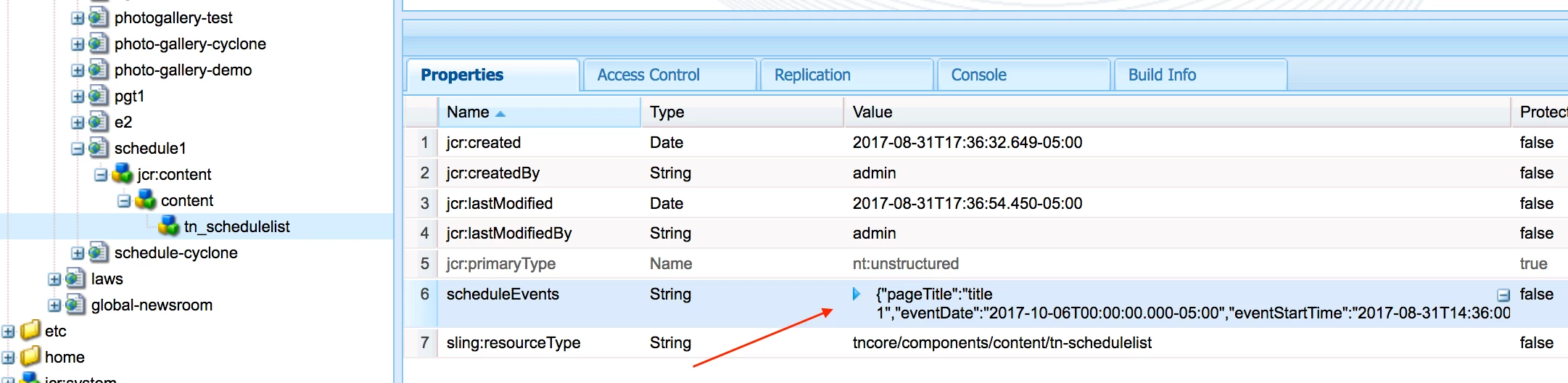
<scheduleEvents jcr:primaryType=“nt:unstructured" sling:resourceType="granite/ui/components/foundation/form/multifield” class="full-width">

    <field jcr:primaryType=“nt:unstructured" sling:resourceType="granite/ui/components/foundation/form/fieldset” acs-commons-nested=“JSON_STORE" name="./scheduleEvents”>

    <layout jcr:primaryType=“nt:unstructured" sling:resourceType="granite/ui/components/foundation/layouts/fixedcolumns” method="absolute”/>

    <items jcr:primaryType="nt:unstructured”>

      <column jcr:primaryType=“nt:unstructured" sling:resourceType="granite/ui/components/foundation/container”>

         <items jcr:primaryType="nt:unstructured”>

            <eventDate jcr:primaryType=“nt:unstructured" sling:resourceType="granite/ui/components/foundation/form/datepicker” type=“date" displayedFormat="YYYY-MM-DD” fieldLabel="Event Date” fieldDescription="Scheduled date of the event.” name="./eventDate”/>

         </items>

Backend code:

@ValueMapValue(name="scheduleEvents")

protected String[] scheduleEventsArray = null;

...

if (scheduleEventsArray != null && scheduleEventsArray.length > 0) {

  for( String section : scheduleEventsArray ) {

    Map<String, String> props = (Map<String, String>) new Gson().fromJson(section, Map.class);

      eventDate = props.get("eventDate”);

2. NODE_STORE (Each event is stored as a node)
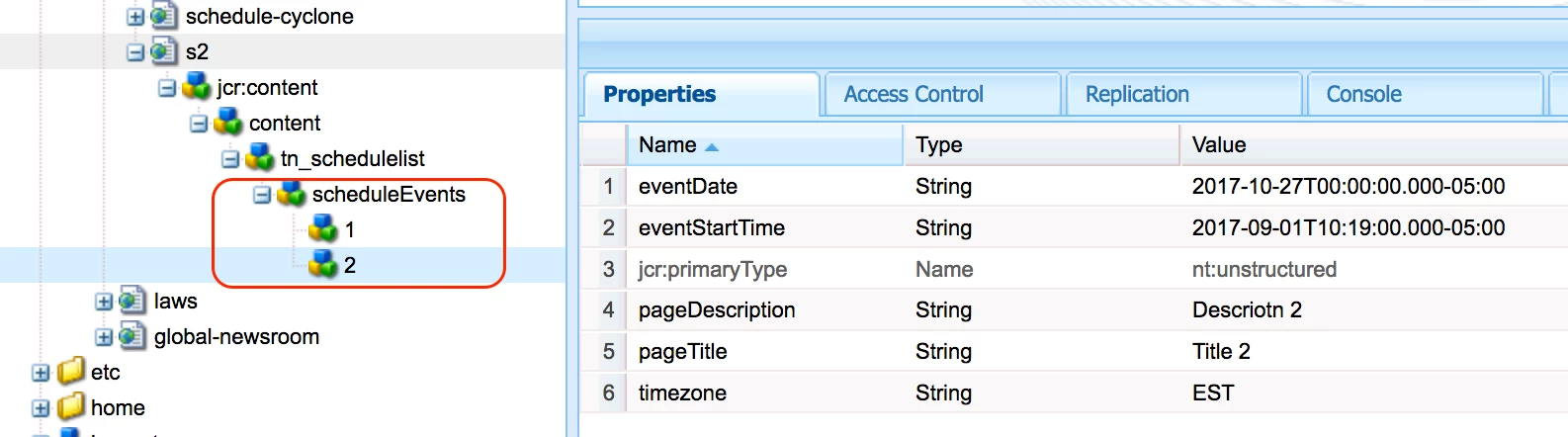
<scheduleEvents jcr:primaryType=“nt:unstructured" sling:resourceType="granite/ui/components/foundation/form/multifield” class="full-width">

    <field jcr:primaryType=“nt:unstructured" sling:resourceType="granite/ui/components/foundation/form/fieldset” acs-commons-nested=“NODE_STORE" name="./scheduleEvents”>

    <layout jcr:primaryType=“nt:unstructured" sling:resourceType="granite/ui/components/foundation/layouts/fixedcolumns” method="absolute”/>

    <items jcr:primaryType="nt:unstructured”>

      <column jcr:primaryType=“nt:unstructured" sling:resourceType="granite/ui/components/foundation/container”>

         <items jcr:primaryType="nt:unstructured”>

            <eventDate jcr:primaryType=“nt:unstructured" sling:resourceType="granite/ui/components/foundation/form/datepicker” type=“date" displayedFormat="YYYY-MM-DD” fieldLabel="Event Date” fieldDescription="Scheduled date of the event.” name="./eventDate”/>

         </items>

Backend code:

Resource eventsResource = resource.getChild( "scheduleEvents" );

Iterator<Resource> allEventsResources = eventsResource.listChildren();

  while ( allEventsResources.hasNext() ){

     Resource eventResource = allEventsResources.next();

      valuemap = eventResource.getValueMap();

       eventDate = valuemap.get("eventDate", Calendar.class);
6 replies

smacdonald2008
New Participant
September 1, 2017

Excellent response - thank you for sharing.

konathalasurenAuthorAccepted solution
New Participant
September 1, 2017

I was able to resolve this. Adding solution.

By default if we leave, acs-commons-nested=“” , the data is stored as one JSON. While the code I was handing in the backend was looking for multiple nodes for each event. We can resolve this couple ways:

1. JSON_STORE or “" (all events are stored as one Json string)

<scheduleEvents jcr:primaryType=“nt:unstructured" sling:resourceType="granite/ui/components/foundation/form/multifield” class="full-width">

    <field jcr:primaryType=“nt:unstructured" sling:resourceType="granite/ui/components/foundation/form/fieldset” acs-commons-nested=“JSON_STORE" name="./scheduleEvents”>

    <layout jcr:primaryType=“nt:unstructured" sling:resourceType="granite/ui/components/foundation/layouts/fixedcolumns” method="absolute”/>

    <items jcr:primaryType="nt:unstructured”>

      <column jcr:primaryType=“nt:unstructured" sling:resourceType="granite/ui/components/foundation/container”>

         <items jcr:primaryType="nt:unstructured”>

            <eventDate jcr:primaryType=“nt:unstructured" sling:resourceType="granite/ui/components/foundation/form/datepicker” type=“date" displayedFormat="YYYY-MM-DD” fieldLabel="Event Date” fieldDescription="Scheduled date of the event.” name="./eventDate”/>

         </items>

Backend code:

@ValueMapValue(name="scheduleEvents")

protected String[] scheduleEventsArray = null;

...

if (scheduleEventsArray != null && scheduleEventsArray.length > 0) {

  for( String section : scheduleEventsArray ) {

    Map<String, String> props = (Map<String, String>) new Gson().fromJson(section, Map.class);

      eventDate = props.get("eventDate”);

2. NODE_STORE (Each event is stored as a node)

<scheduleEvents jcr:primaryType=“nt:unstructured" sling:resourceType="granite/ui/components/foundation/form/multifield” class="full-width">

    <field jcr:primaryType=“nt:unstructured" sling:resourceType="granite/ui/components/foundation/form/fieldset” acs-commons-nested=“NODE_STORE" name="./scheduleEvents”>

    <layout jcr:primaryType=“nt:unstructured" sling:resourceType="granite/ui/components/foundation/layouts/fixedcolumns” method="absolute”/>

    <items jcr:primaryType="nt:unstructured”>

      <column jcr:primaryType=“nt:unstructured" sling:resourceType="granite/ui/components/foundation/container”>

         <items jcr:primaryType="nt:unstructured”>

            <eventDate jcr:primaryType=“nt:unstructured" sling:resourceType="granite/ui/components/foundation/form/datepicker” type=“date" displayedFormat="YYYY-MM-DD” fieldLabel="Event Date” fieldDescription="Scheduled date of the event.” name="./eventDate”/>

         </items>

Backend code:

Resource eventsResource = resource.getChild( "scheduleEvents" );

Iterator<Resource> allEventsResources = eventsResource.listChildren();

  while ( allEventsResources.hasNext() ){

     Resource eventResource = allEventsResources.next();

      valuemap = eventResource.getValueMap();

       eventDate = valuemap.get("eventDate", Calendar.class);
New Participant
August 30, 2017

Thanks for pointing this Ratna Kumar . I did try as suggested in the posting, it did not help.

Ratna_Kumar
New Participant
August 30, 2017

Hi,

Check this thread that contains the same use case: AEM 6.1 Touch UI: Datepicker Field not prepopulated with stored value

Thanks,

Ratna.

New Participant
August 30, 2017

Yes, ACS AEM Commons 3.10.0

smacdonald2008
New Participant
August 29, 2017

When working with MF - are you using ACS-Commons - see: Scott's Digital Community: Creating an AEM HTML Template Language 6.3 component that uses a Multifield

This was tested on AEM 6.3 - however - try ACS-Commons on 6.2 - that may help.